 ★ Graphic Tools Guide ★ 3D Editor User's Manual
■ | Advance ▼
3D Editor User's Manual 1.First of all
■ Summary
- "3D Editor" can open 3D data files in "SEGA 3D" format and "DXF" format, and refer to the saved 3D stereoscopic images from any direction. Then, you can paste or color the polygon faces included in these and save them in the "SEGA 3D" format.
■ Restrictions
- ● Connection target
- Version 1.71J (1.72J) supports the following SEGA development targets.
- Sega Saturn Target Model-S Graphics Box
- Sega Saturn Cartridge Development System (commonly known as CartDev)
- For precautions when connecting, refer to the manual etc. attached to each target.
- ● Power PC compatible
- If you launch the "3D Editor" on a Power Macintosh, it works in native mode.
■ Basic operation
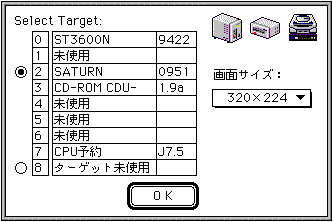
- When you start the application, the following screen will be displayed. Select the target box you want to connect to and click OK. You can also resize the TV screen as needed.
■ About input file
- Both "SEGA 3D" and "DXF" formats are text format files, but in the "3D Editor" open dialog, other text files are omitted and only the file names of these formats are listed.
■ | Advance ▼
★ Graphic Tools Guide ★ 3D Editor User's Manual
Copyright SEGA ENTERPRISES, LTD., 1997