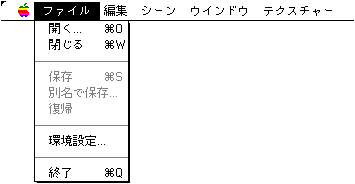
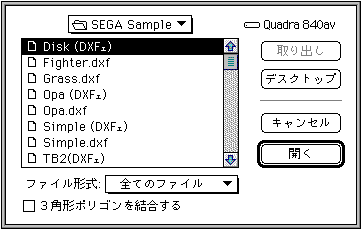
Displays an open dialog with a file format specification pop-up menu. Shows the list of files specified by the File Format pop-up menu. Also, by checking the "Combine triangle polygons" check box, you can combine triangle polygons that are approximated at the time of reading. Other functions are the same as the open menu of a normal application.
● Close
Close the open window. (The window close box behaves in the same way.) If there is a change in the file, you will be asked if you want to save it or discard it as it is. To save it, click the "Save" button. Performs the same operation as "Save". (If multiple windows are displayed, this operation is performed when the last window is closed, when the command key () and option key (option) are pressed at the same time, or when the window is closed.)
● Save
If there is a change in the open window, it will be saved again with the contents (overwriting the file. No conversion will be performed).
● Save as
Displays a save dialog with a file format specification pop-up menu. Specify the file format using the file format pop-up menu. If a file format different from the original file is specified, it will be converted and saved.
● Return
Restore the saved contents.
● Preferences
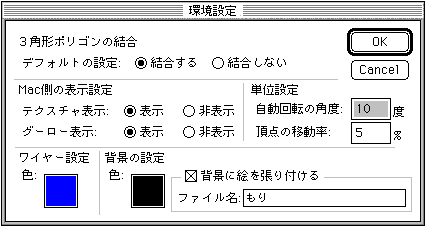
The following dialog is displayed. Make each setting.
◆ Combining triangle polygons
Set the default settings for the "Combine triangle polygons" checkbox in the file open dialog. This checkbox is often overlooked, so it's useful to set it to your liking by default.
◆ Display settings on the Mac side
Texture display
When set to "View", an image similar to the TV screen will be displayed on the Mac when the texture is pasted on the material.
Goo low display
When set to "Display", an image close to the TV screen will be displayed on the Mac when Gouraud shading is specified. If you want to get a comfortable operation while editing, set it to "Hide".
◆ Unit setting
Angle of automatic rotation
Use the following tools on the tool palette to set the angle at which the 3D image is automatically rotated.
Y-axis automatic rotation tool
X-axis automatic rotation tool
Z-axis automatic rotation tool
Vertex movement rate
Set the movement rate of the vertex data change function.
◆ Wire setting
colour
Sets the wireframe color.
◆ Background setting
colour
Set the background color.
Paste a picture on the background
Set the image data to be pasted on the background.
● End
Exit the application. If the modified file is open, a dialog asking if you want to save it is displayed.