 ★ Graphic Tools Guide ★ Graphic Tools Guide ★ SS Monitor User's Manual
▲ Back | ■
SS Monitor User's Manual 2. menu
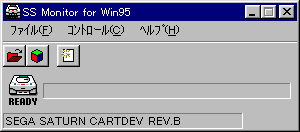
■ "File" menu
- Performs basic monitor control. In addition, the termination process is also executed in this menu.
- ◆ Monitor load
- Download the monitor program. Not normally used.
- ◆ Open COFF (only available for SS Debug)
- Download the COFF file (executable file) → execute it.
- ◆ Open binary (only available for SS Debug)
- Download the binary file.
- 【dialog box】
- Address Specify the download destination address in hexadecimal.
- VDP1
Specify the start address of VDP1 ($ 25c00000). - VDP2
Specify the start address of VDP2 ($ 25e00000). - SGL
Specify the start address ($ 06004000) of the user area of SGL. - COL
Specify the start address ($ 25f00000) of the color RAM. - USER
Specify the address entered in the reservation box.
- ◆ End
- Exit the application.
■ "Control" menu
- Takes basic control over the target.
- ◆ Viewer execution
- Download "SS Viewer" → execute it. Not normally used.
- ◆ PC settings (only available for SS Debug)
- Set the program counter. The program will stop.
- 【dialog box】
- Address Specify the download destination address in hexadecimal.
- SGL
Specify the start address ($ 06004000) of the user area of SGL. - USER
Specify the address entered in the reservation box.
- ◆ Execution (only SS Debug is available)
- The program is executed from the current program counter.
- ◆ Stop (only SS Debug is available)
- Stops program execution.
- ◆ Reset
- Reset the target.
■ "Help" menu
- Displays a help file that explains how to use "SS Monitor". It also displays "SS Monitor" information.
- ◆ Table of contents
- Displays the table of contents of the help file.
- ◆ Version information
- Information such as the version of "SS Monitor" is displayed.
▲ Back | ■
★ Graphic Tools Guide ★ SS Monitor User's Manual
Copyright SEGA ENTERPRISES, LTD ,. 1997