HARDWARE ManualSCSP User's Manual
BackForward
SCSP User's Manual / 4.2 Sound Source Register

■ MIXER register

The digital mixer is a block that adjusts the level balance of each audio signal in SCSP. The digital mixer consists of four parts: a direct audio adjustment unit, a DSP input stage adjustment unit, a DSP output stage adjustment unit, and a final stage output adjustment unit. Figure 4.47 shows a digital mixer block diagram to explain each block.

Figure 4.47 Digital mixer block diagram
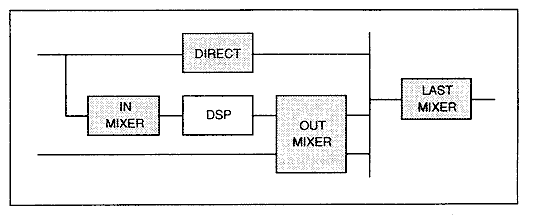
Direct audio adjustment unit
The output of each slot is a mixer block that manages the route directly connected to the DAC output. You can control the output level ("DISDL") and output balance ("DIPAN") for each slot.

DSP input stage adjustment unit
Mixing is performed to input the output of each slot to the DSP ("MIXS"). Actually, select "MIXS" to input the audio signal with "ISEL" of each slot, and adjust the input level with "IMXL". When mixing multiple sounds with "ISEL", it is necessary to balance each sound. Since "MIXS" can mix and input multiple slot outputs, the same effect processing can be performed for multiple sounds like BGM reverb. Also, when applying effects with DSP, transfer the audio data to "MIXS".

DSP output stage adjustment unit
The sound applied by the DSP and the sound captured by the external digital input are finally combined into stereo through mixing processing. It is possible to adjust the output level ("EFSDL") and output balance ("EFPAN") for the audio signal output from "EFREG", which corresponds to the DSP, and "EXTS", which receives external digital audio input. I can do it. The data summarized here is also mixed with the direct audio component.

Final stage output adjustment unit
Adjust the output level to the DAC by combining the direct component and effect component of the audio. Adjust the final output level with "MVOL".

* About direct components and effect components
When an effect is applied to the sound, the sound without the effect (dry) and the sound with the effect (wet) are mixed in an appropriate balance according to each scene. The built-in effect program is divided into dry and wet inside the DSP and finally mixed, so if you are creating dry and wet components inside the DSP, you do not need to output the direct component. This will not be output by setting DISDL to "0". Figure 4.48 shows the path of the direct and effect components.

Figure 4.48 Path of direct and effect components
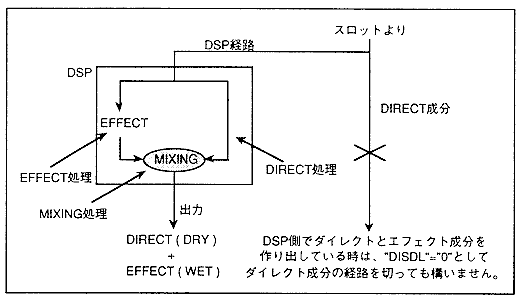
When rewriting the DSP program, the DSP operation becomes unstable and the sound is not output correctly from "EFREG". Therefore, set "EFSDL" to "0H" to prevent the sound from being output.

* About localization
The SCSP digital mixer supports a 31-step panning function, but if you want to make more detailed settings, use the DSP built into the SCSP to perform the panning process, as shown in Figure 4.49.

Figure 4.49 Localization operation by DSP
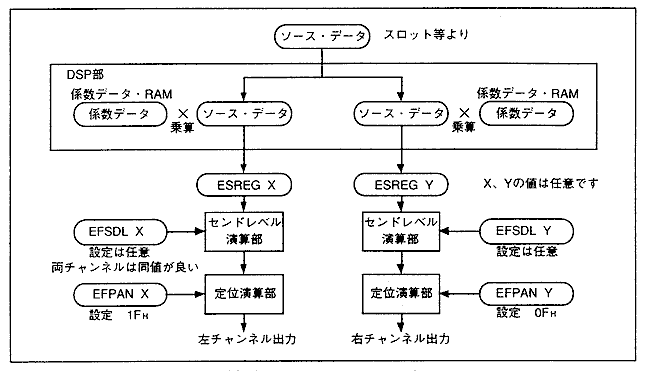
Figure 5.56 shows a block diagram of the digital mixer.

Figure 4.50 Digital mixer block diagram
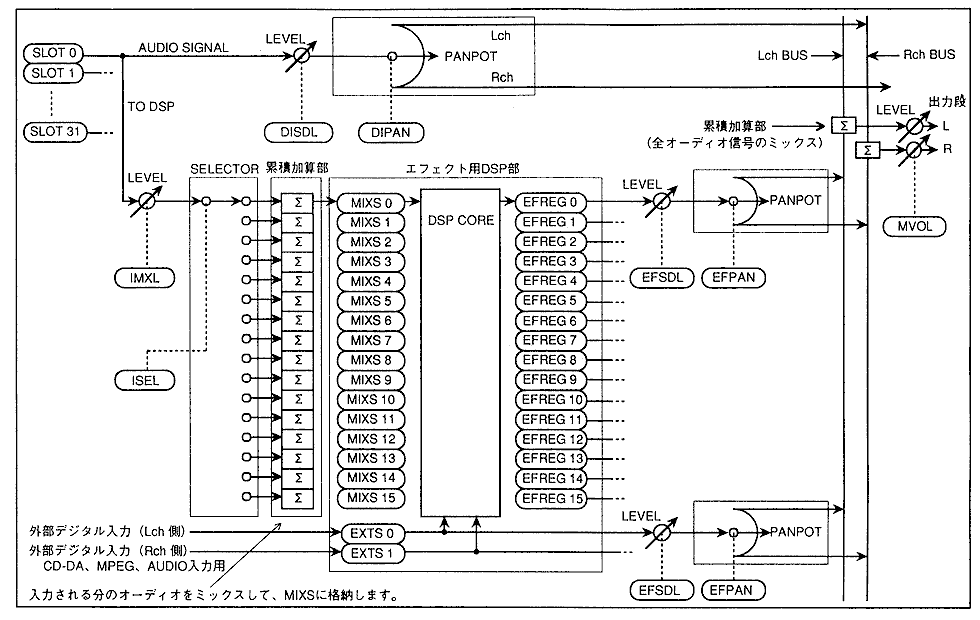
Next, we will explain how to set each parameter based on the detailed diagram in Figure 4.50.
The "IMXL", "ISEL", "DISDL", and "EPSDL" settings prevent overflow when a large number of notes are produced, and prevent the overall volume from becoming low when the number of notes is not output too much. Therefore, the setting method described below is required.

(a) Mixer on the DSP input side
The mixer equivalents on the DSP input side are the "IMXL" and "ISEL" parameters.
"MIXS" (see below for a description of the mix stack) can have multiple slot outputs. This register has the function of mixing multiple data. At this time, set "IMXL" to an appropriate value according to the number of slots to be input, and be careful not to cause "MIXS" to overflow.
Table 4.18 shows the number of notes that can be input when the value of "IMXL" is changed. For example, if "IMXL" is set to "7H" for the input source and the level input to "MIXS" is set to "0 [dB]", the number of slots that can be input to "MIXS" is 1. It becomes a sound.

Table 4.18 Relationship between the number of sources that can be input to IMXL and MIXS
"IMXL" value [2: 0] level Number of sounds that can be input (number of sources)
[dB] magnification
0H -MAX × 0.000000 --sound
1H -36 × 0.015625 64 sounds
2H -30 × 0.031250 32 sounds
3H -twenty four × 0.062500 16 sounds
4H -18 × 0.125000 Octet
5H -12 × 0.250000 4 sounds
6H -6 × 0.500000 2 sounds
7H -0 × 1.000000 1 sound

(b) "DISDL" and "EFSDL"
"DISDL" and "EFSDL" are the same idea as "IMXL", but these two are decided by considering the total number of sound outputs.
The total number of sound outputs is the sum of the direct components, effect components, and external input components that are in the state of outputting sound. This refers to the number of sources that output sound to the L / R cumulative adder in Figure 4.50 (think of the L / R pair as one). In other words, it is not equal to the total number of slots that output sound.

(c) "DIPAN" and "EFPAN"
These registers are centered when the set value is "00H" or "10H".
If you increase the value of the lower 4 bits while keeping the most significant bit "0B", the localization will move to the right.
If you increase the value of the lower 4 bits while keeping the most significant bit "1B", the localization will move to the left.

IMXL [2: 0] (R / W); Input MiXing Level
Specifies the mix stack input level for each slot when the DSP mix stack ("MIXS") inputs sound slot output data.

Table 4.19 Mix stack register input levels
IMXL Level (dB)
0 -MAX (do not mix)
1 -36
2 -30
3 -twenty four
Four -18
Five -12
6 -6
7 -0

ISEL [3: 0] (R / W); Input SELect
Specifies the mix stack number for each slot when inputting sound slot output data to the DSP's mix stack register ("MIXS").

The mix stack ("MIXS") calculates the sum of the inputs for all slots and uses it as the DSP input. The mix stack does not have an overflow protection function, so set the total for all slots so that it does not exceed "0 [d B]".

DISDL [2: 0] (R / W); DIrect SenD Level
Specify the transmission level for each slot when outputting direct data to the D / A converter.

Table 4.20 D / A converter output level
DISDL Level (dB)
0 -∞ (do not send)
1 -36
2 -30
3 -twenty four
Four -18
Five -12
6 -6
7 -0

DIPAN [4: 0] (R / W); DIrect PANpot
Specify the localization for each slot when sending direct data.

Table 4.21 Localization data by DIPAN
DIPAN Left localization (dB) Right localization (dB)
00H -00.0 -00.0
10H -00.0 -00.0
01H -03.0 -00.0
11H -00.0 -03.0
02H -06.0 -00.0
12H -00.0 -06.0
03H -09.0 -00.0
13H -00.0 -09.0
04H -12.0 -00.0
14H -00.0 -12.0
05H -15.0 -00.0
15H -00.0 -15.0
06H -18.0 -00.0
16H -00.0 -18.0
07H -21.0 -00.0
17H -00.0 -21.0
08H -24.0 -00.0
18H -00.0 -24.0
09H -27.0 -00.0
19H -00.0 -27.0
0AH -30.0 -00.0
1AH -00.0 -30.0
0BH -33.0 -00.0
1BH -00.0 -33.0
0CH -36.0 -00.0
1CH -00.0 -36.0
0DH -39.0 -00.0
1DH -00.0 -39.0
0EH -42.0 -00.0
1EH -00.0 -42.0
0FH -∞ -00.0
1FH -00.0 -∞

EFSDL [2: 0] (R / W); EFfect SenD Level
Specifies the transmission level of the waveform data (effect data) that has undergone effect processing through the DSP and the input waveform data from the outside to the D / A converter.

Table 4.22 Sending level to D / A converter
EFSDL Level (dB)
0 -∞ (do not send)
1 -36
2 -30
3 -twenty four
Four -18
Five -12
6 -6
7 -0

EFPAN [4: 0] (R / W); EFfect PANpot
Specify the localization of the waveform data (effect data) that has undergone effect processing through the DSP and the input waveform data from the outside.

Table 4.23 Localization data by EFPAN
EFPAN Left output (dB) Right output (dB)
00H -00.0 -00.0
10H -00.0 -00.0
01H -03.0 -00.0
11H -00.0 -03.0
02H -06.0 -00.0
12H -00.0 -06.0
03H -09.0 -00.0
13H -00.0 -09.0
04H -12.0 -00.0
14H -00.0 -12.0
05H -15.0 -00.0
15H -00.0 -15.0
06H -18.0 -00.0
16H -00.0 -18.0
07H -21.0 -00.0
17H -00.0 -21.0
08H -24.0 -00.0
18H -00.0 -24.0
09H -27.0 -00.0
19H -00.0 -27.0
0AH -30.0 -00.0
1AH -00.0 -30.0
0BH -33.0 -00.0
1BH -00.0 -33.0
0CH -36.0 -00.0
1CH -00.0 -36.0
0DH -39.0 -00.0
1DH -00.0 -39.0
0EH -42.0 -00.0
1EH -00.0 -42.0
0FH -∞ -00.0
1FH -00.0 -∞

"EFSDL" and "EFPAN" can be set individually for each "EFREG" and "EXTS". The addresses of the "EFSDL" and "EFPAN" registers corresponding to each "EFREG" and "EXTS" are shown in Table 4.24.

Table 4.24 EFSDL, EFPAN register addresses corresponding to each EFREG, EXTS
sauce address data sauce address data
7 6 Five Four 3 2 1 0 7 6 Five Four 3 2 1 0
EFREG0 100017H EFSDL0 EFPAN0 EFREG9 100137H EFSDL9 EFPAN9
EFREG1 100037H EFSDL1 EFPAN1 EFREG10 100157H EFSDL10 EFPAN10
EFREG2 100057H EFSDL2 EFPAN2 EFREG11 100177H EFSDL11 EFPAN11
EFREG3 100077H EFSDL3 EFPAN3 EFREG12 100197H EFSDL12 EFPAN12
EFREG4 100097H EFSDL4 EFPAN4 EFREG13 1001B7H EFSDL13 EFPAN13
EFREG5 1000B7H EFSDL5 EFPAN5 EFREG14 1001D7H EFSDL14 EFPAN14
EFREG6 1000D7H EFSDL6 EFPAN6 EFREG15 1001F7H EFSDL15 EFPAN15
EFREG7 1000F7H EFSDL7 EFPAN7 EXTS0 100217H EFSDL16 EFPAN16
EFREG8 100117H EFSDL8 EFPAN8 EXTS1 100237H EFSDL17 EFPAN17

MVOL [3: 0] (W); Master VOLume
Represents the output master volume to the D / A converter.
It is for controlling the overall output level, and even if the setting value of "MVOL" is lowered and the gain is lowered with respect to the output overflow, the clipping noise does not disappear (to eliminate the clipping noise). , Please reconfigure "DISDL" and "EFSDL" to eliminate the overflow).

DAC18B (W); DAC out 18Bit
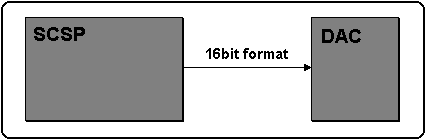
When using the digital output as an interface for an 18-bit D / A converter, set this bit to "1B". For 16 bits, set "0B". (Since a 16-bit type D / A converter is basically connected, set "0B" in the register.)

Figure 4.51 SCSP and DAC connections


BackForward
HARDWARE ManualSCSP User's Manual
Copyright SEGA ENTERPRISES, LTD., 1997