HARDWARE ManualSMPC User's Manual
BackForward
SMPC User's Manual

Chapter 3 Peripheral Control


■ 3.1 Peripheral control mode

The SH-2 can control peripherals via SMPC. There are the following two peripheral control methods.

(1) SMPC control mode
(2) SH-2 direct mode

◆ SMPC control mode

● Block diagram

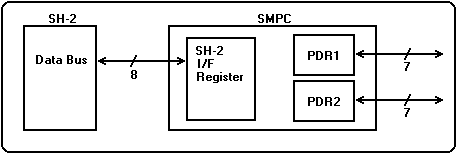
Figure 3.1 shows a block diagram of SMPC control mode. SMPC control mode is activated by setting command parameters in the IREG of the SH-2 interface register and issuing the INTBACK command. The collection result of peripheral data is output to OREG as a result parameter.

Figure 3.1 Block diagram of SMPC control mode
● Features

It's a great way to minimize the overhead of accessing peripherals in your application.

● Settings for using SMPC control mode

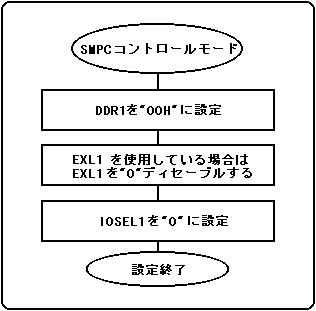
Figure 3.2 shows an example configuration for using SMPC control mode.
Figure 3.2 shows an example configuration for port 1. The mode setting can be set independently for each port.

Figure 3.2 SMPC control mode setting example
● Default value of parallel I / O register when power is turned on

The parallel I / O registers when the power is turned on are set to the default values shown in Table 3.1.

Table 3.1 Default values of parallel I / O registers when power is turned on
 Register name
 Set value
 Contents
 IOSEL1 / 2
 0H
 SMPC control mode
 EXL1 / 2
 0H
 PAD interrupt, VDP2 external latch disabled
 DDR1 / 2
 00H
 All bit input

● How to use SMPC control mode

When acquiring peripheral data using the INTBACK command, the collected peripheral data is output to OREG as a result parameter. However, peripheral data can be more than the capacity of OREG. Therefore, in SMPC control mode, peripheral data collection is interrupted each time OREG is full. When OREG is full with peripheral data, SMPC raises an SMPC interrupt, requesting SH-2 to get the peripheral data.
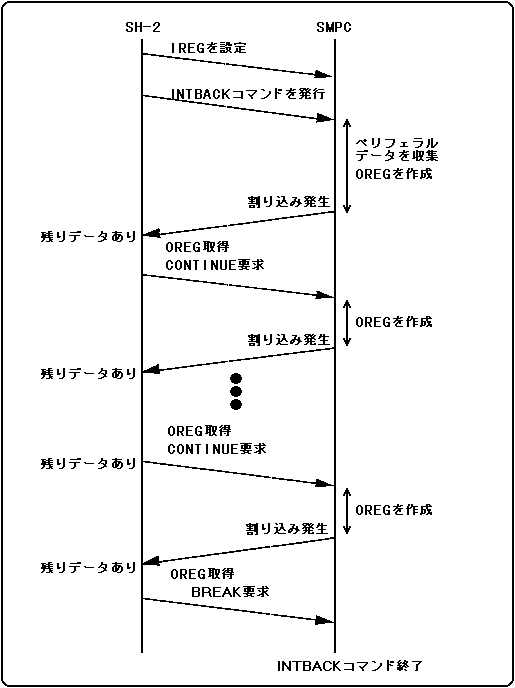
Also, when peripheral data to be collected remains, the status register indicates that there is remaining data. After the SH-2 acquires the peripheral data, the SMPC resumes the peripheral data collection by requesting the SMPC to continue. You can also terminate the peripheral data collection by requesting a break when you do not need the remaining peripheral data. The above sequence is shown in Figure 3.3 and Figure 3.4.

・ Continue request
Continue from SH-2 to SMPC can be requested by inverting bit 7 of IREG0.

・ Break request
A break from SH-2 to SMPC can be requested by writing "1" to bit 6 of IREG0.

・ Notes on continue and break requests
Please note the conditions shown in Table 3.2 when requesting continue and break.

Table 3.2 Conditions for issuing Continue and Break
 Request to issue
 Reception conditions
 SMPC operation
 Continue
 break
 ×
 ×
 on hold
 Waiting for request
 ×
 break
 Peripheral data collection interrupted, INTBACK command terminated
 ×
 Continue
 Continued peripheral data collection
 Ban
 No guarantee

-Termination condition of INTBACK command to acquire peripheral data
The INTBACK command for acquiring peripheral data ends under the following conditions.

(1) When all peripheral data collection is completed
(2) When peripheral data collection could not be completed by V-BLANK-IN (time over)
(3) When peripheral data collection is completed due to a break request from SH-2

Figure 3.3 All peripheral data acquisition sequence
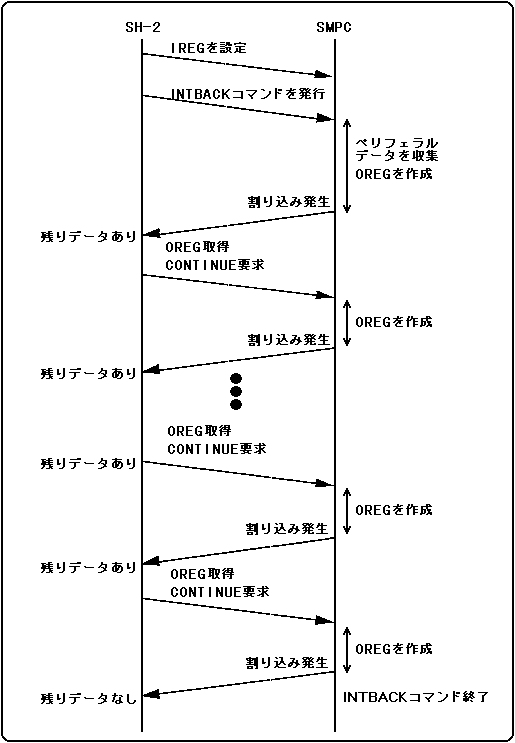
Figure 3.4 Peripheral data acquisition cancellation sequence due to break request

BackForward
HARDWARE ManualSMPC User's Manual
Copyright SEGA ENTERPRISES, LTD., 1997