 ★ HARDWARE Manual ★ SMPC User's Manual
┌───────────┐ ┌─────┬─────┬─────┬─────┬─────┬─────┬ ─────┐ SR │ Peripheral │ = │ 1 │ PDL │ RESB │ P2MD1 │ P2MD0 │ P1MD1 │ P1MD0 │ │ Control status │ └─────┴─────┴─────┴─────┴─────┴─────┴─────┘ ├───────────┤───┌──────────┐ ┌────────┬────────┐ │ │ │ Port 1 status │ = │ Multi-tap ID │ Number of connectors │ │ │ ├──────────┤ └────────┴────────┘ │ Port 1 data │ │ Peripheral 1 data │ │ │ ├──────────┤───┌──────────────┐┌─────────┬────── ───┐ │ │ │ Peripheral 2 data │ │ Saturn Peripheral ID │ = │ Sega Saturn │ Data size │ OREG ├────────┤─┐├──────────┤─┐├──────────────┤ │ Peripheral type │ │ │ │ │ │ : │ │ │ Extended data size │ └─────────┴─────────┘ │ │ │ ├──────────┤ │ ├──────────────┤ │ Port 2 data │ │ │: │ │ │ Peripheral 2 1st data │ │ │ │ ├──────────┤ │ ├──────────────┤ │ │ │ │ : │ │ │ Peripheral 2 2nd data │ └───────────┘ │ ├──────────┤ │ ├──────────────┤ │ │: │ │ │ │: │ │ ├──────────┤ │ ├──────────────┤ │ │ Peripheral m data │ │ │ │: │ └─└──────────┘ │ ├──────────────┤ │ │: │ │ ├──────────────┤ │ │ Peripheral 2nd data │ └─└──────────────┘
Figure 3.11 Result parameter configuration when one is in 0-byte mode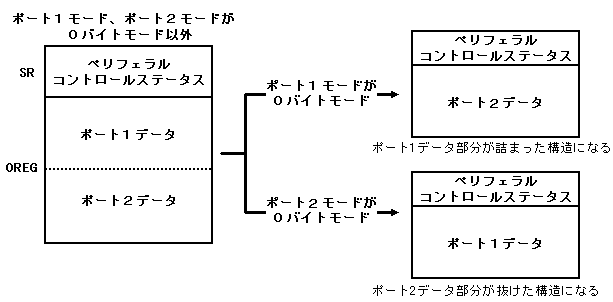
| Command parameter setting conditions | Result parameter configuration | |||||
|---|---|---|---|---|---|---|
Returns SMPC status | Returns peripheral data | With port 1 control | With port 2 control | SMPC status | Port 1 data | Port 2 data |
| <×> | <×> | <×> | <×> | <×> | <×> | <×> |
| <×> | <×> | <×> | <○> | <×> | <×> | <×> |
| <×> | <×> | <○> | <×> | <×> | <×> | <×> |
| <×> | <×> | <○> | <○> | <×> | <×> | <×> |
| <×> | <○> | <×> | <×> | <×> | <×> | <×> |
| × | ○ | × | ○ | × | × | ○ |
| × | ○ | ○ | × | × | ○ | × |
| × | ○ | ○ | ○ | × | ○ | ○ |
| ○ | × | × | × | ○ | × | × |
| ○ | × | × | ○ | ○ | × | × |
| ○ | × | ○ | × | ○ | × | × |
| ○ | × | ○ | ○ | ○ | × | × |
| ○ | ○ | × | × | ○ | × | × |
| ○ | ○ | × | ○ | ○ | × | ○ |
| ○ | ○ | ○ | × | ○ | ○ | × |
| ○ | ○ | ○ | ○ | ○ | ○ | ○ |
★ HARDWARE Manual ★ SMPC User's Manual