HARDWARE ManualVDP1 User's Manual
BackForward
VDP1 User's Manual / Chapter 6 Command Table

■ Pre-clipping disabled

Pre-clipping invalid: preclipping disable (Pclp), bit 11
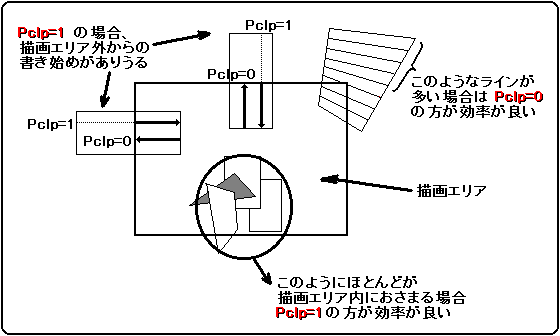
Specifies whether to have pre-clipping or disable it. If 0 is specified, preclipping will be performed. If 1 is specified, preclipping will not be performed.
One drawing command is formed by a set of several lines, and each line is a set of several dots. Drawing for each dot is performed based on the clipping area (drawing area) information specified by the CPU.
Lines that are completely out of the drawing area and the entire line does not need to be drawn can be detected in advance, and if drawing is not started, drawing efficiency will be improved. Also, if one end of a line is outside the drawing area, it is more efficient to start drawing from within the drawing area (the line must be horizontal or vertical).
VDP1 normally performs the detection work, but when drawing a small size object in the vertex (A)-(B) or (D)-(C) direction, the overhead due to the detection work (up to 5 CPU clocks per line) ) Conspicuously causes the drawing efficiency to decrease.
Pre-clipping is more efficient if the size is large and it extends far beyond the drawing area.
This bit is valid only for drawing commands. For other commands, fix it to 0.

 Pclp
 process
0 With pre-clipping and left-right reversal
1 No pre-clipping, no left-right reversal

Figure 6.6 Pre-clipping

■ User clipping enabled

User clipping enable bit (Clip), bit 10
When drawing a part, specify whether to draw the part according to the user clipping coordinates that have already been set. When it is 0, it is clipped and drawn according to the system clipping coordinates, ignoring the user clipping coordinates. When it is 1, it is clipped and drawn according to the user clipping coordinates and clipping mode bit (Cmod). Even if it is 1, it will be clipped at the system clipping coordinates.
Since both user / system clipping coordinates are undefined at reset, specify the system clipping coordinates after resetting and the user clipping coordinates before specifying user clipping with the clipping register setting command.

■ User clipping mode

Clipping mode bit: clipping mode bit (Cmod), bit 9
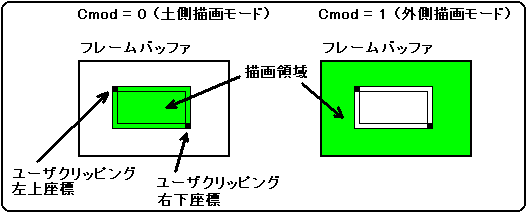
When user clipping is enabled (Clip = 1), select whether to draw inside or outside the user clipping coordinates. When it is 0, the inside is drawn, and when it is 1, the outside is drawn.
When Cmod = 1, it becomes the drawing area including the already specified user clipping short line. When Cmod = 0, the drawing area does not contain the short line.

Figure 6.7 Drawing area

Do not set this bit to 1 when user clipping is disabled (Clip = 0).
The combinations of user clipping enabled bits and clipping mode bits are as follows:

 Clip
 Cmod
 User clipping process
0 0
 User clipping disabled
0 1
 Setting prohibited (Please do not set)
1 0
 Inner drawing mode
1 1
 Outer drawing mode


BackForward
HARDWARE ManualVDP1 User's Manual
Copyright SEGA ENTERPRISES, LTD., 1997