HARDWARE ManualVDP1 User's Manual
BackForward
VDP1 User's Manual / Chapter 6 Command Table

■ End code invalid

End code invalid bit: end-code disable (ECD), bit 7
Specifies whether to disable the character pattern end code. When it is 0, the end code is valid, and when it is 1, the end code is invalid.
The end code invalid bit is valid only for sprite drawing with a character pattern. For polygons, polylines, and lines, set this bit to 1.
When the end code is valid (ECD = 0), when the second end code is read in the horizontal direction during character pattern drawing, the drawing of that line ends there and the drawing moves to the beginning of the next line. The end code is not drawn and the pixel is transparent.
If you disable the end code (ECD = 1), the end code will be treated like any other color code.
The horizontal drawing ends when the end code is read twice, and the end processing is performed only in the horizontal direction of the character pattern, and the vertical direction has no effect.
It is processed independently of the transparent pixel invalid bit (SPD).
Please note that if the end code is enabled (ECD = 0), the end code cannot be used for color display, and the number of colors that can be used is reduced by one.
Also, for sprites that shrink horizontally with HSS = 1, disable the end code (ECD = 1).

 HSS
 ECD
 End code processing
 0
 0
 End code valid, horizontal drawing ends at the second end code,
The end code will be transparent
 0
 1
 End code invalid, end code not processed,
The color is as per the code
 1 and expansion
 0
 End code valid, horizontal drawing ends at the second end code,
The end code will be transparent
 1 and reduced
 0
 End code invalid, end code not processed,
The color is as per the code
 1
 1
 End code invalid, end code not processed,
The color is as per the code

The relationship between the color mode and the end code is as follows. The number of bits of the end code differs depending on the color mode.

 Color mode
 End code
 0
 16 colors (color bank mode)
 FH (4 bits)
 1
 16 colors (look-up table mode)
 FH (4 bits)
 2
 64 colors (color bank mode)
 FFH (8 bits)
 3
 128 colors (color bank mode)
 FFH (8 bits)
 Four
 256 colors (color bank mode)
 FFH (8 bits)
 Five
 32768 colors (RGB mode)
 7FFFH (16 bits)

Here is an example of end code processing:

Figure 6.10 (a) End code processing (1)
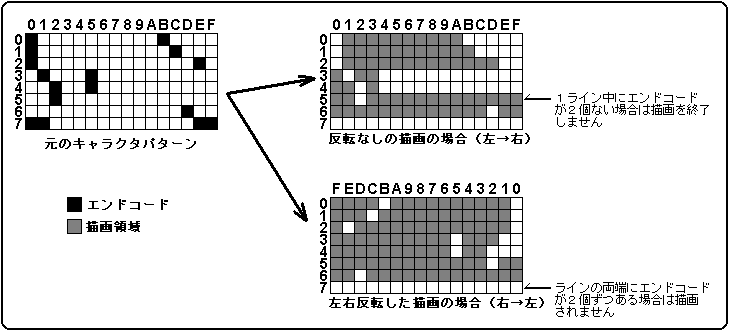
Outside the end code, place only transparent pixels so that it will not be drawn when read from either the left or right. Therefore, be sure to set SPD = 0 when ECD = 0. Do not use the combination of ECD = 0 and SPD = 1.
Pre-clipping may reverse the drawing direction.
If you want to use the end code for the original picture, use it as follows.

Figure 6.10 (b) End code processing (Part 2)
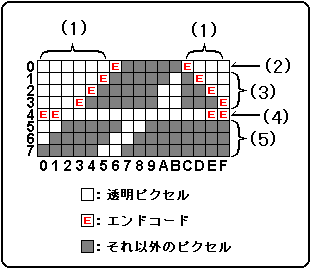
  1. Place transparent pixels outside the end code
  2. Place one end code on each side of the picture made of transparent pixels
  3. Even if it contains transparent pixels inside, only one end code can be placed on the outermost side.
  4. Lines of all transparent pixels have two endcodes on each end
  5. Do not place endcodes on lines where either end or one end is not a transparent pixel

BackForward
HARDWARE ManualVDP1 User's Manual
Copyright SEGA ENTERPRISES, LTD., 1997