Do not change the MSB of pixel data in the framebuffer
1
Set the MSB of the pixel data on the frame buffer to 1.
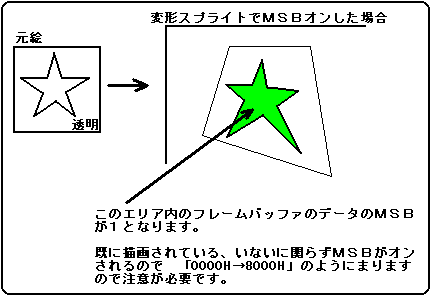
Shadow when the most significant bit (MSB) is 1 when VDP2 is in a mode that uses shadows (decreases the pixel data of the scroll plane) or windows (displays another plane in the specified area). , Process the window. Set the MSB to 1 (on) for pixels already drawn in the framebuffer. The color code is valid only when the frame buffer is a color bank code (because the MSB is used for shadow enable and window enable on the VDP2 side, so there is no RGB identification bit). Color calculation is not possible. Please specify replacement for color calculation. In the case of texture parts, the original picture data is used only with or without pixels (transparent, end code has no pixels, and others are available), so the color code can be either RGB code or color bank code. .. Even for non-textured parts, non-textured colors are not reflected in the drawing. If MSB on is set to 1, do not specify (replace) the color operation. Note that if the MSB is on 1, the color calculation has no meaning and only the processing time will be significantly longer. For meshed parts, the MSB is turned on in a mesh shape. The following is an example of turning on the MSB.