PROGRAMMER'S GUIDEVirtual CD system
BackForward
Virtual CD System User's Manual / Chapter 3 CD Emulator VCDEMU

3.2.2 Menu screen function details

When you press [SPACE], "Menu" on the top bar will be displayed in outline characters.

You can select "Menu" or "Help" with the [LEFT] and [RIGHT] cursors. The selected part is displayed in outline characters.
If you press [ENTER] or [DOWN] of the cursor, the contents of the selected menu will appear.
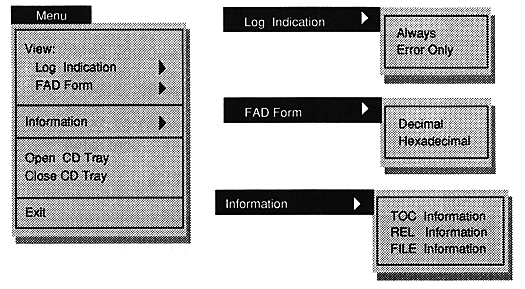
Select a menu item with [UP] or [DOWN] and press [ENTER] or [SPACE] to process according to the menu item.

● View:
* Log Indication
Mode to view log information. When selected, the color of the top bar changes from purple to yellow, indicating that you have entered "LogView" mode by changing "View" in the mode window to "LogView".
With the cursor [UP], [DOWN], or [PAGE UP], [PAGE DOWN], you can see the information up to 500 lines before the last displayed log information.
You can get out of this mode with [ESC].

-Always
A mode to display all log information. When selected, "View" in the mode window changes to "Always".

-Error Only
A mode that displays only error information. When selected, "View" in the mode window changes to "Error".

* FAD Form
Select the frame address display format of the log window.

-Decimal
It will be displayed in decimal.

-Hexadecimal
It will be displayed in hexadecimal.

● Information

* TOC Information
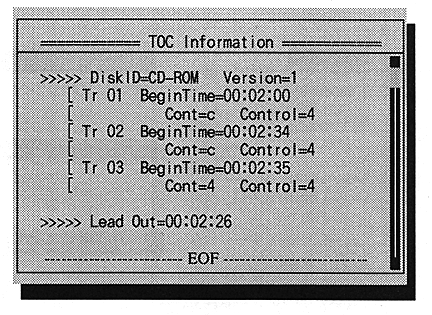
Mode to view TOC information. When selected, the TOC information window opens in the center of the screen.

You can see the TOC information by pressing the cursor [UP], [DOWN], or [PAGE UP], [PAGE DOWN].
You can exit this mode with [ENTER] or [ESC].

* REL Information
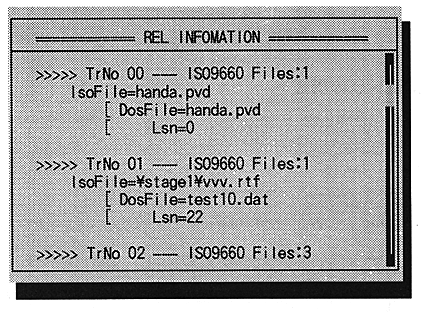
Mode to view correlation table information. When selected, the correlation table information window opens in the center of the screen.

You can see the correlation table information by pressing the cursor [UP], [DOWN], or [PAGE UP], [PAGE DOWN].
You can exit this mode with [ENTER] or [ESC].

* FILE Information
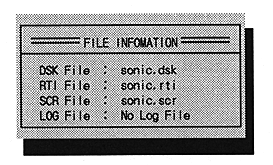
Mode to see the currently set file information. When selected, the file information window opens in the center of the screen.

You can see the correlation table information by pressing the cursor [UP], [DOWN], or [PAGE UP], [PAGE DOWN].
You can exit this mode with [ENTER] or [ESC].

● Open CD Tray
Performs the actual CD drive tray open operation on the virtual CD emulator.

● Close CD Tray
Performs the actual CD drive tray closing operation on the virtual CD emulator.

● Exit
Exit the virtual CD emulator.
After selecting, press any key to exit the program.


BackForward
PROGRAMMER'S GUIDEVirtual CD system
Copyright SEGA ENTERPRISES, LTD ,. 1997