 ★ PROGRAMMER'S GUIDE ★ XBLD User's Manual
▲ Back | Forward ▼
XBLD User's Manual 3. 3. System features
XBLD has the function of writing to a CD-R disc and outputting the files required for CD emulation. The functions of XBLD are shown below.
- Output of disc image for CD creation
- Output of real-time emulation file
- File output for direct DOS file access
- Output of file for on-the-fly writing
3.1 Output of disc image for creating CD
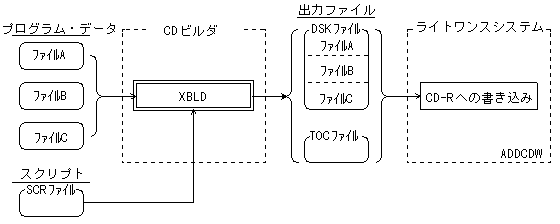
- Outputs the DSK file (disk image) and TOC file required to create a CD.
The line once system uses the DSK file and TOC file output from XBLD to write to a CD-R disc.- This is the operation mode when the r, p, and oti subcommands are not specified.
- Since the DSK file outputs the equivalent of VCDBUILD, it can be used as a write-once system with either ADDCDW or SEGACDW.
- XBLD outputs a TOC file in any operating mode.
(No need to create a TOC file using VCDMKTOC)
Figure 3.1 Outputting a disc image for creating a CD
3.2 Real-time emulation file output
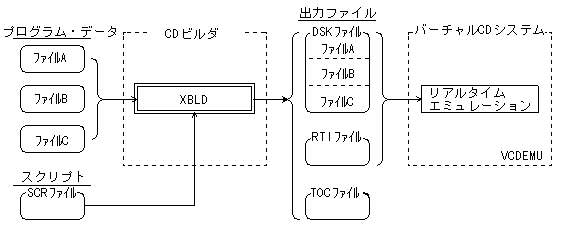
- Outputs the files required for CD emulation in real-time emulation mode. (Real-time emulation is also possible for CDs that include complicated sector placement such as channel interleaving, and CDs that require real-time processing such as MPEG functions.)
- When performing real-time emulation, specify the "r subcommand" of XBLD.
- The CD image partial update function by VCDUTL is also available.
Figure 3.2 Output of real-time emulation file
3.3 Output of file for direct DOS file access
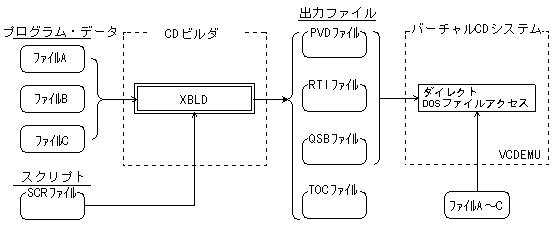
- Outputs the files required for CD emulation with direct DOS file access. (In direct DOS file access mode, it is not necessary to create a disk image, and the source file is edited into a sector image when executing CD emulation. Therefore, it is not possible to emulate a CD that includes heavy interleaving functions and MPEG functions. )
- When accessing a direct DOS file, specify the "p subcommand" of XBLD.
Figure 3.3 Output of file for direct DOS file access
3.4 Output of file for on-the-fly writing
- On-the-fly writing can be performed in cooperation with the write-once system "ADDCDW".
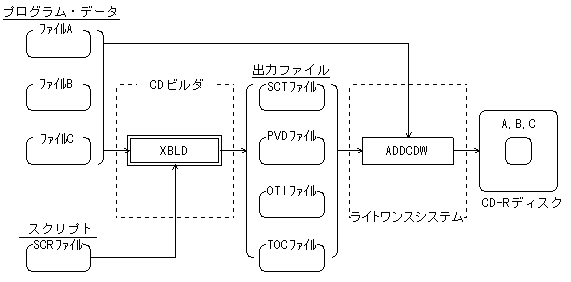
On-the-fly writing does not require a disk image file, which saves time and hard disk space.
XBLD analyzes the disk structure from the script file and outputs the SCT file, PVD file, OTI file, and TOC file.
ADDCDW writes to a CD-R disc while creating a sector image of the disc from these files and the source file of the program data.- When writing on the fly, specify the "oti subcommand" of XBLD.
Figure 3.4 Writing image in the on-the-fly method
▲ Back | Forward ▼
★ PROGRAMMER'S GUIDE ★ XBLD User's Manual
Copyright SEGA ENTERPRISES, LTD ,. 1997