PROGRAMMER'S GUIDEBranch playback library
BackForward
Branch playback library

3. Mechanism of branch playback library


3.1 Processing flow

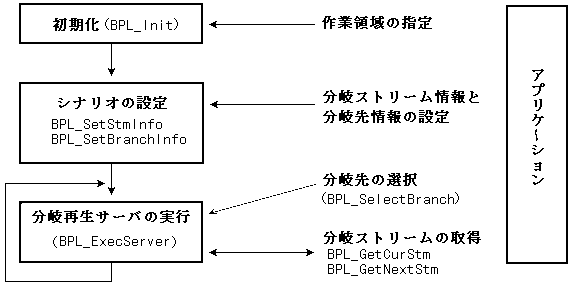
The branch playback library reads the stream according to the scenario and informs the application of the stream handle to decode.
The main processing flow is shown in Figure 3.1.

Figure 3.1 Processing flow

3.2 Scenario

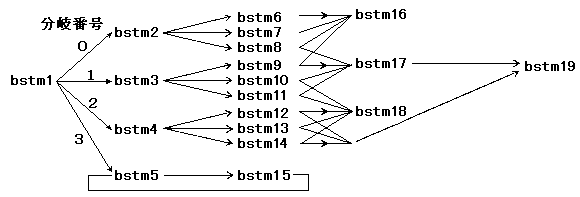
A scenario is information that describes how branch playback is performed over time (in what order the streams are played back).
The branch stream is specified for each file. Data such as audio and video can be retrieved by channel interleaving within the file.

Figure 3.2 Stream branching

  1. In this scenario, the first branch stream to read is bstm1. The branch playback library starts loading bstm1.

  2. The application gets the currently loading branch stream and sets it in the decoder.

  3. The branch playback library starts reading bstm1, followed by branch candidates (branch streams that may be retrieved next), bstm2, bstm3, bstm4, and bstm5. By pre-reading the stream of branch candidates in this way, the CD buffer can be used effectively and smooth branching is possible.

  4. The application gets the event from the pad input etc. and selects the branch destination. If a branch number from 0 to 3 is assigned to the branch to bstm2, bstm3, bstm4, and bstm5 and 1 is specified, reading of bstm2, bstm4, and bstm5 that are no longer needed will be stopped. If necessary, the application gets the stream to branch to and sets it in the decoder.

  5. When the extraction of bstm1 is completed, the extraction of bstm3 will start. When the application specifies branch execution to the branch playback server, the branch playback library starts reading bstm9, bstm10, and bstm11 as in (c).
[Notes]


The same stream must not exist in one branch candidate. This is because opening the same stream with a different stream handle does not read the data at the same time.
A stream that is opened later is connected to the end of the aperture, so data can be retrieved from the stream that was opened earlier. Therefore, the same stream as it is now can exist in the branch candidates.


<< Example in Figure 3.2 >>

-The same stream must not be duplicated in bstm6-8,
You can have the same stream as bstm2.


3.3 State transition of branch playback

The branch playback status is shown in Table 3.1, and the branch playback state transition is shown in Figure 3.3.

Table 3.1 Branch playback status
 Status
 explanation
 Branch playback end
 Branch playback is complete.
All stream groups and streams (current stream and branch candidates) opened by the branch playback library are closed.
 Waiting for branch destination selection
 The branch candidate is pre-read, but the branch destination is not selected.
All streams of branch candidates are read ahead.
Only the current stream can be acquired, not the branch destination stream.
 Branch destination decision
 A branch destination has been selected from the branch candidates.
Only the selected branch destination is read ahead.
You can get both the current stream and the branch destination stream.
 No branch destination
 There are no branch candidates or branch destinations for the current stream.
The last stream is playing.

The branch playback status can be obtained with the server function.

Figure 3.3 State transition diagram of branch playback
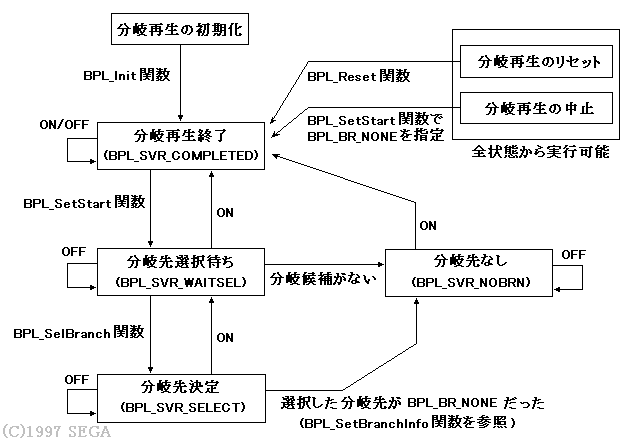
* ON / OFF: Branch execution switch of branch playback server function (BPL_ExecServer)
If ON is specified in the branch destination selection state / no branch destination state, branch playback ends.
If ON is specified in the branch destination determination state, the branch stream is switched.

3.4 Branch execution (branch stream switching process)

(1) Execution of branch
When branching is executed in the branch destination determination state (turning on the branch execution switch of the branch playback server), the following branch stream switching processing is performed.

  1. Closes the current stream A.
    (Stops reading A and erases any data left in the CD buffer.)

  2. The branch destination stream B becomes the new current stream.

  3. The branch destination stream is undecided.

Table 3.2 Switching a branch stream by executing a branch
 Branch stream
 Before branch execution
 After branch execution (after switching process)
 Current stream (obtained by BPL_GetCurStm function)
 A
 B
(A is closed)
 Branch destination stream (obtained by BPL_GetNextStm function)
 B
 Undecided until the next branch destination is selected (select / determine with BPL_SelectBranch function)

The selection of the branch destination always precedes the execution (switching) of the branch, but the operation of selecting and switching is basically asynchronous.

(2) Opening and closing the stream
The streams opened by the branch playback library are the current stream and the candidate stream. The opening / closing procedure is shown below.

  1. The playback start stream specified by the BPL_SetStart function is first opened as the current stream.

  2. When the current stream starts loading, the branch candidate stream is opened.

  3. When you select a branch destination, other branch candidates are closed and only the branch destination is read ahead.

  4. When you perform a branch, its current stream is closed.
    The branch destination stream switches to the current stream and repeats (b) to (d).

  5. When the branch playback ends, the stream group is closed.

(3) Branch stream switching timing
The switching timing of the branch stream is classified as shown in Table 3.3.

Table 3.3 Branch stream switching timing
 timing
 explanation
 Natural switching
 After decoding stream A, switch to stream B at the branch destination.
 Forced switching
 Even during the decoding of stream A, it is forcibly switched to stream B of the branch destination.

Even if the branch destination is decided, the branch should not be executed until the decoder finishes processing the current stream. (To prevent the stream data being decoded from being interrupted).
For either natural or forced switching, execute the switching process for the decoder first, and then turn on the branch execution switch after that is completed.


BackForward
PROGRAMMER'S GUIDEBranch playback library
Copyright SEGA ENTERPRISES, LTD., 1997