PROGRAMMER'S GUIDEFile system library
■ | Advance
File system library

1. 1. Overview


This section describes the library for accessing files on the CD.

1.1 Features

This library has the following features.

(1) Target CD-ROM
  1. ISO9660 level file access is possible.
  2. Access using the subheader information of CD-ROM XA is not covered by this library.

(2) Data buffering
  1. Access is performed assuming the buffer management mechanism of the CD block.
  2. In addition to simple file reading, look-ahead using a buffer is possible.

(3) File identifier
  1. Access by file identifier (sequential number in the directory) is the basis.
  2. Eliminates slowdowns caused by directory searches. >
  3. Access by file name is possible by using the file name to file identifier conversion function.

(4) Development support function
  1. You can access memory files and DOS files as a development support function.
  2. If you have a small amount of data, you can replace the file on the CD with a memory file.
  3. You can access DOS files on your IBM-PC via SCSI as well as memory files.
    Files on CD can be replaced even if the data is too large to fit in SIMM.
  4. We provide two types of libraries, one for product embedding and one with development support functions.

1.2 Functional overview

This section outlines the features of the file system library. The functions of this library are classified into the following 6 types.

(1) Directory operation
It provides the following functions such as library initialization, reading directory information, and current directory setting.

 function
 function
 GFS_Init
 Library initialization and CD mounting process
 GFS_LoadDir
 Read directory information
 GFS_SetDir
 Current directory settings
 GFS_NameToId
 File name → file identifier conversion
 GFS_IdToName
 File identifier → file name conversion
 GFS_GetDirInfo
 Get directory information
 GFS_Reset
 File system reset

(2) File operation
Performs the following common file operations, such as opening, closing, and seeking files.

 function
 function
 GFS_Open
 Open file
 GFS_Close
 File close
 GFS_Seek
 Move access pointer
 GFS_Tell
 Get access pointer
 GFS_IsEof
 Check if the access pointer is at the end of the file
 GFS_ByteToSct
 Byte-by-sector conversion
 GFS_GetFileSize
 Get file size
 GFS_GetFileInfo
 Get file information
 GFS_GetNumCdbuf
 Get the number of sectors in the CD buffer partition

(3) Completion return type reading
Read data from a file. At this time, control does not return from the function until the data reading is completed.

 function
 function
 GFS_Fread
 Read data from the opened file.
 GFS_Load
 Read the data by specifying the file identifier.

(4) Immediate return type reading
Read data from a file with request and server functions. The server function processes the request issued by the request function for each processing unit.
Server functions must be called repeatedly. By inserting the application process into the server function call loop, the application process can be executed before the data loading is completed.

 function
 function
 GFS_NwFread
 Issuing a data read request
 GFS_NwCdRead
 Issuing a read request to the CD buffer
 GFS_NwIsComplete
 Check the completion of reading process
 GFS_NwStop
 Cancel reading process
 GFS_NwGetStat
 Get access status
 GFS_NwExecOne
 Server function for one file
 GFS_NwExecServer
 Server functions for multiple files

(5) Read parameter setting
Set various parameters for the read function for return to completion and return to immediate. You can change how to use the CD buffer, transfer method (DMA, CPU, etc.), and transfer unit.

 function
 function
 GFS_SetGmode
 Ejection method setting from CD buffer
 GFS_SetTmode
 Forwarding method setting
 GFS_SetReadPara
 Setting the read unit to the CD buffer
 GFS_SetTransPara
 Transfer unit setting from the CD buffer
 GFS_SetTrFunc
 Transfer function registration
 GFS_StartTrans
 Start transfer in transfer function

(6) Other
It provides CD pickup control, error handling function registration, and error status acquisition functions. The error handling function is called when an error occurs.

It also provides a CD-DA track number conversion function when using a DSS system.

 function
 function
 GFS_CdMovePickup
 Moving the CD pickup
 GFS_SetErrFunc
 Registration of error handling function
 GFS_GetErrStat
 Getting error status
 GFS_ConvTno
 Track number conversion 

1.3 Module configuration

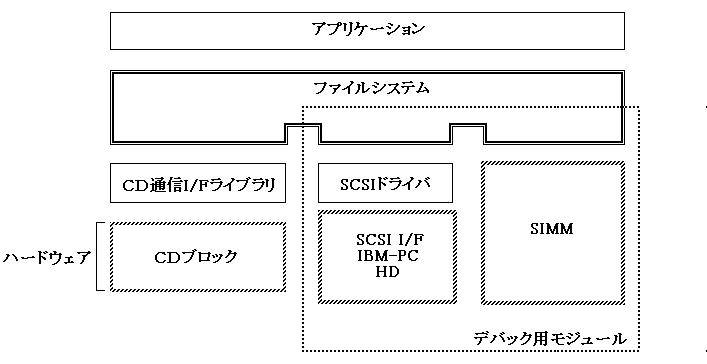
Figure 1.1 shows the position of this library with respect to hardware and other software. The dotted line is the module included in the debug library.

Figure 1.1 Module configuration diagram
To use this library, you need to link the following libraries at the same time.


■ | Advance
PROGRAMMER'S GUIDEFile system library
Copyright SEGA ENTERPRISES, LTD., 1997