PROGRAMMER'S GUIDEFile system library
BackForward
File system library

3. 3. Directory manipulation


3.1 Initialization

You must run GFS_Init before using this library. GFS_Init does the following:

(1) Initialization
Set the workspace used by the library and initialize it. The work area and directory information storage area must all be prepared by the application.
The size of the area changes depending on the number of files opened at the same time, so find it with the following macro. Where open_max is the maximum number of files that can be opened at the same time.

GFS_WORK_SIZE (open_max)

(2) Mount processing
Read the root directory from the CD-ROM and set it as the current directory. It also initializes the CD block and deletes all sector data in the CD buffer. The file system only holds the start address of the directory information storage area, so the application must not change the contents of the area.
Initialize the directory information management structure and call GFS_Init as follows.

#define OPEN_MAX 20 / * Maximum number of files to open at the same time * /
#define MAX_DIR 10 / * Maximum number of directory information * /

Uint32 work [GFS_WORK_SIZE (OPEN_MAX) / 4]; / * Library work area * / GfsDirTbl dirtbl; / * Directory information management structure * / GfsDirId dir [MAX_DIR]; / * Directory information storage area * /

GFS_DIRTBL_TYPE (& dirtbl) = GFS_DIR_ID; / * Directory information storage area type * / GFS_DIRTBL_NDIR (& dirtbl) = MAX_DIR; / * * / in the directory information storage area / * Maximum number of elements * / GFS_DIRTBL_DIRID (& dirtbl) = dir; / * Directory information storage area * / / * Address * / GFS_Init (OPEN_MAX, work, & dirtbl);

If you replace the CD-ROM, you will have to call GFS_Init again.

3.2 File identifier

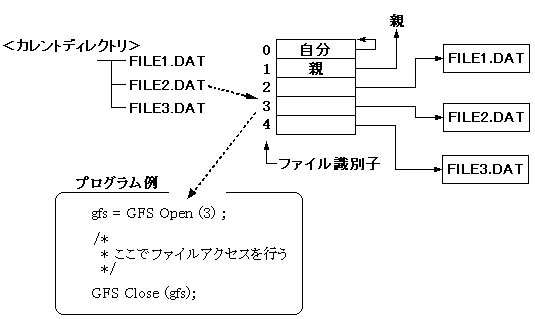
In this library, the file to be accessed shall be specified by the file identifier.
When accessing by file name, convert the file name to a file identifier.
The file identifier is valid for the current directory.

[Example] When accessing the following FILE2.DAT

Figure 3.1 Access by file identifier

3.3 Subdirectory operations

To access the files in the subdirectories, you need to set the current directory information by calling the following function.

You can read the directory information in advance and eliminate the CD-ROM access when opening the file.

(1) Load directory information (GFS_LoadDir)
Specify a subdirectory file to read and retain directory information.
At this time, the following two types can be selected as the directory information retention area.

(a) GFS_DIR_ID

(b) GFS_DIR_NAME

(2) Setting the current directory (GFS_SetDir)
The directory information area read by GFS_LoadDir is set as the current directory.

Figure 3.2 Setting directory information
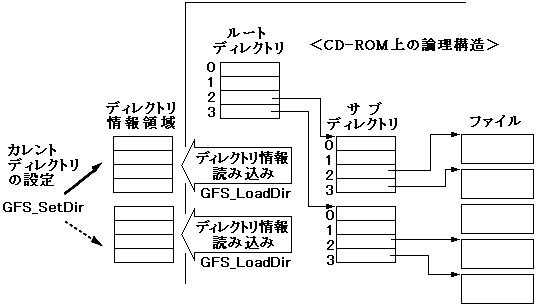
To access the files in the subdirectories, you must do the following:

Reading directory information ↓
Current directory setting ↓
Open file ↓
Access to files ↓
File close

This procedure is illustrated by two examples.

[Example] Accessing files in directories other than the root directory
The following is a program example of the procedure for accessing files in subdirectories. Suppose the file you want to access here is in the directory specified by dir_fid in the current directory.

#define MAX_DIR 10 / * Maximum number of directory information * /

GfsDirTbl dirtbl; / * Directory information storage area * /
GfsDirId dirid [MAX_DIR]; / * Directory information storage area * /
Sint32 dir_fid; / * Contains directory file identifier * /
Sint32 fid; / * Contains the identifier of the file to access * /
GfsHn gfs; / * File handle of the file to access * /

GFS_DIRTBL_TYPE (& dirtbl) = GFS_DIR_ID;
GFS_DIRTBL_NDIR (& dirtbl) = MAX_DIR;
GFS_DIRTBL_DIRID (& dirtbl) = dirid;

GFS_LoadDir (dir_fid, & dirtbl); / * Load directory information * /

GFS_SetDir (& dirtbl); / * Current directory setting * /

/ * Set the identifier of the file that accesses fid * /
gfs = GFS_Open (fid);
/ *
 * Access files here * /
GFS_Close (gfs);

[Example] Simultaneous access to multiple files in different directories
To access a file in a different directory, you must open the desired file while switching the current directory.
The following is an example of accessing two files in two subdirectories directly under the current directory at the same time. Suppose the file identifiers of the two subdirectories containing the files you want to access are specified by dir_fid1 and dir_fid2, respectively.

#define MAX_DIR1 10 / * Maximum number of directory information in dir_fid1 * /
# define MAX_DIR2 10 / * Maximum number of directory information in dir_fid2 * /

GfsDirTbl curdir; / * Current directory at this point * /
GfsDirTbl dirtbl1, dirtbl2; / * Directory information management area * /
GfsDirId dirid1 [MAX_DIR1]; / * Directory information storage area * /
GfsDirId dirid2 [MAX_DIR2]; / * Directory information storage area * /
Sint32 dir_fid1, dir_fid2; / * Contains the directory file identifier * /
Sint32 fid1, fid2; / * Contains the identifier of the file to be accessed * /
GfsHn gfs1, gfs2; / * File handle of the file to access * /

/ * Read the directory information of dir_fid1 in the current directory * /
GFS_DIRTBL_TYPE (& dirtbl1) = GFS_DIR_ID;
GFS_DIRTBL_NDIR (& dirtbl1) = MAX_DIR;
GFS_DIRTBL_DIRID (& dirtbl1) = dirid1;
GFS_LoadDir (dir_fid1, & dirtbl1);

/ * Read the directory information of dir_fid2 in the current directory * /
GFS_DIRTBL_TYPE (& dirtbl2) = GFS_DIR_ID;
GFS_DIRTBL_NDIR (& dirtbl2) = MAX_DIR;
GFS_DIRTBL_DIRID (& dirtbl2) = dirid2;
GFS_LoadDir (dir_fid2, & dirtbl2);

/ * Open fid1, a file in directory dir_fid1 * /
GFS_SetDir (& dirtbl1);
gfs1 = GFS_Open (fid1);

/ * Open fid2, a file in directory dir_fid2 * /
GFS_SetDir (& dirtbl2);
gfs2 = GFS_Open (fid2);
/ *
 * Access files here * /
GFS_Close (gfs1);
GFS_Close (gfs2);

3.4 Mutual conversion of file name and file identifier

If you set the directory information including the file name in the current directory, you can use the mutual conversion function between the file name and the file identifier.
Calling these functions while setting directory information that does not include a file name to the current directory will result in an error.
An example of defining a function that opens a file with a file name using this function is shown below.

[Example] / * Open the file specified by the file name * /
GfsHn OpenByName (Sint8 * fname)
{
Sint32 fid = GFS_NameToId (fname);

if (fid <0) { return NULL; } return GFS_Open (fid); }

3.5 CD block file system

Directory management can be performed using the CD block file system (file system built into the CD block, hereinafter abbreviated as CDBFS).
The process for initializing, reading directory information, and setting the current directory using CDBFS is shown below.

(1) Initialization
To take advantage of CDBFS functionality, you must call GFS_Init with NULL as the pointer to the directory management structure. After the processing of GFS_Init is completed, the root directory is set in CDBFS.

(2) Read directory information
To load the subdirectory information, call GFS_LoadDir with NULL for the pointer to the directory management structure and specify that the directory information is stored in the CD block.

(3) Current directory setting
To set the directory information set in the CD block to the current directory, call GFS_SetDir with NULL as the pointer to the directory management structure.

Even if you set to use CDBFS, you can partially manage directories with this library. In that case, you should always pay attention to which directory management function you are using.
Table 3.1 shows the advantages and disadvantages of using CDBFS.

Table 3.1 Advantages and disadvantages of using CDBFS
 Strong Points
 Disadvantages
 -The host memory usage is low.
 -The CD-ROM is accessed every time a file in a different directory is accessed.
 -The CD buffer that can be used by the application is reduced by one partition.
 -The file name cannot be used.

The functions GFS_Init and GFS_LoadDir that read directory information return the number of loaded directory information as function values. When using CDBFS, the number is the number of directory information held by CDBFS.
Using a file name while setting the current directory of CDBFS will result in an error.


BackForward
PROGRAMMER'S GUIDEFile system library
Copyright SEGA ENTERPRISES, LTD., 1997