PROGRAMMER'S GUIDEFile system library
BackForward
File system library

6. Other functions


6.1 Development support function

The file system provides the ability to access memory and DOS files as a support feature when debugging. This feature allows you to access files that have not yet been created on the CD-ROM, or files that have changed since the CD-ROM was created, in the same way as files on the CD-ROM. However, this feature is not available with CDBFS.
The mechanism for making debug files accessible in the same way as files on a CD-ROM is in the directory information reading process.
When reading directory information from a CD-ROM, it also reads directory information from a debug file. The information in the debug file is processed by replacing or adding to the information in the CD-ROM file.
After reading the directory information from a certain directory on the CD-ROM, the following processing is performed.

(1) Replacement
For the debug file with the same name as the CD-ROM file, the directory information is set in the directory information storage area instead of the corresponding CD-ROM file.

(2) Add
Debug files that have not been replaced are added to the directory information storage area.
Memory files have a higher priority than DOS files when replacing debug files.
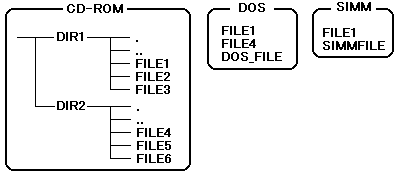
The following is an example of how these operations are performed. Figure 6.1 shows the file structure.

Figure 6.1 Example file configuration

In that file structure, the result of acquiring the directory information of DIR1 is Table 6.1, and the result of acquiring the directory information of DIR2 is Table 6.2.

Table 6.1 Directory information for DIR1
 Obtained directory information
 CD-ROM
 DOS
 SIMM
 ..
 ..
 ..
 ..
 FILE1
 FILE1 ×
 FILE1 ×
 FILE1
 FILE2
 FILE2
 FILE3
 FILE3
 FILE4
 FILE4
 DOS_FILE
 DOS_FILE
 SIMMFILE
 SIMMFILE
The x mark indicates that it has been replaced.

Table 6.2 Directory information for DIR2
 Obtained directory information
 CD-ROM
 DOS
 SIMM
 ..
 ..
 ..
 ..
 FILE4
 FILE4 ×
 FILE4
 FILE5
 FILE5
 FILE6
 FILE6
 FILE1
 FILE1 ×
 FILE1
 DOS_FILE
 DOS_FILE
 SIMMFILE
 SIMMFILE
The x mark indicates that it has been replaced.

As shown in the above example, the debug file replaces and adds to all directories on the CD-ROM.

6.2 Error handling function

By registering an error-handling function, you can specify that the error-handling function should be called if an error occurs during execution of the library function. In the initial state, the error handling function is not registered.
When an error occurs, the error handling function is executed in the following call format.

void * (func) (void * obj, Sint32 err); / * Error handling function * /
void * obj; / * Pointer to the registered object * /
Sint32 err_code; / * Error code that occurred * /
(* func) (obj, err_code); / * Error handling function call * /

When returning from the error handling function, the library function returns control to the application side using the error code as the function value.

6.3 Multiple processing

Multiple processing by interrupts is prohibited. When executing both main processing and interrupt processing, perform exclusive processing on the caller side.

(1) During main processing
Wait until the called function no longer returns GFS_ERR_BUSY, or defer the call to this library function until the next opportunity.

(2) Interrupt processing
The call to this library function will be postponed until the next opportunity.

6.4 CD-DA file processing function

Reading a CD-DA file will play the music track specified in that file.
However, it is necessary to set SCSP on the application side to output sound.

(1) Control over files
The only control that the file system controls for CD-DA files is playback and playback range control. Playback mode is the default value (no repeat, move pickup).

(2) How to play
You can play CD-DA files in the following ways:

  1. GFS_Load
  2. GFS_Fread
  3. GFS_NwFread
  4. GFS_NwCdRead

Methods (a) and (b) will not return until playback is complete.
In the methods (c) and (d), it is necessary to call the server function. When the CD-DA finishes playing, the server function returns GFS_SVR_COMPLETED.
Use GFS_Seek to play from the middle. You cannot access CD-DA files and CD-ROM files at the same time.

(3) Parameters related to file operations
You cannot change the eject mode, transfer mode, read parameters, and eject parameters for a CD-DA file. Calling the following function on a CD-DA file returns an error.

6.5 DDS system compatible

The file system supports functions for DDS (Direct Dispatch System).
The program created as the product version can be executed as it is as the DDS version.
In order to execute the created program as a DDS version, it is necessary to code in consideration of the following restrictions.

  1. For CD-DA playback, the track number is converted by the GFS_ConvTno function, and the CDC_CdPlay function by specifying the track number of the CD communication interface is used.
    Do not use immediate track numbers or CD-DA files.
  2. When accessing a CD, do not use immediate FAD.
  3. The upper limit of the directory depth is 7 including the root directory.

BackForward
PROGRAMMER'S GUIDEFile system library
Copyright SEGA ENTERPRISES, LTD., 1997