PROGRAMMER'S GUIDEVDP2 library
■ | Advance
VDP2 library

1. Guide


1.1 Purpose

1.2 Commentary

VDP2 only allows access to registers and color RAM during the V-BLANK period. Also, many registers are unreadable.
The VDP2 library has a register buffer in the library, and writes / reads to normal registers are performed on this register buffer and copied to the register during the next V-BLANK period. (See Reference for details on register buffers)
This library is roughly classified into the following function groups. I will explain each of them.

[Initialization function]
This must be done first when using the VDP2 library.

[Table creation & dataset function]
Set various parameters by referring to the VDP2 user's manual and reference.

[Display screen operation related functions]
You can move, zoom in / out, and rotate the scroll screen.

[Line screen setting function]
Set the data for the line screen and back screen.

[Window setting function]
Set the window.

[VDP1-related functions]
A function that must be set to display the contents of the VDP1 (sprite) framebuffer.

[Color RAM related functions]
Set the palette and rewrite the palette.

[Priority related functions]
Set the priority and get the information.

[Color operation related functions]
Performs color calculation processing. It can be used to add effects that gradually appear, such as the expression of translucent objects, the appearance of ghosts, and the warp-out of spaceships.

[Color offset related functions]
The process of adding an offset to a color. Applications include fade-in, fade-out, blackout, and whiteout. It is also effective when expressing the change from the blue sky to the sunset sky.

[Other special effects related functions]
You can perform blur calculation, line color screen insertion, and shadow bit settings. (The line color screen can only be used for color calculation)

[Register buffer write / read macro]
Provides a macro for bit access to the priority-related register buffer used by this library. There are about 90 types of macros for writing and reading.

[V-BLANK interrupt processing related functions]
This section describes the frame change processing by the V-BLANK VDP interrupt routine provided by this library to display sprites (VDP1) and scrolls (VDP2).

[Frame change processing]

[V-BLANK VDP interrupt processing]
When the user uses the sprite (VDP1) and scroll (VDP2) display library, it is necessary to create a V-BLANK interrupt routine that calls the following routines provided by this library and set it with INT_SetScuFunc (). You can also call your own interrupt handling routine without using the following routines.

1.3 Basic library usage

The basic usage of the VDP2 library is based on "VDP2 User's Manual Chapter 15 How to Use VDP2 15.1 Operation Flow". Use the appropriate library accordingly.
Here, we will explain the VRAM mapping, which is especially important for using this library, the setting of cycle patterns with a high degree of freedom of setting and complicated setting, and the coding method using a sample program.

VRAM mapping

Figure 1 Comparison of VRAM and data size
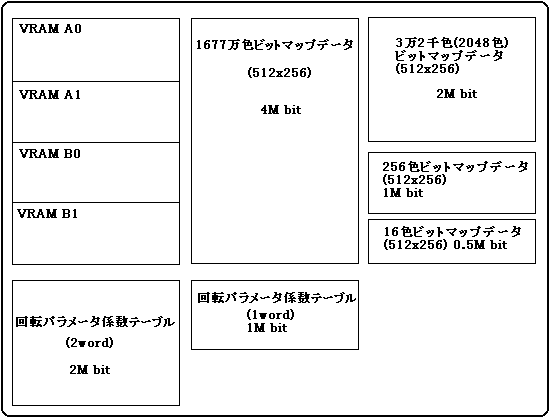
In order to use VDP2 effectively, how to arrange the data on VRAM is important.
For example, when displaying a bitmap image of 16.77 million colors, all VRAM is used and other pictures cannot be displayed.
Next, I will explain each of them with an example of VRAM mapping. A bitmap is used as an example of image data. Because the data size is fixed, this figure is a direct reference for mapping. In the cell format, the data size changes depending on how the data is stored, and if there are many common parts, the memory efficiency will be better than the bitmap.

[Example 1] When using 5 displayable surfaces of VDP2 When all data other than NBG2 and NBG3 are bitmaps, 1 rotating surface is set to 256 colors and 4 normal surfaces are set to 16 colors: It looks like. A rotation parameter table is required to move the surface of revolution. Furthermore, when performing X-axis and Y-axis rotation, a rotation parameter coefficient table must also be prepared.
In this library, the rotation parameter coefficient table is usually arranged from the beginning of each bank (VRAM A0, VRAM A1, VRAM B0, VRAM B1). However, only 2kWord (4kByte) is used for X-axis and Y-axis rotation of this library. Therefore, the rotation parameter table, line scroll table, line color table, back screen data, etc. can be placed in the remaining area (124 kByte). (1M bit = 128kByte)

Fig. 2 When using 5 displayable screens of VDP2
┏━━━━━━━━━━━━━┓ ┌────────────────┐ RBG0
┃VRAM A0 ┃│256 color bitmap data │    
┃ ┃ │ (512 × 256) │    
┃ ┃ │ 1M bit │    
┃ ┃ │ │ │    
┃ ┃ │ │ │    
┣━━━━━━━━━━━━━┫ ┝━━━━━━━━━━━━━━━━┥    
┃VRAM A1 ┃│Rotation parameter coefficient table │    
┃ ┃ │ (1 word) │    
┃ ┃ │ │ │    
┃ ┃ ├────────────────┤    
┃ ┃ │ Rotation parameter table │    
┣━━━━━━━━━━━━━┫ ┝━━━━━━━━━━━━━━━━┥ NBG0
┃ VRAM B0 ┃ │ 16-color bitmap data │    
┃ ┃ │ (512 × 256) 0.5Mbit │    
┃ ┃ ├────────────────┤ NBG2
┃ ┃ │ Character pattern data │    
┃ ┃ │ Pattern name data │    
┣━━━━━━━━━━━━━┫ ┝━━━━━━━━━━━━━━━━┥ NBG1
┃ VRAM B1 ┃ │ 16-color bitmap data │    
┃ ┃ │ (512 × 256) 0.5Mbit │    
┃ ┃ ├────────────────┤ NBG3
┃ ┃ │ Character pattern data │    
┃ ┃ │ Pattern name data │    
┗━━━━━━━━━━━━━┛ └────────────────┘    

[Example 2] When using two rotating surfaces Only one rotating surface data such as character data (bitmap data) and pattern name data can be placed in one bank. Furthermore, the arrangement of RGB1 is fixed to the character pattern data in VRAMB0 and the pattern name data in VRAMB1.

Fig. 3 When using two rotating surfaces
┏━━━━━━━━━━━━━┓ ┌────────────────┐ RBG0
┃VRAM A0 ┃│256 color bitmap data │    
┃ ┃ │ (512 × 256) │    
┃ ┃ │ 1M bit │    
┃ ┃ │ │ │    
┃ ┃ │ │ │    
┣━━━━━━━━━━━━━┫ ┝━━━━━━━━━━━━━━━━┥    
┃VRAM A1 ┃│Rotation parameter coefficient table │    
┃ ┃ │ (1 word) │    
┃ ┃ │ │ │    
┃ ┃ ├────────────────┤    
┃ ┃ │ Rotation parameter table │    
┣━━━━━━━━━━━━━┫ ┝━━━━━━━━━━━━━━━━┥ RBG1
┃VRAM B0 ┃│Character pattern data │    
┃ ┃ │ 1Mbit │    
┃ ┃ │ │ │    
┃ ┃ │ │ │    
┃ ┃ │ │ │    
┣━━━━━━━━━━━━━┫ ┝━━━━━━━━━━━━━━━━┥    
┃VRAM B1 ┃│Pattern name data │    
┃ ┃ │ 1Mbit │    
┃ ┃ │ │ │    
┃ ┃ │ │ │    
┃ ┃ │ │ │    
┗━━━━━━━━━━━━━┛ └────────────────┘    

VRAM division and cycle pattern setting
VDP2 displays the scroll screen data while reading it from VRAM in synchronization with TV scanning. VRAM access during the display period is repeated with 4 times (high resolution screen) or 8 times (normal screen) as the access operation unit (1 cycle).
Cycle pattern registers are provided for each VRAM and bank of VRAM A (VRAM A0, VRAM A1) and VRAM B (VRAM B0, VRAM B1). Access is represented by 1 command and 4 bits.
(Refer to "VDP2 User's Manual 3.4 How to access VRAM during the display period".)
The number of accesses set in the cycle pattern depends on the data type and usage. You need to assign these to the cycle pattern table.

Table 1 Number of pattern name table data accesses required for one cycle
 Item
 NBG0 ~ NBG3
 RBG0, RBG1
 Reduction setting
 1x
 1/2 times
 1/4 times
 Number of VRAM accesses required for one cycle
 1
 2
 Four
 8

Table 2 Character pattern data (bitmap pattern data) Data access count
 Item
 NBG0 ~ NBG3
 RBG0, RBG1
 TV screen mode 
 normal
 High resolution
 exclusive
 Number of character colors
 16
 256
 2048
 32768
 16.77 million
 Reduction setting (double)
 1
 1/2
 1/4
 1
 1/2
 1
 1
 1
 Number of VRAM accesses required for one cycle
 1
 2
 Four
 2
 Four
 Four
 Four
 8
 8
 Four
 Four

For example, in the case of 16-color bitmap data (handled as character pattern data), you can put four 512x256 data in either VRAM A or VRAM B alone. If this is assigned to each normal scroll surface, the total number of accesses will be four. However, NBG0 and NBG1 on the normal scroll surface have a reduction function. If you use this function to set each 1/4 times reduction, the total number of accesses will be 10 times, which will exceed 8 times and will not be displayed correctly on the screen. In that case, if you divide the VRAM, the number of accesses will be distributed and it will be displayed correctly on the screen.

Figure 4 For 16-color bitmap data
┏━━━━━━━━━━━━━┓ ┌────────────────┐ NBG0 1x ┃ VRAM A ┃ │ 16-color bitmap data │     
┃ ┃ │ │ │     
┃ ┃ ├────────────────┤ NBG1 1x ┃ ┃ │ 16-color bitmap data │     
┃ ┃ │ │ │     
┃ ┃ ├────────────────┤ NBG2 1x ┃ ┃ │ Character pattern data │     
┃ ┃ │ Pattern name data │     
┃ ┃ ├────────────────┤ NBG3 1x ┃ ┃ │ Character pattern data │     
┃ ┃ │ Pattern name data │     
┣━━━━━━━━━━━━━┫ ┝━━━━━━━━━━━━━━━━┥ NBG0 1/4 times ┃VRAM B0 ┃│16 color bitmap data │     
┃ ┃ │ │ │     
┃ ┃ ├────────────────┤ NBG1 1/4 times ┃ ┃ │ 16-color bitmap data │     
┃ ┃ │ │ │     
┣━━━━━━━━━━━━━┫ ┝━━━━━━━━━━━━━━━━┥ NBG2 1x ┃ VRAM B1 ┃ │ Character pattern data │     
┃ ┃ │ Pattern name data │     
┃ ┃ ├────────────────┤ NBG3 1x ┃ ┃ │ Character pattern data │     
┃ ┃ │ Pattern name data │     
┗━━━━━━━━━━━━━┛ └────────────────┘     

Program description example
An example of an actual program in C language is shown below.

#include <machine.h>
#include "sega_scl.h"

                                     / * Cycle pattern table settings * /
Uint16 n0_cycle [] = {0x44ff, 0x0fff, / * VRAM A (A0) NBG0 character pattern and pattern name table available * /
                    0xffff, 0xffff, / * VRAM A1 VRAM A is not divided, so * /
                                     /* unused */
                    0xffff, 0xffff, / * VRAM B (B0) No data * /
                    0xffff, 0xffff}; / * VRAM B1 VRAM B is not divided, so * /
                                     /* unused */

extern Uint16 ColData []; / * Palette data pointer * /

SclConfig scfg;
main ()
{
     SCL_Vdp2Init (); / * Initialize VDP2 library * /

     SCL_SetDisplayMode (SCL_NON_INTER, SCL_224LINE, SCL_NOMAL_A);
                                                 / * Screen mode settings * /

     SCL_SetColRamMode (SCL_CRM_2048);
                                                 / * Color RAM mode setting * /
     SCL_AllocColRam (SCL_NBG0,256, ON);
                                                 / * Secure pallet area * /
     SCL_SetColRam (SCL_NBG0,0,265,ColData);
                                                 / * Palette data settings * /

     .................. / * Stores scroll data in VDP2 VRAM. * /
     SCL_InitConfigTb (& scfg); / * Scroll NBG0 Configuration initialization * /


     scfg.dispenbl = ON; / * Display NBG0 on screen * /
     scfg.charsize = SCL_CHAR_SIZE_1X1;
     scfg.pnamesize = SCL_PN1WORD;
     scfg.platesize = SCL_PL_SIZE_1X1;
     scfg.coltype = SCL_COL_TYPE_256;
     scfg.flip = SCL_PN_12BIT;
     scfg.datatype = SCL_CELL;
     scfg.plate_addr [0] = SCL_VDP2_VRAM_A + 0x0000;
     scfg.plate_addr [1] = SCL_VDP2_VRAM_A + 0x2000;
     scfg.plate_addr [2] = SCL_VDP2_VRAM_A + 0x4000;
     scfg.plate_addr [3] = SCL_VDP2_VRAM_A + 0x6000;
     SCL_SetConfig (SCL_NBG0, & scfg);

     SCL_SetPriority (SCL_NBG0,7); / * Set priority to maximum * /

     SCL_SetCycleTable (n0_cycle); / * Cycle pattern setting * /

     INT_SetScuFunc (.....); / * Register V-Blank routine * /

     set_imask (0); / * Enable interrupts. * /

     SCL_Open (SCL_NBG0); / * NBG0 open processing * /
     SCL_Move (FIXED (1), FIXED (1), 0); / * Various scroll operation functions * /
          ..
          ..
          ..
     SCL_Close (SCL_NBG0); / * Scroll processing finished * /

     SCL_DisplayFrame (); / * Wait for V_BLANK and scroll display * /
}


■ | Advance
PROGRAMMER'S GUIDEVDP2 library
Copyright SEGA ENTERPRISES, LTD., 1997