PROGRAMMER'S GUIDEPCM / ADPCM playback library
Back | ■
PCM / ADPCM playback library

6.2 Function details


Initialization and termination processing


 List
 Title

Function specifications

 Function

Initialize

 Function Name

PCM_Init

 No

1.1

Form
Bool PCM_Init (void)
input
none
output
none
Function value
If it can be initialized successfully: TRUE
If it cannot be initialized normally: FALSE
function
Immediately after starting the program, it will be initialized to use this library.
remarks
When using this library, be sure to call this function at the beginning of the program.

 List
 Title

Function specifications

 Function

End processing

 Function Name

PCM_Finish

 No

1.2

Form
void PCM_Finish (void)
input
none
output
none
Function value
none
function
Terminates the PCM library.
remarks
If you do not want to play PCM after that, call this function.

 List
 Title

Function specifications

 Function

Declaration of use of ADPCM

 Function Name

PCM_DeclareUseAdpcm

 No

1.3 1.3

Form
void PCM_DeclareUseAdpcm (void)
input
none
output
none
Function value
none
function
The function is expanded so that ADPCM can be played.
remarks
Required when playing the specified ADPCM format or CD-ROM XA Audio format. Call it immediately after the initialization function PCM_Init.
If you call this, the modules in the ADPCM decompression library will be linked.
Calling does not limit playback functions other than ADPCM.
If you do not call it, the executable file size will be slightly smaller.

 List
 Title

Function specifications

 Function

Saturn PCM usage declaration (file system)

 Function Name

PCM_DeclareUseSapGfs

 No

1.4

Form
void PCM_DeclareUseSapGfs (void)
input
none
output
none
Function value
none
function
Extends the function so that it can be played back in Saturn PCM format.
Saturn Calls when using the PCM format in file playback mode (file system).
remarks
Required when playing Saturn PCM format in file playback mode.
Call it immediately after the initialization function PCM_Init.
By calling this function, all PCM files to be played will be in Saturn PCM format.
SaturnPCM format, AIFF format, specified ADPCM format, and CD-ROM XA Audio format files cannot be used at the same time.

 List
 Title

Function specifications

 Function

Saturn PCM usage declaration (stream system)

 Function Name

PCM_DeclareUseSapStm

 No

1.5

Form
void PCM_DeclareUseSapStm (void)
input
none
output
none
Function value
none
function
Extends the function so that it can be played back in Saturn PCM format.
Uses the Saturn PCM format in stream playback mode (stream system).
remarks
Required when playing Saturn PCM format in stream playback mode.
Call it immediately after the initialization function PCM_Init.
By calling this function, all PCM files to be played will be in Saturn PCM format.
SaturnPCM format, AIFF format, specified ADPCM format, and CD-ROM XA Audio format files cannot be used at the same time.

Steering wheel operation


 List
 Title

Function specifications

 Function

Creating a handle (memory)

 Function Name

PCM_CreateMemHandle

 No

2.1

Form
PcmHn PCM_CreateMemHandle (PcmCreatePara * para)
input
para: Creation parameter
output
none
Function value
Handle (null if not created)
function
Create a handle to play a file in memory.
remarks

 List
 Title

Function specifications

 Function

Erase handle (memory)

 Function Name

PCM_DestroyMemHandle

 No

2.2

Form
void PCM_DestroyMemHandle (PcmHn pcm)
input
pcm: handle
output
none
Function value
none
function
Erase the handle.
remarks
Once you erase a handle, it can no longer be used.

 List
 Title

Function specifications

 Function

Creating a handle (file system)

 Function Name

PCM_CreateGfsHandle

 No

2.3

Form
PcmHn PCM_CreateGfsHandle (PcmCreatePara * para, GfsHn gfs)
input
 para
 : Creation parameters
 gfs
 : File handle
output
none
Function value
Handle (null if not created)
function
Create a handle to play the file on the file system.
remarks

 List
 Title

Function specifications

 Function

Erase handle (file system)

 Function Name

PCM_DestroyGfsHandle

 No

2.4

Form
void PCM_DestroyGfsHandle (PcmHn pcm)
input
pcm: handle
output
none
Function value
none
function
Erase the handle.
remarks
Once you erase a handle, it can no longer be used.

 List
 Title

Function specifications

 Function

Creating a handle (stream system)

 Function Name

PCM_CreateStmHandle

 No

2.5

Form
PcmHn PCM_CreateStmHandle (PcmCreatePara * para, StmHn stm)
input
 para
 : Creation parameters
 stm
 : Stream handle
output
none
Function value
Handle (null if not created)
function
Create a handle to play the file on the stream system.
remarks

 List
 Title

Function specifications

 Function

Erase handle (stream system)

 Function Name

PCM_DestroyStmHandle

 No

2.6

Form
void PCM_DestroyStmHandle (PcmHn pcm)
input
pcm: handle
output
none
Function value
none
function
Erase the handle.
remarks
Once you erase a handle, it can no longer be used.

 List
 Title

Function specifications

 Function

Play task

 Function Name

PCM_Task

 No

2.7 2.7

Form
void PCM_Task (PcmHn pcm)
input
pcm: handle
output
none
Function value
none
function
Reads files from CDs and transfers data to sound memory.
Specifying NULL for pcm executes the playback task for all playing handles.
remarks
Call this function periodically during playback.
V Call at a frequency equal to or higher than the frequency of blank interrupts (1 time / 16ms).

 List
 Title

Function specifications

 Function

V blank IN processing function

 Function Name

PCM_VblIn

 No

2.8

Form
void PCM_VblIn (void)
input
none
output
none
Function value
none
function
Manages playback time.
remarks
When using this library, be sure to call this function with V blank IN interrupt processing.

Playback control


 List
 Title

Function specifications

 Function

Start playing

 Function Name

PCM_Start

 No

3.1 3.1

Form
void PCM_Start (PcmHn pcm)
input
pcm: handle
output
none
Function value
none
function
Playback will start.
remarks
Playback can only be done once for the generated handle.
If you want to play the same file over and over again, generate a handle each time.

 List
 Title

Function specifications

 Function

Stop playing

 Function Name

PCM_Stop

 No

3.2

Form
void PCM_Stop (PcmHn pcm)
input
pcm: handle
output
none
Function value
none
function
Stop playback.

 List
 Title

Function specifications

 Function

Pause

 Function Name

PCM_Pause

 No

3.3

Form
void PCM_Pause (PcmHn pcm, PcmPauseCmd cmd)
input
 pcm
 :handle
 cmd
 : Pause control command
output
none
Function value
none
function
Pauses playback. Alternatively, cancel the pause.

 List
 Title

Function specifications

 Function

Register the handle to play next

 Function Name

PCM_EntryNext

 No

3.4 3.4

Form
void PCM_EntryNext (PcmHn pcm)
input
pcm: handle
output
none
Function value
none
function
Register the handle to play next.
remarks
If you register a handle with this function, the next handle will automatically start playing when the currently playing handle ends. If you specify NULL, the registration will be canceled.
The handle registered by this function also starts playing when forced switching is performed with PCM_Change.
Only one handle can be registered. When the handle is switched to the registered handle, it becomes unregistered and the next handle can be registered.

 List
 Title

Function specifications

 Function

Forced switching of handle

 Function Name

PCM_Change

 No

3.5

Form
void PCM_Change (void)
input
none
output
none
Function value
none
function
Suspends the currently playing handle and starts playing the handle registered with PCM_EntryNext.

 List
 Title

Function specifications

 Function

Obtaining the switching state of the handle

 Function Name

PCM_CheckChange

 No

3.6

Form
PcmChangeStatus PCM_CheckChange (void)
input
none
output
none
Function value
Forced switchability check value
function
Returns the possibility of switching when forced switching with PCM_Change.

 List
 Title

Function specifications

 Function

Setting the number of loop playbacks

 Function Name

PCM_SetLoop

 No

3.7

Form
void PCM_SetLoop (PcmHn pcm, Sint32 cnt_loop)
input
 pcm
 :handle
cnt_loop
 :Number of loops
output
none
Function value
none
function
Specifies the number of loops for loop playback.
The default is once.
remarks
Loop playback can be used in memory playback mode (resident playback method) or file playback mode.
The memory playback mode and stream playback mode of the sequential supply method are not supported.
The specification in the function PCM_EntryNext and the function PCM_Change has priority over the specification of the loop playback count in this function. In other words, regardless of the number of loops specified, the handle switches to the next registered handle.

Information setting function


 List
 Title

Function specifications

 Function

Setting the maximum number of transfer sectors

 Function Name

PCM_SetLoadNum

 No

4.1

Form
void PCM_SetLoadNum (PcmHn pcm, Sint32 load_sct)
input
 pcm
 :handle
 load_sct
 : Maximum number of transfer sectors
output
none
Function value
none
function
Sets the maximum number of transfer sectors when transferring from the CD buffer to the library's ring buffer.
The default is 20 sectors.
remarks
Call this function before starting playback.

 List
 Title

Function specifications

 Function

Playback PAN settings

 Function Name

PCM_SetPan

 No

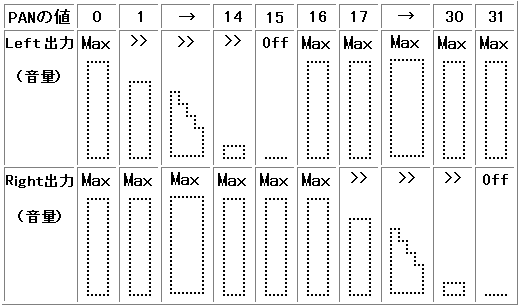
4.2

Form
void PCM_SetPan (PcmHn pcm, Sint32 pan)
input
 pcm
 :handle
 pan
 : PAN value (0-31)
output
none
Function value
none
function
Specifies the sound PAN.
The default is 0.
The PAN setting is effective for monaural playback. Ignored for stereo playback.


 List
 Title

Function specifications

 Function

Playback volume setting

 Function Name

PCM_SetVolume

 No

4.3

Form
void PCM_SetVolume (PcmHn pcm, Sint32 volume)
input
 pcm
 :handle
 volume
 : Volume (0-7)
output
none
Function value
none
function
Specify the volume. (0 outputs nothing, 7 is maximum volume) The default is 7.

 List
 Title

Function specifications

 Function

Change PCM playback parameters

 Function Name

PCM_ChangePcmPara

 No

4.4

Form
void PCM_ChangePcmPara (PcmHn pcm)
input
pcm: handle
output
none
Function value
none
function
Change the PCM playback parameters during playback for the sound driver.
remarks
By calling this function after setting the volume and pan, the actual change processing is performed.

 List
 Title

Function specifications

 Function

PCM stream playback number setting

 Function Name

PCM_SetPcmStreamNo

 No

4.5

Form
void PCM_SetPcmStreamNo (PcmHn pcm, Sint32 stream_no)
input
 pcm
 :handle
 stream_no
 : PCM stream playback number (0-7)
output
none
Function value
none
function
Set the PCM stream playback number to be set in the sound driver.
The default is 1.
remarks
For more information on PCM stream playback numbers, see the Sega Saturn Sound Driver 2.10 Programmer's Guide .
When performing multi-playback, use different stream playback numbers. Call this function before starting playback.

 List
 Title

Function specifications

 Function

Work setting for pause processing

 Function Name

PCM_SetPauseWork

 No

4.6

Form
void PCM_SetPauseWork (Sint32 * addr, Sint32 size)
input
 addr
 : Work address
 size
 : Work size
output
none
Function value
none
function
Sets the work area used for pause-on processing.
remarks
To use the pause function, it is necessary to specify the work for pause processing by PCM_SetPauseWork in advance. This work does not need to be prepared for each handle. Since this work is a work area that is temporarily used during the pause-on process, you may reserve the area immediately before the pause-on process and release the area immediately after that.
Processing example
#defile PAUSE_WORK_SIZE (4096L * 2)

pause_work_addr = malloc (PAUSE_WORK_SIZE); PCM_SetPauseWork (pause_work_addr, PAUSE_WORK_SIZE); PCM_Pause (pcm, PCM_PAUSE_ON_AT_ONCE); free (pause_work_addr);


 List
 Title

Function specifications

 Function

Data transfer method setting (CD block → ring buffer)

 Function Name

PCM_SetTrModeCd

 No

4.7

Form
void PCM_SetTrModeCd (PcmHn pcm, PcmTrMode mode)
input
 pcm
 :handle
 mode
 : Data transfer method
output
none
Function value
none
function
Set the data transfer method from the CD block to the ring buffer.
The default is CPU DMA.
You can specify either program transfer, CPU DMA, or SCU DMA.
caution
Call PCM_SetTrModeCd after creating the handle and before calling the task function for the first time.

 List
 Title

Function specifications

 Function

Playback information settings

 Function Name

PCM_SetInfo

 No

4.8

Form
void PCM_SetInfo (PcmHn pcm, PcmInfo * info)
input
 pcm
 :handle
 info info
 : Playback information
output
none
Function value
none
function
Set the information for PCM playback.
remarks
Normally, we don't use this function because we get the information for playback from the file header. Currently, it is only needed for CD-ROM XA Audio playback.
Example of use
For CD-ROM XA Audio playback, set the playback information as follows.

PcmInfo info;

PCM_INFO_FILE_TYPE (& info) = PCM_FILE_TYPE_NO_HEADER; / * No header * / PCM_INFO_DATA_TYPE (& info) = PCM_DATA_TYPE_ADPCM_SCT; / * XA Audio sector processing * / PCM_SetInfo (pcm, & info);

caution
Call PCM_SetInfo after creating the handle and before calling the task function for the first time.

 List
 Title

Function specifications

 Function

Setting the processing upper limit value per task

 Function Name

PCM_Set1TaskSample

 No

4.9

Form
void PCM_Set1TaskSample (PcmHn pcm, Sint32 sample)
input
 pcm
 :handle
 sample
 : Number of samples (sample / 1ch)
output
none
Function value
none
function
Set the upper limit of the amount processed by one task function (PCM_Task).
This can stabilize the load of the task function.
The default value is 1024 [sample / ch]
remarks

 List
 Title

Function specifications

 Function

Playback start trigger size setting

 Function Name

PCM_SetStartTrgSize

 No

4.10

Form
void PCM_SetStartTrgSize (PcmHn pcm, Sint32 size)
input
 pcm
 :handle
 size
 : Data size (byte)
output
none
Function value
none
function
Playback starts when data of size or larger is supplied.
The default value is 0 [byte]
remarks

 List
 Title

Function specifications

 Function

Playback start trigger sample setting

 Function Name

PCM_SetStartTrgSample

 No

4.11

Form
input
 pcm
 :handle
 sample
 : Number of samples (sample / 1ch)
output
none
Function value
none
function
Playback starts when there is more than sample supply.
The default value is 4096 [sample / ch]
remarks

 List
 Title

Function specifications

 Function

Playback stop trigger sample setting

 Function Name

PCM_SetStopTrgSample

 No

4.12

Form
void PCM_SetStopTrgSample (PcmHn pcm, Sint32 sample)
input
 pcm
 :handle
 sample
 : Number of samples (sample / 1ch)
output
none
Function value
none
function
The remaining amount below the sample is the condition for stopping playback.
The default value is 2048 [sample / ch]
remarks

Information acquisition function


 List
 Title

Function specifications

 Function

Get playback time

 Function Name

PCM_GetTime

 No

5.1

Form
Sint32 PCM_GetTime (PcmHn pcm)
input
pcm: handle
output
none
Function value
Current time
function
Get the current time.
(Number of samples played from the beginning of this file to the present)

 List
 Title

Function specifications

 Function

Get playback status

 Function Name

PCM_GetPlayStatus

 No

5.2.

Form
PcmPlayStatus PCM_GetPlayStatus (PcmHn pcm)
input
pcm: handle
output
none
Function value
Playback status
function
Returns the current playback status.

Buffer control


 List
 Title

Function specifications

 Function

Get write buffer

 Function Name

PCM_GetWriteBuf

 No

6.1

Form
Uint32 * PCM_GetWriteBuf (PcmHn pcm, Sint32 * free_size, Sint32 * free_total)
input
pcm: handle
output
 free_size
 : Number of bytes in continuous writable area
 free_total
 : Total number of bytes in writable area including discontinuous area
Function value
Start address of continuously writable area (NULL if not writable)
function
Gets the buffer address to write to and the number of bytes that can be written.
remarks
It is used when you want to supply data to the ring buffer independently.

 List
 Title

Function specifications

 Function

Write size notification

 Function Name

PCM_NotifyWriteSize

 No

6.2.

Form
void PCM_NotifyWriteSize (PcmHn pcm, Sint32 write_size)
input
 pcm
 :handle
 write_size
 : Number of bytes written
output
none
Function value
none
function
Notifies the library of the number of bytes of data actually supplied to the ring buffer.
remarks
It is used when you want to supply data to the ring buffer independently.
When playing a file in memory, the buffer size (file size) is notified.

 List
 Title

Function specifications

 Function

File preload

 Function Name

PCM_PreloadFile

 No

6.3

Form
void PCM_PreloadFile (PcmHn pcm, Sint32 size)
input
 pcm
 : Handle
 size
 : Number of bytes to read
output
none
Function value
Number of bytes actually read
function
Before starting file playback, read the specified size of data into the ring buffer.
remarks
The number of bytes to be read is in sector units (a multiple of 2048).

Error control


 List
 Title

Function specifications

 Function

Get error information

 Function Name

PCM_GetErr

 No

7.1

Form
PcmErrCode PCM_GetErr (void)
input
none
output
none
Function value
Error code
function
Returns the most recently generated error code.

 List
 Title

Function specifications

 Function

Error function registration

 Function Name

PCM_SetErrFunc

 No

7.2

Form
void PRM_SetErrFunc (PcmErrFunc func, void * obj)
input
 func
 : Function to call when an error occurs
 obj
 : Registered object
output
none
Function value
none
function
Set the function to be called when an error occurs. The registration object is passed to the first argument of the registration function.

Back | ■
PROGRAMMER'S GUIDEPCM / ADPCM playback library
Copyright SEGA ENTERPRISES, LTD., 1997