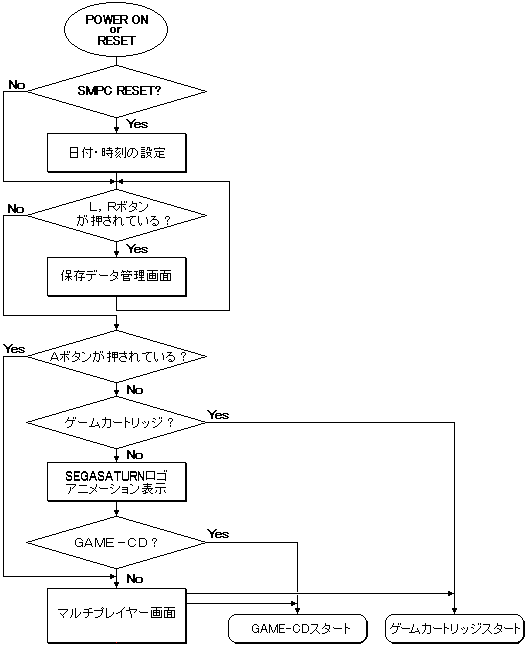
If GAME-CDis recognized while the SEGA SATURN logo is displayed, the game will start automatically. For non -GAME-CD , run multiplayer.
Figure 1 Outline of BOOT ROM processing flow
■ Notes
● If there is no CD, or if the CD door is open
In multiplayer , "CD is not inserted" and "CD door is open" are displayed respectively.
● When a game cartridge is set
The game cartridge has priority. To boot GAME-CD , turn off the power and remove the cartridge.
■ Difference between product version and target box version
● SCSI device for debugging support
In addition to the features of the commercial version, the target box version has the ability to check SCSI devices and SIMM memory and launch the game for debug support. It checks the SCSI device and SIMM memory and tries to launch the game from the filename [IP.BIN] if it exists. For individual usage, refer to " Simple CD Simulator User's Manual ".
● No system disk required
The target box version allows you to launch games from write-once CDs without using a system disc.