 ★ SOUND Manual ★ Sound Driver Programmer's Guide
 Status area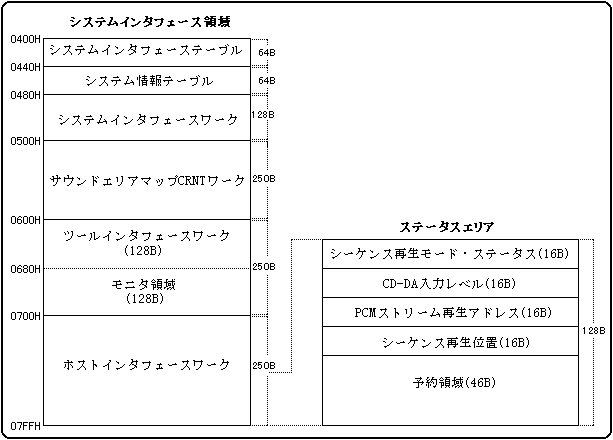
| +0 | Sequence playback mode (0-4) |
| +1 | Sequence playback status (0-FFh) |
During playback of the sequence, the current state is written to the mode status area at any time. To find out what the sequence playback is currently in, see the mode status area.
The mode status area corresponds to pronunciation control numbers 0 to 7, and has a total of 16 bytes for 2 bytes x 8 sequences. For details on the area address, refer to the section on host interface work in the system area.
[Sequence playback mode]
| 0x00 | initial state |
| 0x01 | Playing |
| 0x03 | Pause during playback |
| 0x05 | Fading |
[Sequence playback status]
| 0x00 | normal |
| 0x80 | The resolution exceeds the capabilities of SEGA SATURN. |
| 0x81 | There is no tempo data. |
| 0x82 | There is no event data. |
| 0x83 | The tempo data is set out of range. |
| 0x84 | There is no control in the sequence data |
| 0x85 | You specified a bank that does not exist. |
| 0x86 | You specified a program that does not exist. |
| 0x87 | The program was changed when the bank was not set. When a 0X85 error occurs, it seems that this error often occurs continuously. |
| 0x88 | The Volume bias value is too large for the Total level. |
| 0x89 | A mixer change was made for a bank that does not exist. |
| 0x8A | I used MONO MODE |
| 0x8B | Layer is not set on the Tone editor. |
| 0x8C | The oldest key-on was forcibly crushed because the number of simultaneous pronunciations exceeded 32. |
| 0x8D | You specified a layer that does not exist. |
| 0x8E | Trouble occurs in DSP |
| 0x8F | Issued an unsupported MIDI event. |
| 0x92 | There was a note that could not be pronounced because there were too many FM sound channel. |
| 0x93 | Double assignment of slot (program error) |
| 0x94 | I tried to play on a MIDI channel other than 1-16. |
| 0x99 | NOTE ON was canceled because all slots were filled with FM. |
| +0 | PCM stream playback position (0-15) |
| +1 | unused |
The data position currently being played. The number of relative samples from the beginning of the PCM stream playback buffer, with values ranging from 0 to 15. Since it is possible to monitor in 4K sample units (4KB units for 8-bit playback and 8KB units for 16-bit playback), an advance of 1 means that the playback position has advanced by 4K samples. Also, even in stereo playback, Rch and Lch have the same playback address.
The PCM stream playback position area corresponds to stream playback numbers 0 to 7, and has a total of 16 bytes for 2 bytes x 8 streams. For details on the area address, refer to the section on host interface work in the system area.
| +0 | Sequence playback position (H) |
| +1 | Sequence playback position (L) |
During sequence playback, the sequence playback position is stored in this area. Values from 0 to FFFFh are stored sequentially. This shows the time from the start of playback, and is a guide to know which position is being played. The value advances by 1 every 100 msec.
The sequence playback position area corresponds to pronunciation control numbers 0 to 7, and has a total of 16 bytes for 2 bytes x 8 sequences. For details on the area address, refer to the section on host interface work in the system area.
Note: Since the sequence playback position is absolute time, the indicated position will change even if the value changes as the tempo changes. In order to synchronize accurately with the sequence being played, use a method such as storing a synchronization message in the sequence data.
★ SOUND Manual ★ Sound Driver Programmer's Guide