 ★ SOUND Manual ★ Sound Simulator Manual
▲ Back | ■
Sound simulator manual
Initial setting
- If you select here, the following dialog will be displayed.
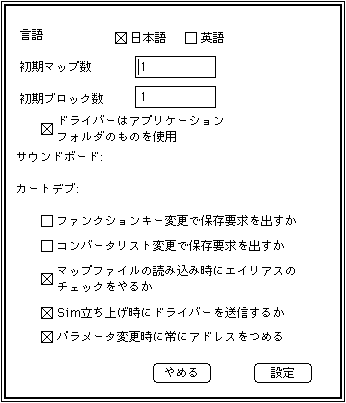
- Language □ Japanese □ English
- Set the display language. Shows the languages that are checked in the checkbox.
- Initial number of maps
- Set the number of maps.
- Number of initial blocks
- Set the number of blocks.
- □ Whether to issue a save request by changing the function key
- □ Whether to issue a save request by changing the converter list
- □ Whether to check for aliases when reading the map file
- □ Whether to send the driver when starting Sim
- □ Always fill the address when changing parameters
- The settings checked in the check boxes are enabled when the sound simulator is started.
▲ Back | ■
★ SOUND Manual ★ Sound Simulator Manual
Copyright SEGA ENTERPRISES, LTD., 1997