 ★ Graphic Tools Guide ★ 3D Editor User's Manual
▲ Back | Forward ▼
3D Editor User's Manual / 2. How to use
■ Scene menu
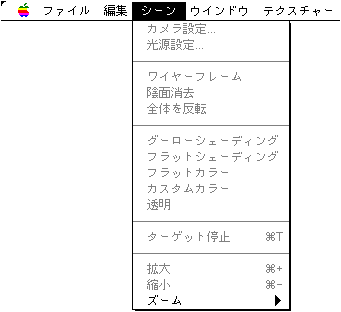
● Camera settings
- Currently not supported.
● Light source setting
- The following window will be displayed. Specify the position of the light source.
- The light source is set at the position where you click the mouse on the sphere. Drag to adjust the position.
In addition, while dragging, once you go out from the edge of the sphere and then come back inward, you can go back and forth between the front side and the back side. The type of sphere can be selected from parallel light source and point light source. ● Wire frame
- It is a toggle menu. If this menu is checked, the wireframe of the 3D image will be displayed.
● Erasing the shadow
- It is a toggle menu. If this menu is checked, the hidden surface will not be displayed in the wireframe display. Also, the part hidden behind another polygon is erased.
● Invert the whole
- It is a toggle menu. In the case of images such as "DXF files", the designation of the entire surface may be turned inside out. At this time, if you check this menu, it will be displayed normally as a 3D image.
● Gouraud Shading Flat Shading Flat Color Custom Color Transparent
- This is a check menu to select one. Gouraud shading, flat shading, and flat color specify the shading method. If you have selected these. The shading method set for each material is ignored.
Custom colors are displayed using the shading method set for each material.
If you select transparent, the wireframe is automatically set and only the wireframe is displayed.
Gouraud shading is similar to flat shading on the Macintosh side, but it is displayed using Gouraud shading on the Sega Saturn side. ● Target stop
- It is a toggle menu. If this menu is checked, the transfer to the target will not be performed anymore.
● Expansion
- Enlarges the image in the scene window.
● Reduction
- Reduces the image in the scene window.
● Zoom
- The image is displayed at the specified zoom by the hierarchical menu.
▲ Back | Forward ▼
★ Graphic Tools Guide ★ 3D Editor User's Manual
Copyright SEGA ENTERPRISES, LTD., 1997