 ★ Graphic Tools Guide ★ 3D Editor User's Manual
▲ Back | Forward ▼
3D Editor User's Manual / 2. How to use
■ Window menu
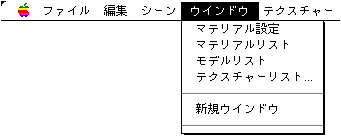
● Material settings
- This is a toggle menu for turning on / off the display of the material setting window. If the material's settings window is hidden by another menu, it will appear first when this menu is selected, whether it is already visible or not.
● Material list
- This is a toggle menu for turning on / off the display of the material list window.
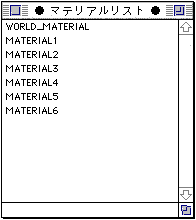
- The Material List window lists all material names in the currently displayed scene file. You can change the material of the polygon selected by the polygon selection tool in the scene window by double-clicking each material name.
Also, when using the polygon selection tool in the scene window, you can select multiple polygons by pressing shift + click. This allows you to paste the same material to multiple selected polygons at once. ● Model list
- This is a toggle menu for turning on / off the display of the model list window.
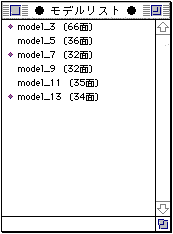
- The model list window lists all model names in the currently displayed scene file. Double-click each model name to show / hide that model.
You can also select multiple models by selecting a model by shift + click. This allows you to switch the display / non-display state of multiple selected model names at once. ● Texture list
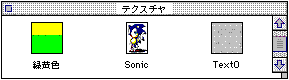
- The following open dialog will be displayed, so select the folder where the texture you want to keep open is saved.
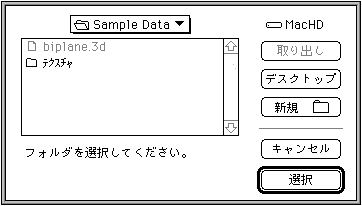
- The texture will be displayed in a list window like the one below. When setting the material, you can paste the texture by dragging and dropping from this window. Since the icon displayed in the folder is used on the list, it will be easier to see if you add a custom icon to the file. Double-click on this window to open the Textures window and see the textures.
● New window
- When viewing a stereoscopic image of one file, you can open another window so that you can refer to it from various directions.
● Window list
- Below the New Window menu, a list of currently displayed windows will appear. The window selected in this menu will be brought to the foreground.
▲ Back | Forward ▼
★ Graphic Tools Guide ★ 3D Editor User's Manual
Copyright SEGA ENTERPRISES, LTD., 1997