★
Graphic Tools Guide
★
3D Editor User's Manual
▲
Back
| ■
3D Editor User's Manual / 2. How to use
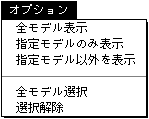
■ Option menu
caution
The Options menu is added when the model list window is in the foreground.
● Display of all models
All models in the scene file are displayed.
● Display only specified models
Shows only the specified model and hides the other models.
● Display other than the specified model
Hides the specified model and shows other models.
● Select all models
Select all models.
● Deselect
Deselect all models.
▲
Back
| ■
★
Graphic Tools Guide
★
3D Editor User's Manual
Copyright SEGA ENTERPRISES, LTD., 1997
 ★ Graphic Tools Guide ★ 3D Editor User's Manual
 ★ Graphic Tools Guide ★ 3D Editor User's Manual