 ★ Graphic Tools Guide ★ MAP / SCREEN Editor User's Manual
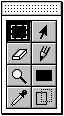 | ||
Rectangle selection tool | Selection tool | |
Eraser tool | Pencil tool | |
Magnifying glass tool | Rectangle tool | |
Eyedropper tool | Drag drop tool |
 Rectangle selection tool
| drag: | Select a range with a rectangle. |
| Shift + drag: | Adds the specified range to the selection. |
| Apple + Drugs: | Deletes the specified range from the selection. |
| Shift + Apple + Drag: | Selects the common area between the specified range and the selected range. |
| click: | Cancels the selection. |
| drag: | Moves the data in the selection. |
| Option + drag: | After copying the data in the selection range, move it. |
| click: | Cancels the selection. |
 Selection tool
| click: | Makes the specified character a selection range. |
| Shift + click: | Adds the specified character to the selection. |
| Apple + click: | Deletes the specified character from the selection. |
| Shift + Apple + Click: | Selects the common area between the specified character and the selection. |
| drag: | Moves the data in the selection. |
| Option + drag: | After copying the data in the selection range, move it. |
| click: | Cancels the selection. |
 Eraser tool
| drag: | Draw with erased data. |
| Double click: | Erases the data in the selection. |
 Pencil tool
| drag: | Draws with the specified data. |
| Option + click: | Specify the click position data. |
 Magnifying glass tool
| click: | It is magnified twice. |
| Option + click: | The display is reduced by 1/2. |
 Rectangle tool
| drag: | Draws a rectangular area with the specified data. |
| Option + click: | Specify the click position data. |
 Eyedropper tool
| click: | Specify the click position data. |
 Drag drop tool ★ Graphic Tools Guide ★ MAP / SCREEN Editor User's Manual