 ★ Graphic Tools Guide ★ MAP / SCREEN Editor User's Manual
▲ Back | Forward ▼
MAP / SCREEN Editor User's Manual
■ File menu
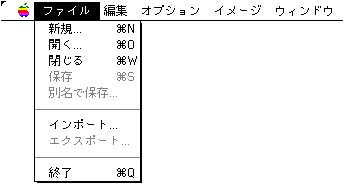
- Performs file management such as file input / output. You can also exit the application here.
- ● New ...
- Displays a new dialog and opens a new file. Please note that parameters other than the map size cannot be changed during editing.
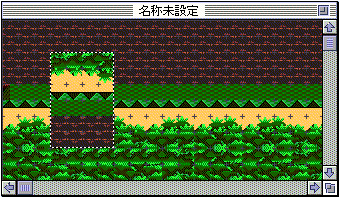
- Map size Enter the map size in units of pages (1 page = 512 x 512 dots).
- Color mode Specifies the color mode of the new file.
- Pattern name size Specify the pattern name size of the new file.
- ● Open ...
- Load an existing "SEGA 2D" file.
- ● Close
- Temporarily closes the currently active window.
- ● Save
- Save the edited file in the "SEGA2D" format with the same name.
- ● Save as ...
- Save the edited file in the alias "SEGA2D" format.
- ● Import ...
- Loads an image (image) file in the specified format and opens an image window. Specifies the palette if the character is being edited in palette mode.
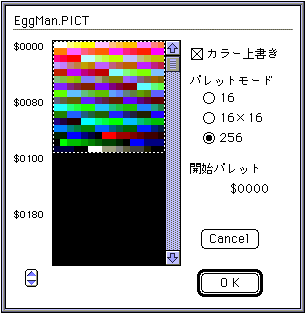
- ◆ Color overwrite
- If specified, the palette data of the image file will be used. If there is no palette data in the image file (full color image, etc.), the optimum palette is automatically created. If not specified, the palette data of the character currently being edited will be used.
- ◆ Palette mode
- Specifies the palette mode. The color mode of the edit file limits the selection.
- ◇ 16
- This can be selected when the edit file is in 16-color mode. Opens an image window in 16 colors.
- ◇ 16 × 16
- This can be selected when the edit file is in 16-color mode.
Opens the image window, assuming that the image file is created with 16 colors or less per character and multiple palettes in mind. - ◇ 256
- If the edit file is in 256 color mode, it will be forcibly selected. Opens an image window in 256 colors.
- ● Export ...
- Map window image Saves the image to an image file in the specified format. Saving is done by dividing each page.
- ● End
- Exit the application.
▲ Back | Forward ▼
★ Graphic Tools Guide ★ MAP / SCREEN Editor User's Manual
Copyright SEGA ENTERPRISES, LTD., 1997