 ★ Graphic Tools Guide ★ 3D Editor User's Manual
▲ Back | ■
3D Editor User's Manual / Window
■ Hierarchical window
- This window is displayed when "View"-> "Hierarchy" is selected in the main window. Controls the display / non-display of the models that make up the currently selected hierarchy. You can also edit the model name here.
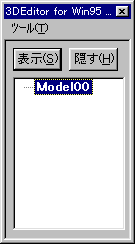
- ◆ Display
- Shows the models that make up the currently selected hierarchy. If the hierarchical tree is collapsed, it applies to all models below it.
- ◆ Hide
- Hides the models that make up the currently selected hierarchy. If the hierarchical tree is collapsed, it applies to all models below it.
- ◆ Rename
- Renames the models that make up the currently selected hierarchy. When saving in MDL format, note that the name specified here will be the variable name.
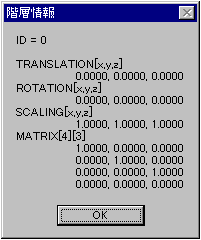
- ◆ Hierarchical information
- Displays the matrix information of the currently selected hierarchy.
- ◆ Close
- Close the hierarchical window.
▲ Back | ■
★ Graphic Tools Guide ★ 3D Editor User's Manual
Copyright SEGA ENTERPRISES, LTD ,. 1997