Graphic Tools Guide3D Editor User's Manual
BackForward
3D Editor User's Manual / Window

■ Attribute window

This window is displayed when "View"-> "Attributes" is selected in the main window. Attribute data such as color and display method can be set for each polygon that makes up the model.

The attribute standard of "3D Editor" conforms to the specifications of Sega Saturn's VDP1 and SGL.
In order to make effective use of the attribute editing function, basic knowledge about both of the above is required.


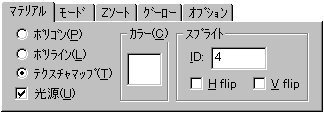
■ "Material" settings

Set information such as the color and texture mapping of the currently selected polygon. Each set information is applied to the target polygon by clicking the "Update" button.
  • Polygon Draws with polygons.
  • Polyline Draws with polyline.
  • Texture map Draw with a transformation sprite (texture map). The texture data to be applied is specified by a number.
  • Light source Calculates the light source.
  • Color Specifies a non-texture color.
  • Sprite ID
    Specify the texture data to be applied as a texture map by number.
  • H flip
    The texture data is flipped horizontally and displayed.
  • V flip
    The texture data is displayed upside down.

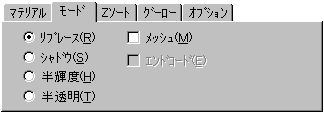
■ "Mode" setting


Sets information on how to draw the currently selected polygon. Each set information is applied to the target polygon by clicking the "Update" button.
  • Replace It will be displayed as it is.
  • Shadow Shadow is displayed.
  • Half-luminance Displays the brightness in half.
  • Translucent Displays in translucent.
  • Mesh mesh display.

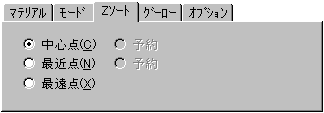
■ "Z sort" setting


Sets the Z sort reference point for the currently selected polygon. Each set information is applied to the target polygon by clicking the "Update" button.
  • Center point Uses the center of the polygon as a reference.
  • Based on the frontmost vertex of the most recent point polygon.
  • The farthest point is based on the innermost vertex of the polygon.

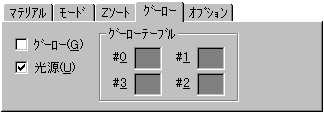
■ "Gourou" settings


If you want to perform Gouraud shading on the currently selected polygon, set that information. Each set information is applied to the target polygon by clicking the "Update" button.
  • Gouraud Gouraud shading processing is performed.
  • Light source Calculates the light source.
  • Goo table # 0 ~ # 3
    Specify the gourd table for 4 vertices.

The relationship between the Gouraud and light source checkboxes and the actual shading process is as follows.
process Checkbox
 Gouraud
 Light source
 Flat color
OFF OFF OFF OFF
 Flat shading
OFF OFF ON
 Table Gouraud shading
ON OFF OFF
 Real-time Gouraud shading
ON ON


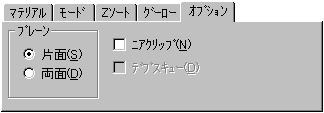
■ "Option" settings


Sets the currently selected polygon with information about other optional attributes. Each set information is applied to the target polygon by clicking the "Update" button.

"plane"
Select the processing method for hidden surface erasure.
  • Treat as a single-sided single-sided polygon.
  • Double- sided Treat as a double-sided polygon.
  • Near clip Even if the polygon near the viewpoint is changed in shape, it is forcibly displayed.

BackForward
Graphic Tools Guide3D Editor User's Manual
Copyright SEGA ENTERPRISES, LTD ,. 1997