 ★ Graphic Tools Guide ★ 3DME User's Manual
| Command name | function |
|---|---|
| New (Ctrl + N) | Creation of new model data |
| Open (Ctrl + O) | Loading existing model data |
| keep | Saving model data (* .pof) |
| Save as | * .MDL, * .ATA, * .MDB format save (* 1) |
| Add another window (Ctrl + W) | Addition of another viewpoint window |
| Grid resizing | Change the size of the cell where the model data is placed |
| Exit (Ctrl + Q) | Exit 3DME.EXE |
| Command name | function |
|---|---|
| Cancel (Ctrl + U) | Redo the work done just before (UNDO) |
| Cut out | Delete selected model |
| copy | Copy of selected model |
| Paste | Paste the model specified in "Cut" and "Copy" |
| Add polygon | Add square polygon |
| BOX added | Addition of cube |
| Addition of hexagonal prism | Hexagonal column added (consisting of quadrilateral polygons) |
| Addition of octagonal prism | Octagonal pillar added (consisting of quadrilateral polygons) |
| Added 4-point designated polygon | Create a polygon consisting of 4 arbitrarily selected vertices |
| Vertex movement | Move selected vertices (multiple selections allowed) |
| Cleanup | Delete multiple polygons on the same plane |
| Vertex cleanup | Unification of vertices at the same coordinates |
| Vertex cleanup setting | Setting how many dots are close to clean up |
| Vertex cross (0-1-2-3) | Used when a twisted polygon is created by specifying 4 points |
| Vertex cross (0-2-1-3) | Used when a twisted polygon is created by specifying 4 points |
| Automatic grouping | Calculate which model exists in each grid (* 2) |
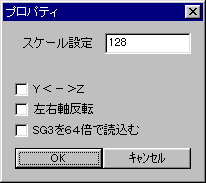
| Property | Set the scale, swap the Y and Z coordinates in 3D space, rotate the left and right axes, and read SG3 at 64x (same as "Properties" in the menu that appears when you click the right mouse button). |
| Command name | function |
|---|---|
| deselection | Deselect the specified model |
| Invert selection | Swap selected and unselected models |
| PP | Copy and paste the selected vertices. After that, move / rotate, etc. |
| merge | Combine multiple selected vertices into one |
| Parts editing | Selecting this command opens a new window where you can save the preselected parts as independent Pof data. If you want to use the same data more than once, you can save the data by editing this part, then call it and copy and paste it. Note that the viewpoint conversion in this window uses the rotation command for Perspective. |
| Command name | function |
|---|---|
| attribute | Set the characteristics of the selected polygon |
| Group editing | Select polygon |
| Texture list | Open a list of textures to use for model data |
| Overlaid display | Overlay each window |
| Displayed side by side | Display each window side by side |
| Close all | Close all windows |
| Window back color specification | Set the background color of the window |
| Command name | function |
|---|---|
| version | Display the version of 3DME.EXE |
| Command name | function |
|---|---|
| Restore to original size | Restore the window to its original size |
| Move | Move the window |
| Resize | Resize the window |
| Minimize | Minimize the window |
| Maximize | Maximize the window |
| close | Close window |
| TexCheck | Display the model with the texture attached |
| SelectCheck | Display the selected part with texture |
| Front | View from the front of the map |
| Top | View from above the map |
| Right | View from the right side of the map |
| PersPective | View the map from various angles |
| PesPective2 | Color polygons appropriately and see from a PersPective perspective |
| Command name | function |
|---|---|
| Scale setting | Change the size setting of 1 square (unit: dot) |
| Y <-> Z | Swap the Y and Z coordinates in 3D space |
| Left and right axis rotation | By checking, the upper right will be (0,0) |
| Read SG3 at 64x | * .Read SG3 data at 64x scale (When reading SG3, the same reading method as Ver1.00) |
★ Graphic Tools Guide ★ 3DME User's Manual