HARDWARE ManualSega Saturn Overview Manual
BackForward

■ 3.4 VDP2

VDP2 displays the scroll screen and determines the priority of the full screen (including sprites). The simultaneous display of the scroll screen has been expanded to a maximum of 5 screens, and the screen can be moved up / down / left / right and rotated. The priority (display priority) can be set programmable for each character.

● System configuration
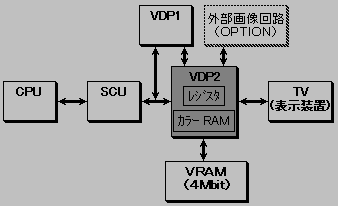
VRAM is connected to VDP2 and has built-in color RAM. Image data is defined in VRAM and color RAM from the CPU via the SCU.
The data defined in VRAM is read according to the register settings and becomes the image data of each scroll screen. The image data of each scroll screen and the image data sent from VDP1 and the external image circuit are displayed in display priority according to the register settings and become the display image data. Furthermore, the display image data is converted to display color data and output to the TV (Fig. 3.12).

Figure 3.12 VDP2 system configuration

Table 3.7 VDP2 system specifications
 No
 Item
 specification
 remarks
 1
 TV screen
・ Select from horizontal resolution 320, 352, 640, 704 pixels ・ Vertical resolution 224, 240, 256 pixels (when non-interlaced)
448, 480, 512 pixels (when interlaced)
Select from
 Vertical resolutions 256 and 512 pixels are PAL only


 2
 charactor
 -Select from character size 1 x 1 cell, 2 x 2 cell-Select from 16, 256, 2048, 32768, 16.77 million character colors
 Bitmap method is also possible

 3
 Normal scroll surface
・ Maximum number of simultaneous display screens: 4 screens ・ Vertical and horizontal screen scrolling possible ・ Line scrolling possible ・ Vertical cell scrolling possible ・ 1/4 to 256 times enlargement / reduction possible ・ Mosaic function
 Four
 Rotating scroll surface
・ Maximum number of simultaneous display screens: 2 ・ Enlargement / reduction rotation is possible ・ Rotation parameters can be switched on the screen ・ Special screen processing using a coefficient table
 When two screens are displayed, the normal scroll plane cannot be displayed.
 Five
 window
・ 2 normal windows ・ 1 sprite window ・ Line window possible
 6
 priority
 -The priority of each screen can be specified programmable.-The priority can be changed in character units and dot units.
 7
 Screen processing
・ Color calculation for up to 4 screens is possible ・ Color calculation ratio 32 steps ・ Color offset function ・ Shadow function

● Function
VDP2 has a scroll function that controls the scroll screen display and a priority function that determines the display priority.

Figure 3.13 Scrolling, priority function

Scroll function ────┬─ Enlargement / reduction 
├─ Line scroll ├─ Vertical cell scroll ├─ Mosaic processing 
└─ Window 
 
Priority function ──┬─ Color calculation 
├─ Color offset └─ Shadow 

● Scroll screen
Scrolling has a scroll screen for displaying pictures and a window for controlling the display. Furthermore, there are two types of scroll screens: a normal scroll screen that allows you to change the number of screens that can be displayed, and a rotary scroll screen that allows you to rotate and display.
Table 3.8 shows the functions of the normal scroll screen and the rotary scroll screen, and the number of character colors.

Table 3.8 Scroll screen functions
 function
 Normal scroll screen
 Rotating scroll screen
 Screen 0
 Screen 1
 Screen 2
 Screen 3
 Screen 0
 Screen 1
 Scale function
 1/4 times to 256 times
 none
 Possible at any magnification
 Rotation function
 none
 can be
 Line scroll function
 can be
 can be
 none
 none
 none
 Vertical cell scroll function
 can be
 can be
 none
 none
 none
 Mosaic processing function
 can be
 Yes (horizontal only)
 Bitmap display
 It can be displayed
 It can be displayed
 Cannot be displayed
 Cannot be displayed
 It can be displayed
 Cannot be displayed
 Number of character colors
 16 colors
256 colors
2048 colors
32768 colors
Choose from 16.77 million colors
 16 colors
256 colors
2048 colors
Select from 32768 colors
 16 colors
Select from 256 colors
 16 colors
Select from 256 colors
 16 colors
256 colors
2048 colors
32768 colors
Choose from 16.77 million colors
 16 colors
256 colors
2048 colors
32768 colors
Choose from 16.77 million colors

◆ Enlargement / reduction function
You can scale the entire screen horizontally and vertically. When displaying in a reduced size in the horizontal direction, there are restrictions such as reducing the number of faces.

◆ Line scroll function
With the function of scrolling up / down / left / right for each line and scaling in the horizontal direction, you can give a sense of distance to the road in a drive game, for example.

◆ Vertical scroll function
It is a function that allows you to scroll up and down in units of cells in the horizontal direction, and you can add depth to, for example, vertical scrolling games.

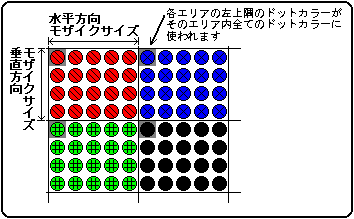
◆ Mosaic function
Each scroll screen is divided into the specified horizontal and vertical directions, and the color of the dot on the upper left of each area is displayed on all the dots in that area.

Figure 3.14 Mosaic pattern

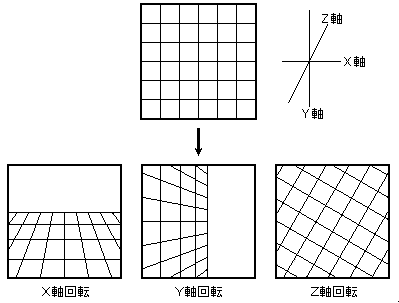
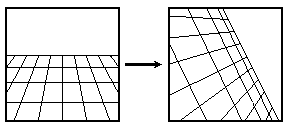
◆ Rotation function

◆ Scroll screen configuration
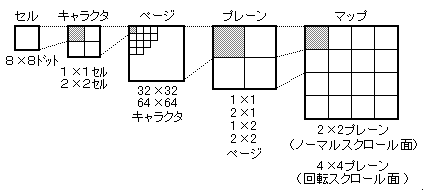
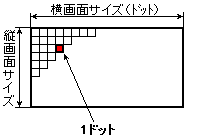
There are two screen formats for scrolling screens: cell format and bitmap format. The cell format is a method of displaying cells side by side in the same way as a conventional home-use game machine, and the bitmap format is a method of displaying a picture corresponding to each dot on the screen, similar to a personal computer.

Figure 3.18 Relationship between bitmap format scroll screen and data settings
512 horizontal dots x 256 vertical dots Horizontal 512 dots x Vertical 512 dots Horizontal 1024 dots x Vertical 256 dots Horizontal 1024 dots x Vertical 512 dots
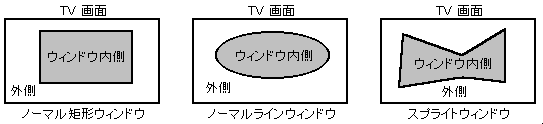
◆ Window
Windows are classified into three types according to the area specification (coordinate specification) method.

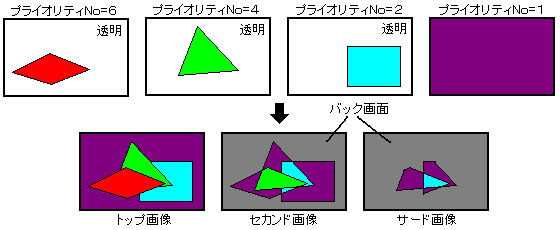
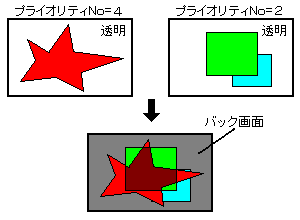
● Priority function The display priority of sprites and scroll screens is determined by the 3-bit priority number. You can set up to eight values for the sprite priority number, one of which is specified on a character-by-character basis.

◆ Judgment of priority
The priority number of the scroll screen is usually specified in units of faces. (If you use the special priority function, you can change it in character units or dot units.)

Figure 3.20 Priority function

◆ Special priority function
The priority number corresponding to each scroll screen can be changed in character units or dot units. By using this function to change the priority of only a certain part of the scroll screen, you can make one scroll screen look like multiple screens.
◆ Color calculation function
The color calculation function adds the color data of multiple screens to create the effect that the back screen can be seen through the front screen. Normally, it is performed on two screens, the top image and the second image, but if you use the extended color calculation function, you can perform up to four screens.

Figure 3.21 Color calculation function

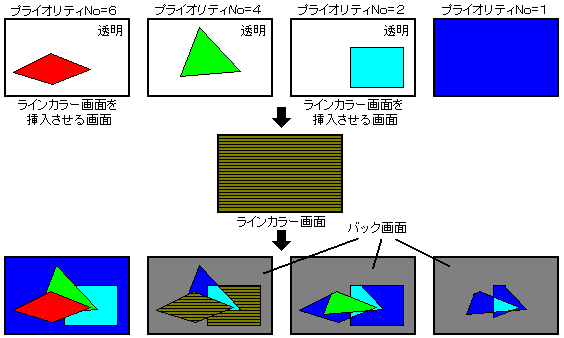
◆ Insert line color screen
The line color screen is a screen that forcibly inserts the specified screen as the second image of the part that is the top image and performs color calculation. At that time, in the part where the line color screen is inserted, the second image before insertion becomes the third image, and the third image becomes the image below it (force image). Figure 3.22 shows the insertion of a line color screen.

Figure 3.22 Inserting a line color screen
◆ Shadow function
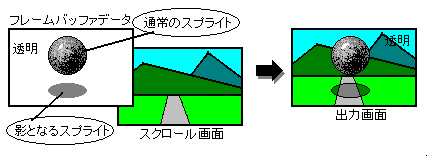
The shadow function is a function that casts a shadow in the shape of a sprite character on each screen.

Figure 3.23 Shadow function

◆ Blur calculation function
The blur calculation function is a function that adds the horizontal color data of a specified screen at a fixed rate, and can produce the effect of blurring a distant background.

Figure 3.24 Blurring calculation function
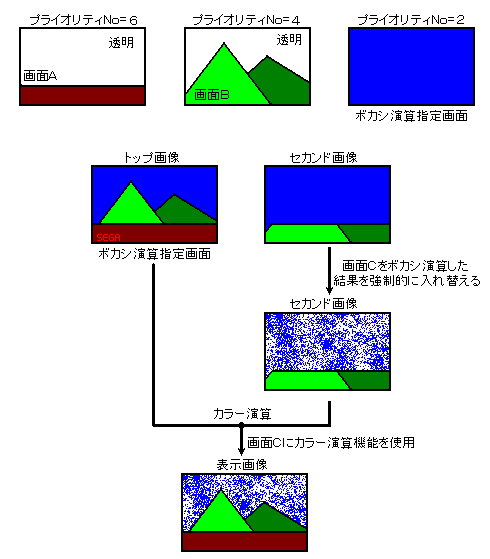
For the area where the specified screen is the top image or the second image, the addition result of the color data is forcibly set to the second image. By performing color calculation on this second image and top image, you can display a picture that has been blurred.
◆ Color offset function
The color offset function is a function that adds (subtracts) the offset value to the color data on the screen and displays it, and is used for fade-in and fade-out. You can specify whether to use the color offset function for each screen.

BackForward
HARDWARE ManualSega Saturn Overview Manual
Copyright SEGA ENTERPRISES, LTD., 1997