 ★ HARDWARE Manual ★ Sega Saturn Overview Manual
 Figure 3.2 VDP1 system configuration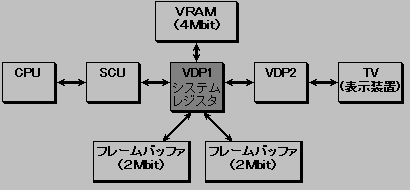
No | Item | specification | remarks |
1 | Texture parts display | ・ Standard sprites (normal sprites, horizontal 8 to 504 dots, vertical 1 to 255 dots) | All sprites can be flipped vertically and horizontally |
2 | Non-texture parts display | ・ Rectangle polygon ・ Polyline ・ Line | Triangular polygons and polylines are possible if two adjacent vertices have the same coordinates. |
3 | Color calculation | ・ Semi-transparent parts, semi-brightness, shadow, mesh, Gouraud shading | Gouraud shading and translucent or semi-brightness can be combined |
Four | Drawing method | -Double frame buffer method (The entire frame buffer plane can be enlarged, reduced, rotated, and transformed. | |
Five | Number of simultaneous colors | ・ 16,64,128,256,32768 colors | 16,64,128,256 colors at high resolution |
6 | Memory capacity | ・ VRAM 4Mbit |
Classification | Part name | function | Definite law | |
parts | Texture parts | Fixed sprite | charactor, | Read direction of 1 vertex |
Scale sprite | charactor, | Read direction of 2 vertices, or fixed point, width and read direction | ||
Deformed sprite | charactor, | 4 Vertex read directions | ||
Non-textured parts | polygon | Rectangle, | 4 vertices | |
Polyline | Rectangle | 4 vertices | ||
line | Straight line | Start and end points | ||
Figure 3.3 Fixed form sprite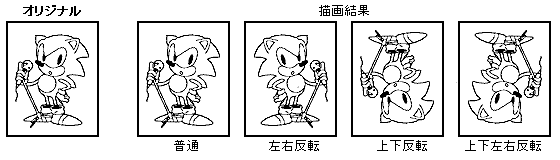
Figure 3.4 Scale sprites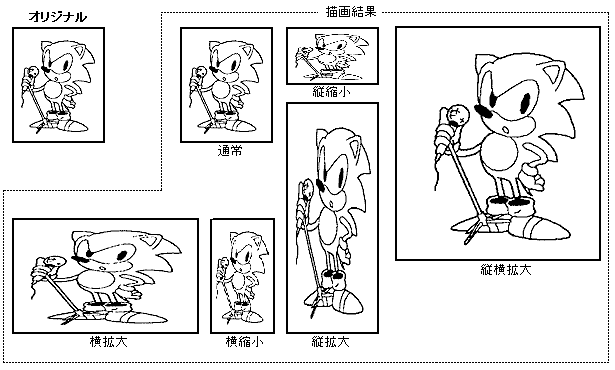
▲
◆ Non-texture parts
Figure 3.6 Polygons, polylines, lines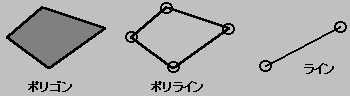
▲
● Color mode specification There are color bank method, RGB code method, and color lookup method for color mode specification of texture parts. The color specification for non-textured parts has pixel data.
Figure 3.7 Color bank system configuration
MSB LSB
┌──┬──┬──────┬───────────┐
│ │ │ Color bank │ Palette code │
└──┴──┴──────┴───────────┘
│ │
│ └─ → Priority
↓
Color calculation
▲
● Color calculation With VDP1, you can specify Gouraud shading, shadow, semi-brightness, and semi-transparent color calculation.
Table 3.5 shows the types of color operations.
kinds | Contents |
Half brightness | The brightness of the original picture is halved and drawn in the frame buffer. Since the background is overwritten, the background cannot be seen and the brightness of the original picture is halved. |
Translucent | Add the one with the background brightness halved and the one with the original picture halved, |
Shadow | The background brightness is halved and redrawn in the frame buffer. In this case, a shadow in the shape of the character in the original picture is created. Also, the characters in the original picture are used only for the shadow shape, and the color data is ignored. |
Gouraud shading | The original picture with Gouraud shading applied is drawn in the frame buffer. |
Gouraud shading translucent | Gouraud shading is applied to the original picture, but the brightness is further reduced by half. |
Gouraud shading half brightness | Gouraud shading is applied to the original picture, but the brightness is further reduced by half. |
◆ Gouraud shading Gouraud shading can be applied only to parts drawn in RGB. Gouraud shading is a method of interpolating colors between the vertices of polygons to make a plane look like a curved surface.
Brightness correction values are given to each of the four vertices of the polygon, and Gouraud shading is applied between those four vertices to make it look like a curved surface. Gouraud shading can be applied not only to polygons but also to polylines and lines. Figure 3.8 shows an example of Gouraud shading.
Figure 3.8 Example of Gouraud shading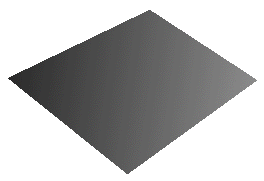
▲
● Mesh processing All parts can be meshed. When you apply the mesh, the parts are drawn in a grid pattern every other dot.
If "X coordinate value + Y coordinate value" is even, it will be drawn, and if it is odd, it will not be drawn and will be skipped. (Fig. 3.9)
Figure 3.9 Example of mesh processing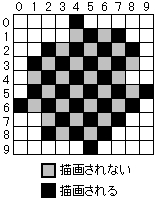
Figure 3.10 System clipping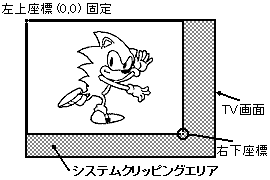
Figure 3.11 User Clipping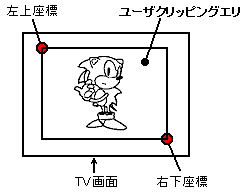
▲
● Frame buffer The frame buffer is divided into two sides, a display frame buffer and a drawing frame buffer.
Read / write access from the SCU to the framebuffer is only to the drawing framebuffer. The display frame buffer is a back bank and cannot be accessed.
Also, by reading the framebuffer, the entire framebuffer plane can be enlarged, reduced, and rotated by giving displacements in the X and Y directions that specify where the read start coordinates and the next read dot should be. ..
▲
● Display method For display, a TV, which is a general display device, is used. The domestic and American TV standards are NTSC. Europe is PAL system.
TV display is performed by reading data from the beginning of the frame buffer every frame (1 frame is 1/60 second).
Normally, one frame is one field, but you can make one frame into two fields by interlacing and double the vertical resolution (1 frame is 1/30 second). Interlaces include double-dense interlaces and single-dense interlaces, as shown in Table 3.6 (Table 3.6).
Dense interlace | Display different images with odd and even lines |
Monodense interlacing | Display the same image on odd and even lines |
★ HARDWARE Manual ★ Sega Saturn Overview Manual