 ★ HARDWARE Manual ★ Sega Saturn Overview Manual
▲ Back | Forward ▼
■ 3.6 CD-ROM
The CD-ROM system has a CPU and buffer RAM inside, and can operate independently of the main system. By setting conditions from the main system in advance, flexible buffer management suitable for the structure of the application is realized.
● System configuration
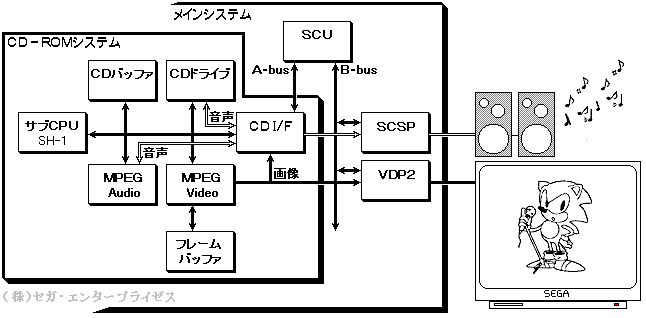
The CD-ROM system works by simply giving commands from the main system via the CD I / F. The sub CPU interprets commands from the main system and controls the CD-ROM drive, CDD buffer, etc. to read data, play video, and play audio. For video playback and audio playback, the MPEG method, which is the international standard for video compression, is adopted, and the dedicated LSIs "MPEG / Video LSI" and "MPEG / Audio LSI" are used. Figure 3.29 shows the system configuration.
Sub CPU, CD buffer, frame buffer, and C / DI / F are connected to MPEG / Video. Receives compressed image data from the CD buffer and writes the playback image data to the frame buffer (drawing). The drawn frame buffer data is applied according to the register settings and displayed on the display device via VDP2, which controls the screen display. Alternatively, it can be transferred to VRAM of VDP1 and VDP2 via CD I / F and SCU.
MPEG / Audio receives compressed audio data from the CD buffer and outputs stereo 1ch audio data. This audio data is output as sound via SCSP.
Figure 3.28 CD-ROM system configuration
● System specifications
The CD-ROM system specifications are shown in Table 3.10, and the CD drive specifications are shown in Table 3.11.
Table 3.10 CD-ROM system specifications | Item | specification | remarks |
1 | G / A register width | 16 bit | |
2 | 1/3 stroke average access time
note | Before test Reliability After test Double speed 500ms or less 700ms or less Standard speed 800ms or less 1000ms or less | The average value obtained by measuring the time from when the CD drive receives the PLAY command to when the PLAY status is issued 200 times (100 round trips). |
3 | Rotational speed | Normal time: 620 to 1680 rpm Double speed: 1240 to 3360 rpm | |
Four | CD read speed | Normal speed: 75 sectors / sec = 150KB / sec
Double speed: 150 sectors / sec = 300KB / sec | |
Five | Tray opening and closing method | Top loading | |
6 | Memory capacity | RAM 512KB (for CD buffer) ROM 64KB (for BIOS)
RAM512KB (for MPEG) | |
7 | Data transfer rate | Up to 8MB / sec, up to 4MB / sec during MPEG operation | |
8 | led | Blinks depending on the operating status of the CD | |
note- 1/3 stroke is from 15 minutes 00 seconds 00 frame to 35 minutes 00 seconds 00 frame.
- The above values are for reference only and do not guarantee operation.
Table 3.11 CD drive specifications | Item | specification | remarks | 1 | CD playback | Track / index Specified playback frame address (corresponding to absolute time) Specified playback Playback resume (pause release, pickup movement control)
Repeat playback
CD-DA and CD-ROM can be controlled with the same format command. Scan playback subcode acquisition | |
2 | others | Multi-session support Enfasis support
Decoding and error correction compatible with CD-ROM XA (subheader recognition, ECC processing, read retry processing) | |
● Function
The main functions of the CD-ROM system are listed below.
- Stream selection
- Parallel processing
- MPEG function
- Corresponding standard
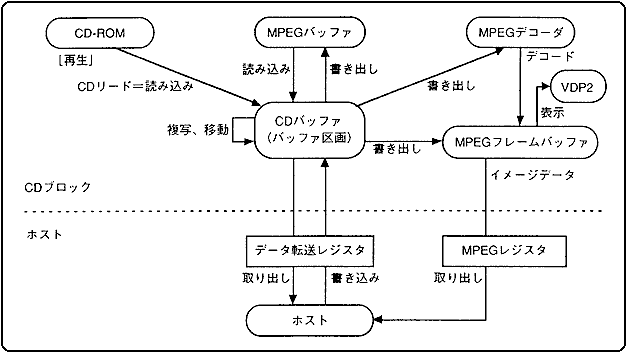
The CD-ROM system temporarily stores the data read from the CD-ROM in the CD buffer. The stored data writes and reads data to MPEG and the main system in response to commands from the main system.
Figure 3.29 shows the data flow of the CD-ROM system.
Figure 3.29 CD-ROM system data flow
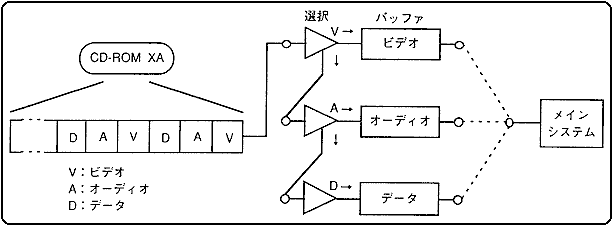
● Stream selection The flow of data from a CD-ROM is called a stream. Streams include audio data, video data, and program data. The stream selection mechanism selects the type of data and sends the data to the main system and MPEG (Figure 3.30). The control contents of the stream selection mechanism are shown below.
- The stream data is stored in the CD buffer and selected according to the data type.
- It controls data from devices such as CD-ROMs and MPEG decoders in a unified manner.
- Set the stream selection conditions by command.
Figure 3.30 Stream selection mechanism
● Parallel processing The CD-ROM system operates independently of the main system for reading streams, selecting streams, and controlling CD drives. Furthermore, since multiple stream selection mechanisms are set, parallel processing is possible.
● MPEG function MPEG plays video with audio.
Since the image data before playback is compressed to about 1/50 and the audio data is compressed to about 1/10, it can be recorded on a CD for 74 minutes. In addition, since playback is performed on a dedicated LSI, the CPU is not burdened at all, and you can play games while playing high-quality videos.
◆ MPEG / Video Functions Satan's MPEG / Video is equipped with various special functions customized exclusively for Satan.
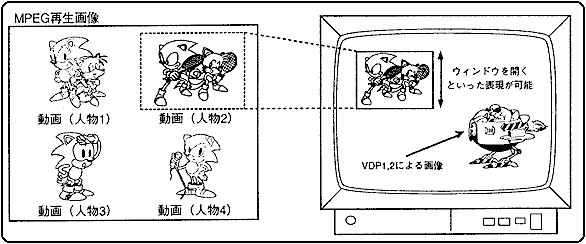
- Window function As shown in Figure 3.31, this function cuts out a part of the played image and displays it on the TV screen in any size. By using this function, you can perform "Change display position and display size of MPEG playback image", "Select one of multiple screens to display", "Zoom in and out", etc.
Figure 3.31 Window function
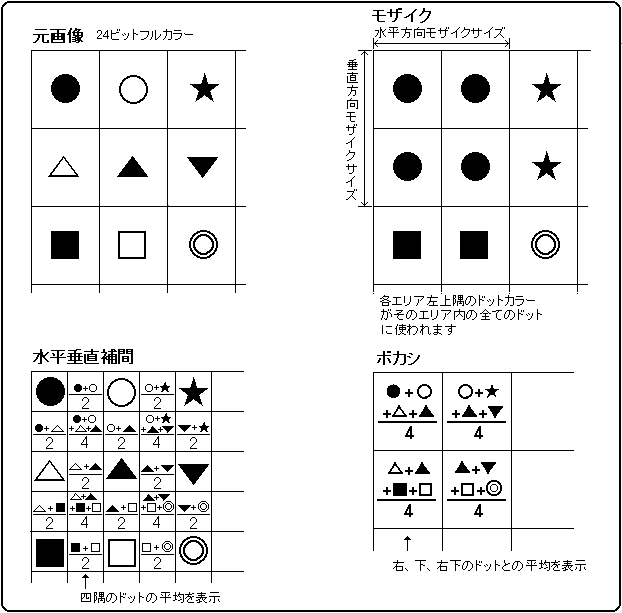
- Interpolation function The maximum MPEG playback image is 352 x 240 dots, but it can be displayed at a maximum resolution of 704 x 480 dots by horizontal and vertical interpolation, enabling smooth display with little flicker.
- Blur function The blur function is a function that displays the average of 4-dot color data that are adjacent horizontally and vertically, and can produce the effect of blurring a distant background.
- Mosaic function The MPEG playback image is divided into horizontal, vertical, and specified sizes, and the color of the dot on the upper left of each area is displayed by all the dots in that area. You can specify up to full screen size horizontally and vertically independently.
Figure 3.32 Interpolation, blur, mosaic function
- Fade function This function displays the brightness and color difference signal of the screen by multiplying them, and is used for fade-in and fade-out. Since it is not a method of adjusting the offset value, only the brightness can be changed correctly. You can also display in monochrome or darken the display color by changing the color difference signal.
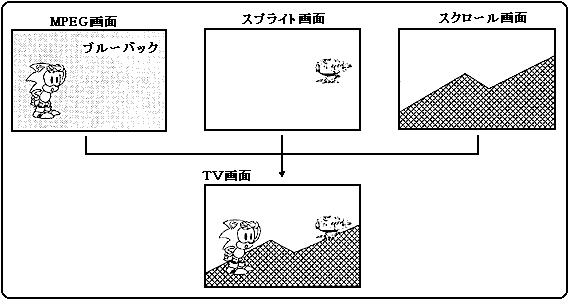
- Chroma key function As shown in Fig. 3.33, it is a function to play a video with transparent dots. Chroma key is a technique such as "taking a picture of a person in front of a blue wall, extracting the part other than blue from the screen, and overlaying it on another picture." The existing MPEG LSI can only use the MPEG moving image in the background, but in Saturn, the chroma key function allows the MPEG moving image to be displayed on top of the sprite and scroll.
Figure 3.33 Chroma key function
- Screen capture function This function captures moving images played back in MPEG into the main system. With this function, it is possible to treat moving images played back in MPEG as sprites, use them as texture data, display them with VDP1 and VDP2 functions, and play back multiple videos.
The amount of MPEG video data is 50 times the amount of data from a CD, and the transfer speed is faster than the transfer from a CD buffer, so it can also be used for high-speed rewriting of texture data. - High-definition still function This function displays a high-definition still image of 704 dots x 480 dots. Full-color high-definition images cannot be displayed on the main system side (up to 352 x 240 dots in full-color), but the high-definition still image function can be used to display images with the maximum number of colors in Satan.
- Pause function, freeze function The pause function is a function that freezes the video at an arbitrary frame, and slow playback and frame-by-frame playback are possible.
The freeze function is a function that stores a video in an arbitrary frame (image memory), and strobe playback is possible. - Branch playback function MPEG can store compressed image data in the CD buffer memory, so you can play videos even during CD seek (track search). Therefore, even if you jump to a video on another track, it will not be a static screen like LD, and the video will continue to play. With the branch playback function, MPEG can realize branch playback in which the branch point cannot be determined. You can also perform "loop playback" that repeats the same video.
- ◆ MPEG / Audio function
- Audio data played in MPEG / Audio is sent to SCSP by the same route as CD-DA (CD for music), and various effects can be applied.
- Variable compression rate The compression rate can be selected according to the application, and compression from 1 / 3.5 to 1/21 can be selected. With 1/21 compression, you can record 50 hours of audio on a CD. Even with a long RPG or ADV, all lines and narration can be done by voice.
- On-memory playback function MPEG / Audio can compress from 1 / 3.5 to 1/21, but if you use 1/21 compression and use half of the 4M bits of CD buffer memory for MPEG / Audio, for example. , You can play 64 seconds of audio without accessing the CD. Therefore, audio playback can be performed without waiting time. You can also connect shorter lines to make a long conversation.
● Supported standards Table 3.12 shows the supported standards for the CD-ROM system.
Table 3.12 Corresponding standards Standard | explanation | CD-DA | The standard name of the sound contained in the CD, which is based on the RED BOOK international standard.
Sampling frequency 44.1KHz, quantization bit 16-bit stereo. |
CD-G, CD-EG | Data such as graphics are recorded in the format area of the music CD.
The display color is 16 colors and the sound quality of CD-DA is adopted. |
CD-ROM | It is a standard defined so that computer data can be recorded in the same physical format as music CDs (CD-DA). Based on the YELLOW BOOK international standard. |
CD-ROM XA | This is a recording format that expands the CD-ROM and enables interleaved recording for playing back images and sounds in parallel. |
 EB
(E-book) | This is the recording format of the CD-ROM software adopted by Sony's electronic book player "Data Discman". |
Photo-CD | This system allows you to view photos through a monitor such as a TV.
Up to 100 frames of photos can be recorded on a CD, and the same photos can be enlarged or reduced. |
 Video CD
(KARAOKE CD) | Contains video compressed by MPEG. It can record up to 74 minutes on a CD and can play up to 2000 high-definition still images. |
▲ Back | Forward ▼
★ HARDWARE Manual ★ Sega Saturn Overview Manual
Copyright SEGA ENTERPRISES, LTD., 1997