 ★ HARDWARE Manual ★ Sega Saturn Overview Manual
The SMPC resets the entire Saturn system when the power is turned on or the reset button is pressed. In addition, commands from SH-2 are used to turn on / off the peripheral LSI inside Saturn, set and acquire the calendar clock, and collect data from the peripheral. In addition, the clock change command switches the horizontal resolution to 320 dots or 352 dots.
Figure 3.34 SMPC system configuration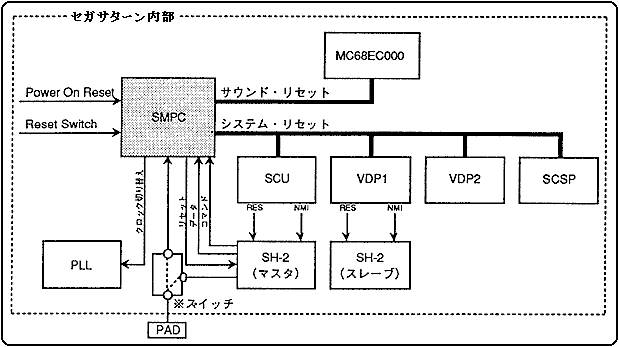
Table 3.13 lists the main features of SMPC.
RTC | ・ Time setting and acquisition from SH-2 ・ Battery backup function ・ Automatically update date, day of the week, hour, minute and second |
SM | ・ Sound CPU ON / OFF |
PC | -Automatically collects peripheral data for control pads, mice, etc.-Supports megadrive and genesis peripherals (3 buttons, 6 buttons, 4 player adapters, mice) |
PAD type | specification |
Saturn standard PAD | button: |
★ HARDWARE Manual ★ Sega Saturn Overview Manual