HARDWARE ManualVDP1 User's Manual
BackForward
VDP1 User's Manual / Chapter 1 Functions of VDP1

● Parts

The parts are categorized as follows:

Table 1.1 Classification of parts
 Classification
 Part name
 function
 Definition method
 parts
 Texture parts
 Fixed sprite
 charactor,
Up / down, left / right inversion,
 1 Vertex and read direction
 Rectangular sprite
 charactor,
Up / down, left / right inversion,
Enlargement / reduction, expansion / contraction
 2 Vertex and read direction, or fixed point and width and read direction
 Deformed sprite
 charactor,
Up / down, left / right inversion,
Enlargement / reduction, expansion / contraction,
Rotation, twist
 4 vertices and reading direction
 Non-textured parts
 polygon
 Rectangle,
Fill the inside
 4 vertices
 Polyline
 Rectangle
 4 vertices
 line
 Straight line
 Start and end points

● Texture parts

Textured parts are called sprites. Sprites draw character patterns. Character patterns define pixel data in VRAM as a character pattern table. The size of the pixel data is determined by the color mode and the size of the character.
Sprites include standard sprites, rectangular sprites, and modified sprites. Fixed sprites can be flipped vertically and horizontally, rectangular sprites can be flipped vertically and horizontally, scaled and stretched, and deformed sprites can be flipped vertically and horizontally, scaled up and down, stretched, rotated and twisted.

◆ Standard sprite
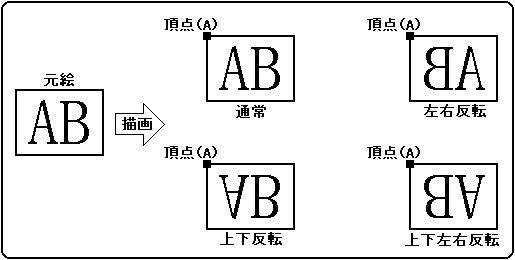
Draws at the position where you specify the character pattern. Specifies the coordinates of the upper left vertex where the character pattern is drawn. From the specified upper left coordinate, X is drawn to the right and Y is drawn downward. When the reading direction of the character pattern is specified as upside down or left / right inversion, the right end of the defined character pattern is drawn from the left or the bottom end is drawn from the top.
Fixed sprites cannot be rotated 90 °. If you want to rotate it 90 °, specify it with the transform sprite drawing command.

Figure 1.2 Fixed form sprite

◆ Rectangular sprite
Enlarges or reduces the character pattern to the specified position and draws it. There are two ways to specify the position and zoom in / out. One is to specify the coordinates of the upper left vertex and the lower right vertex, and the other is to specify the fixed point (zoom point), its coordinates, and the vertical and horizontal display width. Rectangular sprites cannot be rotated 90 °. If you want to rotate it 90 °, specify it with the transform sprite drawing command.

Specify 2 coordinates
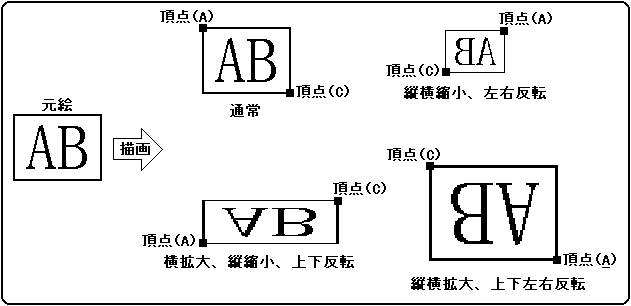
When specifying two coordinates, specify the coordinates of the two points that draw the upper left vertex and the lower right vertex of the character pattern.
The drawing direction (character drawing direction) is determined by the positional relationship of the lower right coordinates with respect to the specified upper left coordinates. The character pattern is drawn from the upper left coordinate to the lower right coordinate.
When the X value in the lower right coordinate is smaller than the X value in the upper left coordinate, it is drawn flipped horizontally, and when the Y value in the lower right coordinate is smaller than the Y value in the upper left coordinate, it is drawn flipped vertically. ..
You can specify inversion in the read direction as well as standard sprites. If you flip it upside down in the coordinates and flip it upside down in the read direction, the inversion will be canceled and the upside down specification will be invalid.

Figure 1.3 Rectangular sprite (2 coordinates specified)
Fixed point designation
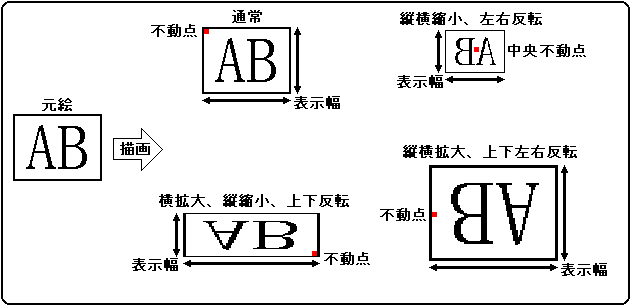
You can draw a rectangular sprite by specifying a fixed point and display width. Specify the fixed point of the character pattern, the drawing coordinates of the fixed point, and the display width for drawing the character pattern.
The fixed point specifies which point in the character pattern is drawn as the fixed point. Select from the left, center, and right sides in the horizontal direction, and from the top, center, and bottom sides in the vertical direction.
The display width specifies the display width in the X and Y directions. When the reading direction of the character pattern is specified as upside down or left / right inversion, it is drawn upside down and left / right inversion based on the fixed point of the character pattern, respectively.
The drawing area differs depending on whether it is flipped vertically or horizontally.

Figure 1.4 Rectangular sprite (fixed point designation)
◆ Deformed sprite
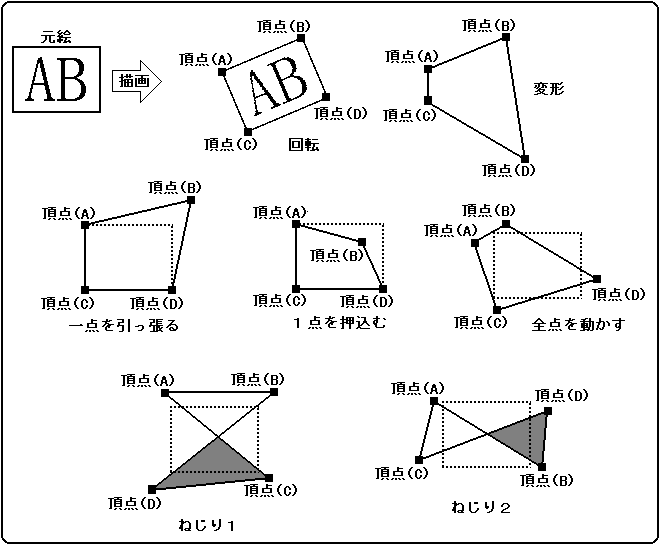
Draws a character pattern by specifying the coordinates of four vertices. Specify four corresponding drawing coordinates of each of the four vertices of the character pattern. The relationship between the four coordinates is arbitrary and can be flipped, scaled, rotated, or twisted as specified.
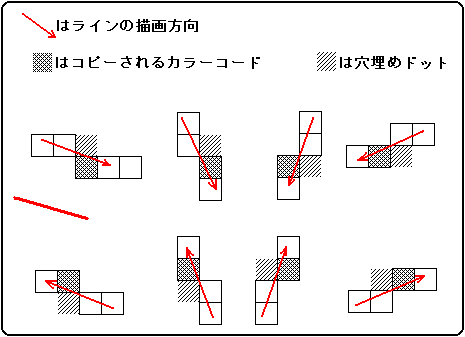
Transform sprites draw character patterns as diagonal lines. At this time, fill in the holes so that there are no missing pixels. As a result, pixels written twice are generated, so the results are not guaranteed for translucent processing of color operations.
Since the drawing is drawn with lines, in the case of twisting and rotation, it may extend outside the figure connecting the four vertices.

Figure 1.5 Deformed sprite

Fill-in-the-blank processing
Transform sprites and polygons draw lines diagonally. At this time, fill in the holes so that there are no missing pixels. Here's how to fill in the blanks.

Figure 1.6 Fill-in-the-blank processing

BackForward
HARDWARE ManualVDP1 User's Manual
Copyright SEGA ENTERPRISES, LTD., 1997