HARDWARE ManualVDP1 User's Manual
BackForward
VDP1 User's Manual

Chapter 6 Command Table


■ 6.1 CMDCTRL (control word)

CMDCTRL specifies commands, controls the command table, inverts sprites, and specifies fixed points. CMDCTRL is 16bit at the command table start address + 00H, and the bit configuration is as follows. Set the unused bit to 0.

bit
 15
 14
 13
 12
 11
 Ten
 9
 8
 7
 6
 5
 4
 3
 2
 1
 0
CMDCTRL
+ 00H
END JP ZP 0 0 Dir Comm

End bit: end bit (END), bit 15
Indicates the drawing end command. The command selection bit is valid when it is not a drawing end command.

Jump format : jump select (JP), bits 14-12
Shows how to specify the next command table to read (fetch).

Zoom point bits : zoom point (ZP), bits 11-8
Represents a zoom point (fixed point) for rectangular sprite drawing commands. The zoom point specifies the reference point for inversion and enlargement / reduction.

Character read direction bits : character read direction (Dir), bits 5-4
Indicates the reading direction from the character pattern table when using the texture drawing command.

Command select bits : command select (Comm), bits 3-0
Represents the function of the command. Command selection is disabled when the end bit is the end command.

● Command

The command is determined by the CMDCTRL end bits (END, bits 15) and the command selection bits (Comm, bits 3-0). The commands set by the end bit and the command selection bit are as follows.
The command determines the contents of the VRAM command table.

Table 6.1 Commands
 END
 Comm
 function
 command
 Bit 15
 3
 2
 1
 0
 0
 0
 0
 0
 0
 Drawing command
 Texture drawing command
 Fixed sprite drawing command
 0
 1
 Rectangle sprite drawing command
 1
 0
 Transform sprite drawing command
 1
 0
 0
 Non-texture drawing command
 Polygon drawing command
 0
 1
 Polyline drawing command
 1
 0
 Line drawing command
 1
 0
 0
 0
 Coordinate setting command
 Clipping coordinate setting command
 User clipping coordinate setting command
 1
 System clipping coordinate setting command
 1
 0
 Relative coordinate setting command
 1
 0 0 0 0
 Drawing end command
 Codes other than the above
 Setting prohibited (Please do not set)

● Jump format

The jump format specifies the command table to be processed next and the jump format to that table.
When the jump format specifies an address to jump, set the address of the command table to jump to CMDLINK (command table start address + 02H, 16 bits).

Jump format: jump mode (JP), command table start address + 00H, bits 14-12
Specifies the jump format to the command table to be processed next. When the jump format is skip (bit 14 = 1), the command table read ends there and the table is not processed.
Nesting by jump call is 1st level. Jump calls in subroutines are prohibited .

000 jump next
After processing this table, it will automatically move to the next table (+ 20H address) (CMDLINK will be ignored).

001 jump assign
After processing this table, move to the CMDLINK table

010 jump call
After processing this table, call the CMDLINK table as a subroutine.

011 jump return
After processing this table, return to the main routine (CMDLINK is ignored)

100 skip next
Moves to the next table (+ 20H) without processing this table (CMDLINK is ignored)

101 skip assign
Migrate to CMDLINK table without processing this table

110 skip call
Subroutine call the CMDLINK table without processing this table

111 skip return
Go back to the main routine without processing this table (CMDLINK is ignored)

If you specify jump assign, jump call, skip assign, or skip call, specify the address of the table to be processed next in CMDLINK.
If you specify Jump Next, Jump Return, Skip Next, or Skip Return, CMDLINK is ignored.

● Zoom point

The zoom point specifies the fixed point of the character when drawing a rectangular sprite by enlarging / reducing it. Only rectangular sprites are eligible.

Zoom point: zoom point (ZP), command table start address + 00H, bits 11-8
The zoom point specifies the fixed point of the character when drawing a rectangular sprite by enlarging or reducing it. The relationship between the zoom point value and the fixed point is as follows. When the zoom point (ZP) is 0H, the zoom point does not exist, and it is drawn by specifying two points, the upper left coordinate and the lower right coordinate.
Fix the zoom point to 0H except for rectangular sprites.

 ZP
 code
 Zoom point
 Bit 11
 Ten
 9
 8
 0
 0
 0
 0
 0H
 Specify 2 coordinates
 0
 1
 0
 1
 5H
 Left edge of the top
 0
 1
 1
 0
 6H
 Center of the top
 0
 1
 1
 1
 7H
 Right edge of the top
 1
 0
 0
 1
 9H
 Left edge of the center
 1
 0
 1
 0
 AH
 Central center
 1
 0
 1
 1
 BH
 Right edge of the center
 1
 1
 0
 1
 DH
 Left edge of the bottom
 1
 1
 1
 0
 EH
 Center of the bottom
 1
 1
 1
 1
 FH
 Right edge of the bottom

Strict adherence ★ Settings other than the above are prohibited.

Figure 6.1 Zoom point
+1 +2 +3 
┃ 
┌─┬─┬─┬─╂─┬─┬─┬─┐ 
+4 │ ■ │ │ │ ■ ┃ │ │ │ ■ │ 
├─┼─┼─┼─╂─┼─┼─┼─┤ 
│ │ │ │ ┃ │ │ │ │ │ 
├─┼─┼─┼─╂─┼─┼─┼─┤ 
│ │ │ │ ┃ │ │ │ │ │ 
├─┼─┼─┼─╂─┼─┼─┼─┤ 
│ │ │ │ ┃ │ │ │ │ │ 
├─┼─┼─┼─╂─┼─┼─┼─┤ 
│ │ │ │ ┃ │ │ │ │ │ 
├─┼─┼─┼─╂─┼─┼─┼─┤ 
+8 ┿ ■ ┿━┿━┿ ■ ╋━┿━┿━┿ ■ ┿ Center line ├─┼─┼─┼─╂─┼─┼─┼─┤ 
│ │ │ │ ┃ │ │ │ │ │ 
├─┼─┼─┼─╂─┼─┼─┼─┤ 
│ │ │ │ ┃ │ │ │ │ │ 
├─┼─┼─┼─╂─┼─┼─┼─┤ 
│ │ │ │ ┃ │ │ │ │ │ 
├─┼─┼─┼─╂─┼─┼─┼─┤ 
│ │ │ │ ┃ │ │ │ │ │ 
├─┼─┼─┼─╂─┼─┼─┼─┤ 
+ C │ ■ │ │ │ ■ ┃ │ │ │ ■ │ 
└─┴─┴─┴─╂─┴─┴─┴─┘ 
┃ 
Center line 
 
The value of the zoom point is the sum of these vertical and horizontal values. 

When a value other than 0 is specified for the zoom point (ZP), the sprite drawing position and drawing size are determined by the zoom point (ZP), fixed point coordinates, and display width.
The fixed point of the character specified by the zoom point is drawn in the fixed point coordinates (CMDXA, CMDYA).
The drawing size is determined by the display width (CMDXB, CMDYB).
When shrinking, pixels may be decimated and the specified fixed point may disappear.
Do not specify any value other than the one determined as the zoom point. Drawing is not guaranteed if a value other than the specified value is specified.
The length of the character size in the X direction is a multiple of 8, so even if you specify the center, the fixed point will not be the center. Even if the length in the Y direction is even, it will not be centered.
The drawing direction of the character is specified by the character reading direction bit.
If the display width in the X direction is negative, the character is drawn in the X direction opposite to the direction specified by the character read bit in the X direction. If the display width in the Y direction is negative, it is drawn in the Y direction opposite to the direction specified by the character read bit in the Y direction.

Fixed point designation
When ZP is other than 0H, specify the fixed point coordinates as CMDXA and CMDYA, and the display width as CMDXB and CMDYB.

 15
 14
 13
 12
 11
 Ten
 9
 8
 7
 6
 5
 4
 3
 2
 1
 0
CMDXA + 0CH Sign extension Fixed point, X coordinate (XA)
CMDYA + 0EH Sign extension Fixed point, Y coordinate (YA)
CMDXB + 10H Sign extension Display, X coordinate (XB)
CMDYB + 12H Sign extension Display, Y coordinate (YB)

Specify 2 coordinates
When ZP is 0H, two points are specified, the upper left coordinate and the lower right coordinate. Specify the vertices as CMDXA and CMDYA, and the vertices as CMDXC and CMDYC.

 15
 14
 13
 12
 11
 Ten
 9
 8
 7
 6
 5
 4
 3
 2
 1
 0
CMDXA + 0CH Sign extension Vertex (A), X coordinate (XA)
CMDYA + 0EH Sign extension Vertex (A), Y coordinate (YA)
+ 10H :
+ 12H :
CMDXC + 14H Sign extension Vertex (C), X coordinate (XC)
CMDYC + 16H Sign extension Vertex (C), Y coordinate (YC)

Drawing area
Specify the fixed point coordinates for CMDXA and CMDYA. The fixed point specified by the zoom point (ZP) is drawn on the fixed point coordinates. The fixed point is the reference point when zooming the character.
Specify the display width for CMDXB and CMDYB. The display width is the size to draw.
The area in which the character is drawn is determined by the zoom point bits (ZP), fixed point coordinates, and display width. When the fixed point coordinates are (XA, YA) and the display width is (XB, YB), the result is as follows.

Figure 6.2 Drawing area
┌──────────────── → The left end is a fixed point, the left end = XA 
│ Right end = XA + XB 
│ 
│ ┌────────── → Center is a fixed point, left end = XA-XB / 2 
│ │ Right end = XA + (XB + 1) / 2
│ │ 
│ │ ┌─── The right end is a fixed point, the left end = XA-XB 
│ │ │ Right end = XA 
│ │ │ 
┌─┬─┬─┬─┬─┬─┬─┬─┐ 
│ ■ │ │ │ ■ │ │ │ │ │ ■ │ ─ → The upper side is a fixed point, the upper side = YA 
├─┼─┼─┼─┼─┼─┼─┼─┤ Bottom = YA + YB 
│ │ │ │ │ │ │ │ │ │ │ 
├─┼─┼─┼─┼─┼─┼─┼─┤ 
│ │ │ │ │ │ │ │ │ │ │ 
├─┼─┼─┼─┼─┼─┼─┼─┤ 
│ │ │ │ │ │ │ │ │ │ │ 
├─┼─┼─┼─┼─┼─┼─┼─┤ 
│ │ │ │ │ │ │ │ │ │ │ 
├─┼─┼─┼─┼─┼─┼─┼─┤ 
│ ■ │ │ │ ■ │ │ │ │ │ ■ │ ─ → The center is a fixed point, the upper side = YA-YB / 2 
├─┼─┼─┼─┼─┼─┼─┼─┤ Bottom = YA + (YB + 1) / 2
│ │ │ │ │ │ │ │ │ │ │ 
├─┼─┼─┼─┼─┼─┼─┼─┤ 
│ │ │ │ │ │ │ │ │ │ │ 
├─┼─┼─┼─┼─┼─┼─┼─┤ 
│ │ │ │ │ │ │ │ │ │ │ 
├─┼─┼─┼─┼─┼─┼─┼─┤ 
│ │ │ │ │ │ │ │ │ │ │ 
├─┼─┼─┼─┼─┼─┼─┼─┤ 
│ ■ │ │ │ ■ │ │ │ │ │ ■ │ ─ → The lower side is a fixed point, the upper side = YA-YB 
└─┴─┴─┴─┴─┴─┴─┴─┘ Bottom = YA 

[Note] Round down after the decimal point

Zoom point and drawing area
When the fixed point coordinates are (100, 50) and the display width is (40, 30), the coordinates of each vertex are as follows. However, it is assumed that the upside down, left and right inversion is not specified. When the zoom point (ZP) is 0H, the vertices are (100, 50) and the vertices are (140, 80).

Figure 6.3 Zoom point and drawing area
ZP = 0
(100, 50) 
┏━━━━━━━━┓ 
┃ ┃ 
┃ ┃ 
┃ ┃ 
┃ ┃ 
┃ ┃ 
┗━━━━━━━━┛ 
(140,80)


ZP = 5H ZP = 6H ZP = 7H 
(100,50) (140,50) (80,50 (120,50) (60,50 (100,50))
┏┿━━━━━━━┓ ┏━━━┿━━━━┓ ┏━━━━━━━┿┓ 
╂ ■ ───────╂ ╂─── ■ ────╂ ╂─────── ■ ╂ 
┃ │ ┃ ┃ │ ┃ ┃ │ ┃ 
┃ │ ┃ ┃ │ ┃ ┃ │ ┃ 
┃ │ ┃ ┃ │ ┃ ┃ │ ┃ 
┃ │ ┃ ┃ │ ┃ ┃ │ ┃ 
┗┿━━━━━━━┛ ┗━━━┿━━━━┛ ┗━━━━━━━┿┛ 
(100,80) (140,80) (80,80) (140,80) (60,80) (100,80)


ZP = 9H ZP = AH (10) ZP = BH (11) 
(100,35) (140,35) (80,35 (120,35) (60,35 (100,35))
┏┿━━━━━━━┓ ┏━━━┿━━━━┓ ┏━━━━━━━┿┓ 
┃ │ ┃ ┃ │ ┃ ┃ │ ┃ 
┃ │ ┃ ┃ │ ┃ ┃ │ ┃ 
╂ ■ ───────╂ ╂─── ■ ────╂ ╂─────── ■ ╂ 
┃ │ ┃ ┃ │ ┃ ┃ │ ┃ 
┃ │ ┃ ┃ │ ┃ ┃ │ ┃ 
┗┿━━━━━━━┛ ┗━━━┿━━━━┛ ┗━━━━━━━┿┛ 
(100,65) (140,65) (80,65) (140,65) (60,65) (100,65)


ZP = DH (13) ZP = EH (14) ZP = FH (15) 
(100,20) (140,20) (80,20 (120,20) (60,20 (100,20))
┏┿━━━━━━━┓ ┏━━━┿━━━━┓ ┏━━━━━━━┿┓ 
┃ │ ┃ ┃ │ ┃ ┃ │ ┃ 
┃ │ ┃ ┃ │ ┃ ┃ │ ┃ 
┃ │ ┃ ┃ │ ┃ ┃ │ ┃ 
┃ │ ┃ ┃ │ ┃ ┃ │ ┃ 
╂ ■ ───────╂ ╂─── ■ ────╂ ╂─────── ■ ╂ 
┗┿━━━━━━━┛ ┗━━━┿━━━━┛ ┗━━━━━━━┿┛ 
(100,50) (140,50) (80,50) (140,50) (60,50) (100,50)

● Character reading direction

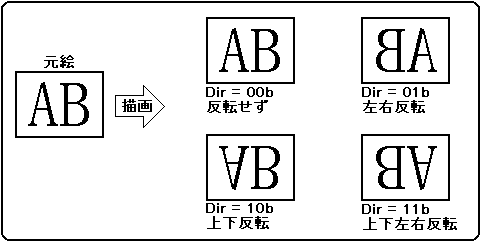
You can specify the reading direction of the character. With this specification, the character can be flipped vertically or horizontally.

Character read direction bits: character read direction (Dir), command table start address + 00H, bits 5, 4
Specifies the reading direction of the character pattern. You can instruct to flip up / down, flip left / right, or flip up / down / left / right at the same time.
When bit 5 is 0, it is not flipped vertically and is drawn in the vertical (Y) direction as it is. When it is 1, it is drawn upside down.
When bit 4 is 0, left and right are not inverted, and the horizontal (X) direction is drawn as it is. When it is 1, the left and right sides are reversed and drawn.
When bits 4 and 5 are both 0, the character pattern is drawn without inversion. When bits 4 and 5 are both 1, the drawing is done upside down and left and right.
For characters other than sprites, fix the character read direction to 00B.

 Dir
 Inversion processing
 Y
 X
 0
 0
 Does not flip
 0
 1
 Flip left and right
 1
 0
 Flip upside down
 1
 1
 Flip up / down / left / right

Figure 6.4 Character reading direction


BackForward
HARDWARE ManualVDP1 User's Manual
Copyright SEGA ENTERPRISES, LTD., 1997