HARDWARE ManualVDP1 User's ManualChapter 7 Commands
BackForward
VDP1 User's Manual / Chapter 7 Commands

■ 7.5 Rectangle sprite drawing command

The Rectangle Sprite Draw command draws a character pattern in the framebuffer. When drawing, you can flip the character pattern upside down, flip it horizontally, zoom in / out, or stretch it to the specified coordinates.
This is a rectangular sprite drawing command when the end bit is 0B and the command selection bit is 0001B. When the zoom point is 0000B, it is defined by specifying two coordinates. When the value is other than 0000B, the fixed point is specified.
Rectangular sprites cannot be rotated 90 °. If you want to rotate it 90 °, specify it with the transform sprite drawing command.

● Specify two coordinates (rectangular sprite drawing command)

The contents of the command table for specifying two coordinates are as follows.

 bit
 15
 14
 13
 12
 11
 Ten
 9
 8
 7
 6
 5
 4
 3
 2
 1
 0
CMDCTRL
+00
0 JP 0 0 0 0 0 0 Dir 0 0 0 1
CMDLINK
+02
LINK designation / 8H 0 0
CMDPMOD
+04
MO 0 0 0 Pc Cl Cm Me EC SP Color mode Color calculation
CMDCOLR
+06
Color bank, color look-up table / 8H (LSB fixed to 00)
CMDSRCA
+08
Character address / 8H
CMDSIZE
+ 0A
0 0 Character size X / 8 Character size Y / 8
CMDXA
+ 0C
Sign extension Vertex (A), X coordinate (XA)
CMDYA
+ 0E
Sign extension Vertex (A), Y coordinate (YA)
+10
+12
CMDXC
+14
Sign extension Vertex (C), X coordinate (XC)
CMDYC
+16
Sign extension Vertex (C), Y coordinate (YC)
+18
+ 1A
CMDGRDA
+ 1C
Gouraud shading table / 8H
【note】
Is ignored (don't care)

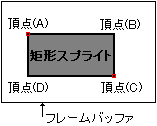
The two-point coordinate specification of the rectangular sprite drawing command is defined as follows.


BackForward
HARDWARE ManualVDP1 User's Manual
Copyright SEGA ENTERPRISES, LTD., 1997