HARDWARE ManualVDP2 User's ManualChapter 2 TV screen
BackForward
VDP2 User's Manual / Chapter 2 TV Screen

■ 2.2 Interlaced mode

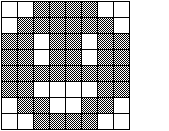
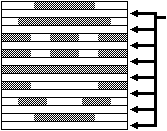
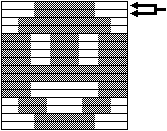
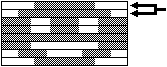
VDP2's interlaced mode (screen scanning method) includes non-interlaced, monodense interlaced, and double-dense interlaced. In non-interlaced mode, one frame is one field (1/60 second). In monodense interlaced mode, one frame has two fields (1/30 seconds), but the same image is displayed in even and odd fields. In double-dense interlaced mode, one frame has two fields (1/30 seconds), and even-numbered fields and odd-numbered fields display separate images. In both single-dense interlaced mode and double-dense interlaced mode, there is no gap between the scan lines, but the actual vertical resolution in single-dense interlaced mode is the same as the vertical resolution in non-interlaced mode. It will be the same. Figure 2.1 shows how to display by interlacing settings.

Figure 2.1 Display method by interlace setting
8x8 dot character pattern
● Non-interlaced mode
Since the scan is the same place for each field, there are places where it is not scanned.
One frame is one field (1/60 second).

● Single-dense interlaced mode
Scanning is done for both odd and even fields, but the same picture is displayed, so the vertical resolution is the same as in non-interlaced mode.
One frame has two fields (1/30 seconds).

● Double-dense interlace mode
Scanning is done for both odd and even fields, and different pictures are displayed, so the vertical resolution is twice that of non-interlaced mode.
One frame has two fields (1/30 seconds).

BackForward
HARDWARE ManualVDP2 User's ManualChapter 2 TV screen
Copyright SEGA ENTERPRISES, LTD., 1997