HARDWARE ManualVDP2 User's Manual
BackForward
VDP2 User's Manual

Chapter 6 Rotating scroll screen


The rotation scroll screen has two sets of parameter tables called "rotation parameter A" and "rotation parameter B", and the screens of each parameter table can be displayed at the same time. The two sets of parameters can be stored in VRAM as a rotation parameter table, and can also be stored in VRAM as a corresponding coefficient table.

There are two sets of rotation parameters, rotation parameter A and rotation parameter B, and each is stored in the table. RBG0 can display one screen specified by rotation parameter A or rotation parameter B, or two screens specified by rotation parameter A and rotation parameter B at the same time, and RBG1 is the screen specified by rotation parameter B. Only can be displayed. Table 6.1 shows the relationship between the rotation scroll screen and rotation parameters.

Table 6.1 Rotation scroll screen
screen Single display Relationship with rotation parameters
RBG0 Yes One screen specified by either rotation parameter A or B,
Or two screens specified by rotation parameters A and B can be displayed at the same time.
RBG1 Not possible (RBG0 must also be displayed) Display the screen specified by rotation parameter B

Rotation parameter A and rotation parameter B can each have a coefficient table, and various displays can be made by reading the coefficient data line by line or dot by dot. You can also use rotation parameter A to scale the sprite framebuffer.

■ 6.1 Rotation scroll coordinate calculation

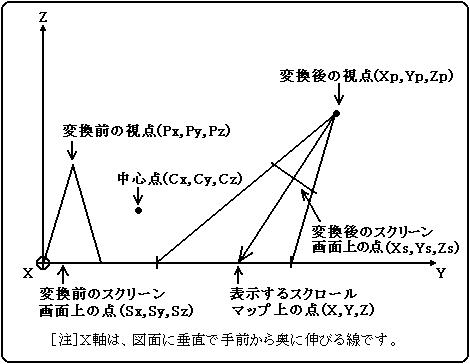
On the display screen of the rotation scroll screen, the viewpoint and screen screen (TV screen) are rotated and converted (including translation) based on the center point, and the line of sight from the converted viewpoint through the converted screen screen is fixed. It is a collection of points that intersect with the scroll map. Figure 6.1 shows how to display the rotary scroll screen.

Figure 6.1 How to display the rotary scroll screen
From the rotation conversion formula, the viewpoint coordinates after conversion and the screen screen coordinates after conversion are expressed by the following formulas.


┌ ┐ ┌ ┐ ┌ ┐ ┌ ┐ ┌ ┐
│ Xp │ │ ABC │ │ Px --Cx │ │ Cx │ │ Mx │
│ Yp │ = │ DEF │ x │ Py --Cy │ + │ Cy │ + │ My │
│ Zp │ │ GHI │ │ Pz --Cz │ │ Cz │ │ Mz │
└ ┘ └ ┘ └ ┘ └ ┘ └ ┘
┌ ┐ ┌ ┐ ┌ ┐ ┌ ┐ ┌ ┐
│ Xs │ │ ABC │ │ Sx --Cx │ │ Cx │ │ Mx │
│ Ys │ = │ DEF │ x │ Sy --Cy │ + │ Cy │ + │ My │
│ Zs │ │ GHI │ │ Sz --Cz │ │ Cz │ │ Mz │
└ ┘ └ ┘ └ ┘ └ ┘ └ ┘

A, B, C, D, E, F, G, H, I: Rotation matrix parameters Px, Py, Pz: Viewpoint coordinates before rotation transformation Sx, Sy, Sz: Screen screen coordinates before rotation transformation Cx, Cy, Cz: Rotation center coordinates Mx, My, Mz: Translation amount Xp, Yp, Zp: Viewpoint coordinates after rotation transformation Xs, Ys, Zs: Screen screen coordinates after rotation transformation

In addition, the line of sight from the viewpoint after rotation conversion to the screen after rotation conversion is expressed by the following formula.


X − Xp Y − Yp Z − Zp
―――― = ―――― = ――――
Xs− Xp Ys− Yp Zs− Zp

Here, since the scroll map is fixed to the XY plane (Z = 0), the display coordinates (X, Y) on the scroll map can be calculated by the following formula.


X = k (Xs−Xp) + Xp
Y = k (Ys−Yp) + Yp

However,


      −Zp
k = ――――
     Zs− Zp

This k is called the perspective transformation factor, which changes only in the vertical direction of the screen in the X-axis rotation and is constant in the horizontal direction. Also, with Y-axis rotation, the screen changes only in the horizontal direction of the screen and is constant in the vertical direction. It is always constant in Z-axis rotation.
Normally, the screen screen before rotation conversion is the same as the TV screen, so Sx is the horizontal coordinate value (H counter value) on the TV screen, Sy is the vertical coordinate value (V counter value) on the TV screen, and Sz is 0. Will be. The coordinate values of the screen screen when rotated along the perpendicular (SZ axis) of this screen screen can be calculated by the following formula.


┌ ┐ ┌ ┐ ┌ ┐ ┌ ┐ ┌ ┐
│ Sx │ │ ab 0 │ │ Hcnt --Csx │ │ Csx │ │ Msx │
│ Sy │ = │ cd 0 │ x │ Vcnt --Csy │ + │ Csy │ + │ Msy │
│ Sz │ │ 0 0 1 │ │ 0 │ │ 0 │ │ Msz │
└ ┘ └ ┘ └ ┘ └ ┘ └ ┘

   a, b, c, d: Screen rotation matrix parameters Hcnt, Vcnt: HV counter value Csx, Csy: Screen rotation center coordinates Msx, Msy, Msz: Screen screen translation amount

The above formula is expressed as follows.


Sx = Xst + DX ・ Hcnt + DXst ・ Vcnt
Sy = Yst + DY ・ Hcnt + DYst ・ Vcnt
Sz = Zst

However,


Xst = −a ・ Csx−b ・ Csy + Csx + Msx
Yst = −c ・ Csx−d ・ Csy + Csy + Msy
Zst = Msz

△ X = a
△ Y = c
△ Xst = b
△ Yst = d

Xst, Yst, Zst: Screen screen start coordinates △ X, △ Y: Screen screen horizontal coordinate increment △ Xst, △ Yst: Screen screen vertical coordinate increment

From the above formula, the calculation formula of the display coordinates (X, Y) when both the 3-axis rotation of the scroll screen and the rotation of the screen screen are performed is as follows.


X = kx (Xsp + dX ・ Hcnt) + Xp
Y = ky (Ysp + dY ・ Hcnt) + Yp

However,


Xsp = A {(Xst + △ Xst ・ Vcnt) −Px} + B {(Yst + △ Yst ・ Vcnt) −Py} + C (Zst-Pz)
Ysp = D {(Xst + △ Xst ・ Vcnt) −Px} + E {(Yst + △ Yst ・ Vcnt) −Py} + F (Zst-Pz)
Xp = A (Px−Cx) + B (Py−Cy) + C (Pz−Cz) + Cx + Mx
Yp = D (Px−Cx) + E (Py−Cy) + F (Pz−Cz) + Cy + My
dX = A ・ DX + B ・ DY
dY = D ・ DX + E ・ DY

   Xst, Yst, Zst: Screen screen start coordinates △ Xst, △ Yst: Screen screen vertical coordinate increment △ X, △ Y: Screen screen horizontal coordinate increment A, B, C, D, E, F: Rotation matrix parameter Px , Py, Pz: Viewpoint coordinates Cx, Cy, Cz: Center coordinates Mx, My: Translation amount kx, ky: Scale factor Hcnt, Vcnt: HV counter value

VDP2 reads each parameter line by line from the rotation parameter table stored in VRAM, calculates Xsp, Ysp, Xp, Yp, dX, dY using the above formula, and uses the result for each dot. Find the display coordinates (X, Y) of. The scaling factors kx and ky usually use the values read from the rotation parameter table, but you can also use the factor table to change the values line by line or dot by dot.


BackForward
HARDWARE ManualVDP2 User's Manual
Copyright SEGA ENTERPRISES, LTD., 1997