HARDWARE ManualVDP2 User's Manual
BackForward
VDP2 User's Manual / Chapter 8 Window

■ 8.1 Window area

The scroll IC window has two normal windows (W0, W1) and one sprite window (SW). The normal window is specified by the start point coordinates and end point coordinates on the TV screen, and the sprite window is specified by the value of the most significant bit of the sprite data written in the frame buffer. Each window allows you to specify which scroll screen to enable and whether to enable the inner or outer area. Also, if multiple windows are enabled, they can be overlapped with AND or OR logic.

For the normal window, you can select either a normal rectangular window specified by horizontal and vertical start and end coordinates, or a normal line window that specifies horizontal start and end coordinates for each line. For the start point coordinates and end point coordinates, the coordinate values on the TV screen are set in each register, not the coordinate values on the scroll screen.

● Normal rectangular window

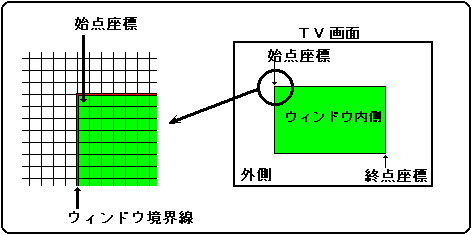
A normal rectangular window can be obtained by specifying the start point coordinates of the upper left corner and the end point coordinates of the lower right corner of the window in the window position register. The area surrounded by the specified coordinates is the inside, and the other areas are the outside. The window border is considered inside.
If the start point coordinates are larger than the end point coordinates in either the horizontal or vertical direction, the entire screen is judged as the area outside the window.
A normal rectangular window is shown in Figure 8.1.

Figure 8.1 Normal rectangular window

● Window position register

The window position register specifies the horizontal and vertical start and end coordinates of the normal window. This is a write-only 16-bit register located at addresses 1800C0H to 1800CEH. After turning on the power or resetting, the value will be cleared to 0, so be sure to set it.

WPSX0 1800C0H
 15
 14
 13
 12
 11
 Ten
 09 09
 08 08
 ---
 ---
 ---
 ---
 ---
 ---
 W0SX9
 W0SX8

 07 07
 06 06
 05 05
 04
 03 03
 02 02
 01 01
 00
 W0SX7
 W0SX6
 W0SX5
 W0SX4
 W0SX3
 W0SX2
 W0SX1
 W0SX0 

WPSY0 1800C2H
 15
 14
 13
 12
 11
 Ten
 09 09
 08 08
 ---
 ---
 ---
 ---
 ---
 ---
 W0SY9
 W0SY8

 07 07
 06 06
 05 05
 04
 03 03
 02 02
 01 01
 00
 W0SY7
 W0SY6
 W0SY5
 W0SY4
 W0SY3
 W0SY2
 W0SY1
 W0SY0 

WPEX0 1800C4H
 15
 14
 13
 12
 11
 Ten
 09 09
 08 08
 ---
 ---
 ---
 ---
 ---
 ---
 W0EX9
 W0EX8

 07 07
 06 06
 05 05
 04
 03 03
 02 02
 01 01
 00
 W0EX7
 W0EX6
 W0EX5
 W0EX4
 W0EX3
 W0EX2
 W0EX1
 W0EX0 

WPEY0 1800C6H
 15
 14
 13
 12
 11
 Ten
 09 09
 08 08
 ---
 ---
 ---
 ---
 ---
 ---
 W0EY9
 W0EY8

 07 07
 06 06
 05 05
 04
 03 03
 02 02
 01 01
 00
 W0EY7
 W0EY6
 W0EY5
 W0EY4
 W0EY3
 W0EY2
 W0EY1
 W0EY0 

WPSX1 1800C8H
 15
 14
 13
 12
 11
 Ten
 09 09
 08 08
 ---
 ---
 ---
 ---
 ---
 ---
 W1SX9
 W1SX8

 07 07
 06 06
 05 05
 04
 03 03
 02 02
 01 01
 00
 W1SX7
 W1SX6
 W1SX5
 W1SX4
 W1SX3
 W1SX2
 W1SX1
 W1SX0 

WPSY1 1800CAH
 15
 14
 13
 12
 11
 Ten
 09 09
 08 08
 ---
 ---
 ---
 ---
 ---
 ---
 W1SY9
 W1SY8

 07 07
 06 06
 05 05
 04
 03 03
 02 02
 01 01
 00
 W1SY7
 W1SY6
 W1SY5
 W1SY4
 W1SY3
 W1SY2
 W1SY1
 W1SY0 

WPEX1 1800CCH
 15
 14
 13
 12
 11
 Ten
 09 09
 08 08
 ---
 ---
 ---
 ---
 ---
 ---
 W1EX9
 W1EX8

 07 07
 06 06
 05 05
 04
 03 03
 02 02
 01 01
 00
 W1EX7
 W1EX6
 W1EX5
 W1EX4
 W1EX3
 W1EX2
 W1EX1
 W1EX0 

WPEY1 1800CEH
 15
 14
 13
 12
 11
 Ten
 09 09
 08 08
 ---
 ---
 ---
 ---
 ---
 ---
 W1EY9
 W1EY8

 07 07
 06 06
 05 05
 04
 03 03
 02 02
 01 01
 00
 W1EY7
 W1EY6
 W1EY5
 W1EY4
 W1EY3
 W1EY2
 W1EY1
 W1EY0

    
Window position bit (for horizontal coordinates) : Window start / end X bit
(W0SX9 to W0SX0, W0EX9 to W0EX0, W1SX9 to W1SX0, W1EX9 to W1EX0)
Specify the horizontal start and end coordinates. The coordinate value to be specified is the coordinate value (H counter value) on the TV screen.

W0SX9 to W0SX0 1800C0H Bits 9-0 For W0 start point coordinates
W0EX9 ~ W0EX0 1800C4H Bits 9-0 For W0 end point coordinates
W1SX9 to W1SX0 1800C8H Bits 9-0 For W1 start point coordinates
W1EX9 ~ W1EX0 1800CCH Bits 9-0 For W1 end point coordinates

The bit configuration of the register changes depending on the graphic mode setting. In the case of normal graphics, the least significant bit is invalid data. In the case of a dedicated normal graphic, the most significant bit is invalid data. Also, in the case of dedicated high-resolution graphics, the most significant bit is invalid data, and since there is no bit for H0, the value is in units of 2 pixels.
Table 8.1 shows the bit contents of the window position register depending on the graphic mode setting.

Table 8.1 Bit contents of window position register for horizontal coordinates
Graphic mode WxxX9 WxxX8 WxxX7 WxxX6 WxxX5 WxxX4 WxxX3 WxxX2 WxxX1 WxxX0
normal H8 H7 H6 H5 H4 H3 H2 H1 H0 invalid
High resolution H9 H8 H7 H6 H5 H4 H3 H2 H1 H0
Dedicated normal invalid H8 H7 H6 H5 H4 H3 H2 H1 H0
Dedicated high resolution invalid H9 H8 H7 H6 H5 H4 H3 H2 H1
Note The bit name xx can be 0S, 0E, 1S, or 1E.


Window position bit (for vertical coordinates) : Window start / end Y bit
(W0SY8 ~ W0SY0, W0EY8 ~ W0EY0, W1SY8 ~ W1SY0, W1EY8 ~ W1EY0)
Specify the vertical start and end coordinates. The coordinate value to be specified is the coordinate value (V counter value) on the TV screen.

W0SY8 to W0SY0 1800C2H Bits 8-0 For W0 start point coordinates
W0EY8 ~ W0EY0 1800C6H Bits 8-0 For W0 end point coordinates
W1SY8 to W1SY0 1800CAH Bits 8-0 For W1 start point coordinates
W1EY8 ~ W1EY0 1800CEH Bits 8-0 For W1 end point coordinates

The register bit configuration changes depending on the screen mode setting. For single-dense interlacing in normal and high-resolution modes, specify the V counter value for each of the even and odd fields. For double-dense interlace in normal and high-resolution modes, the least significant bit is disabled and the remaining bits specify the V counter value for each field.
Table 8.2 shows the bit contents of the window position register depending on the screen mode setting.

Table 8.2 Bit contents of window position register for vertical coordinates
TV screen (interlaced)
mode
WxxY8 WxxY7 WxxY6 WxxY5 WxxY4 WxxY3 WxxY2 WxxY1 WxxY0
Normal, high resolution (non-interlaced,
(Single dense interlace)
V8 V7 V6 V5 V4 V3 V2 V1 V0
Normal, high resolution (double dense interlace) V7 V6 V5 V4 V3 V2 V1 V0 invalid
Dedicated monitor V8 V7 V6 V5 V4 V3 V2 V1 V0
Note The bit name xx can be 0S, 0E, 1S, or 1E.

Window position Vertical end point coordinate value limit
When using a normal window in double-dense interlaced mode, do not set the value of the vertical end point coordinate window position register (WPEY0: 1800C6H, WPEY: 1800CEH) to "1FCH to 1FFH".
Entering these values disables the window.


BackForward
HARDWARE ManualVDP2 User's Manual
Copyright SEGA ENTERPRISES, LTD., 1997