(2 dots left in display coordinates: 1 dot left in display coordinates: (display coordinates = 1: 1: 2)
Color data) Color data) Color data)
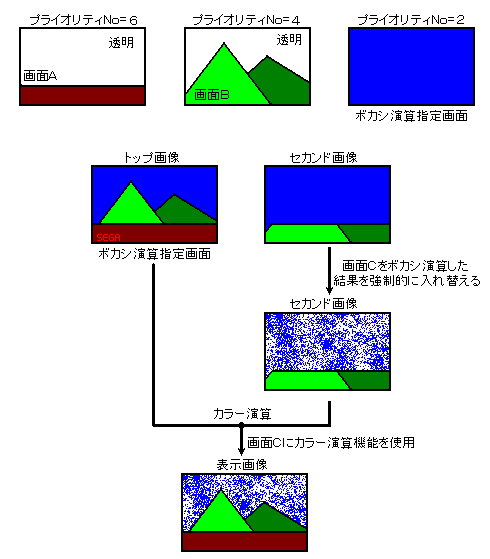
Then, for the area where the specified screen becomes the top image or the second image, the addition result is forcibly made into the second image. By performing color calculation on this second image and top image, you can display a picture that has been blurred. Second of the area where the blur calculation specification screen does not become the top image or the second image The image will be the screen determined by the priority as usual.
Make sure that the screen for blur calculation does not have transparent dots. If you perform a blur calculation on a screen with transparent dots, the correct calculation will not be performed at that boundary.
If you use the blur calculation function, you will not be able to insert the line color screen. Also, the extended color calculation function cannot be used.
The blur calculation function is shown in Figure 12.4. Figure 12.4 Blurring calculation function