HARDWARE ManualVDP2 User's Manual
BackForward
VDP2 User's Manual

Chapter 12 Color Calculation


VDP2 can calculate the color data of the top image and the second image obtained by comparing the priority of each scroll screen with the sprite at the specified ratio. At that time, the color calculation ratio of the sprite can be selected for each character from a maximum of eight values, and the color calculation enable of each scroll screen is specified for each character or dot by using the special color calculation function. can also do.

You can perform color calculation on up to 4 screens by converting the second image and the third image (up to the force image when the line color screen is inserted) at a fixed ratio into the second image.
You can also enable the blur calculation function to create an effect that blurs a distant background.

■ 12.1 Color calculation function

The color calculation function is a function that adds the top image and the second image (or the image obtained by adding the three images of the second image, the third image, and the force image at a fixed ratio) at the specified ratio for each RGB color, and is semi-transparent. You can create the effect of overlapping the screens. The color calculation function is shown in Figure 12.1.

Figure 12.1 Color calculation function
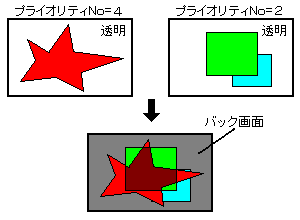
Normal color calculationExtended color calculation functionBlur calculation function


BackForward
HARDWARE ManualVDP2 User's ManualChapter 12 Color Calculation
Copyright SEGA ENTERPRISES, LTD., 1997