HARDWARE ManualVDP2 User's ManualChapter 15 How to use VDP2
BackForward
VDP2 User's Manual / Chapter 15 How to use VDP2

■ 15.4 Usage techniques

Introducing useful techniques for using VDP2 and specific usage plans for each function.

■ Technique to make bitmaps arbitrary size

Since the horizontal size of the VDP2 bitmap can only be selected from 512 dots or 1024 dots, there is a drawback that the VRAM addresses are not continuous when transferring image data of any size such as moving images by DMA. We will solve this shortcoming and explain a technique for contiguous VRAM addresses in bitmaps of arbitrary size.

● Principle
I will explain the principle of the technique to realize a bitmap of arbitrary size with consecutive VRAM addresses.
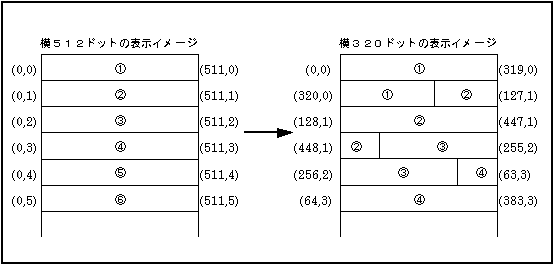
For example, the VRAM address of a bitmap with 512 horizontal dots is continuous from the coordinates (0,0) to (511,0), and the address after (511,0) is the dot of (0,1). At this time, in order to make the VRAM address of the bitmap of 320 dots horizontal continuous, the display coordinates when displaying on the screen should be changed as shown in Fig. 15.

Figure 15.1 Bitmap display image

In order to realize the display coordinates according to the size of the bitmap as shown in Fig. 15., the line scroll function and the vertical cell scroll function should be combined.

Hereafter, it is assumed that the bitmap size of VDP2 is set to 512 dots horizontally x 256 dots vertically. The horizontal size of the bitmap to be displayed is an integral multiple of 8, the display start line is n = 0, and the display start cell is w = 0.

1) Horizontal coordinates
For the horizontal display coordinates that change for each line, use the line scroll function to set the leftmost horizontal display coordinate value as the horizontal line scroll value. The formula for calculating the horizontal line scroll value for the nth line is as follows.

(Horizontal line scroll value of the nth line)
= {00010000H × (horizontal size) × n} & 01ff0000H

2) Vertical coordinates
Vertical display coordinates that change line by line or in the middle of the line are realized by combining the line scroll function and the vertical cell scroll function. First, the vertical cell scroll value is set in order to increase the vertical display coordinate by one in the middle of the line by using the fact that the display coordinate value of VDP2 truncates the decimal part of the calculated value using each scroll value. Set. The formula for calculating the vertical cell scroll value of the wth cell is as follows.

(Vertical cell scroll value of the wth cell) = 00000400H × w

Then, set the vertical line scroll value while considering the vertical cell scroll value. The vertical line scroll value is calculated by the following procedure.

Step ①:
Find the integer part I (n) of the vertical display coordinate value of the nth line.

Step (2):
In the nth line, find the cell number m when the vertical display coordinate value increases by one.

Step ③:
Find the vertical line scroll value for the nth line.

3) Setting example
A full-screen & full-color bitmap (NBG0, horizontal 320 dots x vertical 224 dots, 16.77 million colors) is displayed, and a setting example in which the VRAM address is continuous is explained in detail.

(1) Set the VDP2 register as follows.
address +0 +2 +4 +6 +8 + A + C + E
25F80000H 8000 0000 0000 0000 0000 0000 0000 0200 ← Because it is a vertical cell scroll table
25F80010H 4444 4444 ffff ffff 4444 4444 cfff ffff Divide only VRAM-B 25F80020H 0001 0000 0000 0000 0042 0000 0000 0000 ← 16.77 million color bitmap, size 25F80030H 0000 0000 0000 0000 0000 0000 0000 0000 25F80040H 0000 0000 0000 0000 0000 0000 0000 0000 
25F80050H 0000 0000 0000 0000 0000 0000 0000 0000 
25F80060H 0000 0000 0000 0000 0000 0000 0000 0000 
25F80070H 0000 0000 0000 0000 0001 0000 0001 0000 
25F80080H 0000 0000 0000 0000 0000 0000 0000 0000 
25F80090H 0000 0000 0000 0000 0000 0007 0003 8000 ← Line scroll (horizontal and vertical screen 25F800A0H 0003 0000 0000 0000 0000 0000 0000 0000 Scroll value) and vertical cell scroll 25F800B0H 0000 0000 0000 0000 0000 0000 0000 0000 0000 0000 0000 0000 0000 0000 0000 
25F800D0H 0000 0000 0000 0000 0000 0000 0000 0000 
25F800E0H 0000 0000 0000 0000 0000 0000 0000 0000 
25F800F0H 0000 0000 0000 0000 0007 0000 0000 0000 ← Display only NBG0 25F80100H 0000 0000 0000 0000 0000 0000 0000 0000 
25F80110H 0000 0000 0000 0000 0000 0000 0000 0000 

(2) Set the value calculated by the formula in the vertical cell scroll table.
address +0 +4 +8 + C   
25E70000H 00000000 00000400 00000800 00000c00
25E70010H 00001000 00001400 00001800 00001c00
25E70020H 00002000 00002400 00002800 00002c00
25E70030H 00003000 00003400 00003800 00003c00
25E70040H 00004000 00004400 00004800 00004c00
25E70050H 00005000 00005400 00005800 00005c00
25E70060H 00006000 00006400 00006800 00006c00
25E70070H 00007000 00007400 00007800 00007c00
25E70080H 00008000 00008400 00008800 00008c00
25E70090H 00009000 00009400 00009800 00009c00
25E700A0H 0000a000 0000a400 0000a800 0000ac00 ← In this example, the data of the 41st cell and above is not used.

(3) Set the value calculated by the formula in the line scroll table.
address +0 +4 +8 + C   
25E60000H 00000000 00000000 01400000 0000a000
25E60010H 00800000 00010000 01c00000 0001e000
25E60020H 01000000 00028000 00400000 00030000
25E60030H 01800000 0003c000 00c00000 00040000
25E60040H 00000000 00050000 01400000 0005a000
25E60050H 00800000 00060000 01c00000 0006e000
25E60060H 01000000 00078000 00400000 00080000
25E60070H 01800000 0008c000 00c00000 00090000
25E60080H 00000000 000a0000 01400000 000aa000
25E60090H 00800000 000b0000 01c00000 000be000
25E600A0H 01000000 000c8000 00400000 000d0000
25E600B0H 01800000 000dc000 00c00000 000e0000
25E600C0H 00000000 000f0000 01400000 000fa000
25E600D0H 00800000 00100000 01c00000 0010e000
25E600E0H 01000000 00118000 00400000 00120000
25E600F0H 01800000 0012c000 00c00000 00130000

25E60100H 00000000 00140000 01400000 0014a000
25E60110H 00800000 00150000 01c00000 0015e000
25E60120H 01000000 00168000 00400000 00170000
25E60130H 01800000 0017c000 00c00000 00180000
25E60140H 00000000 00190000 01400000 0019a000
25E60150H 00800000 001a0000 01c00000 001ae000
25E60160H 01000000 001b8000 00400000 001c0000
25E60170H 01800000 001cc000 00c00000 001d0000
25E60180H 00000000 001e0000 01400000 001ea000
25E60190H 00800000 001f0000 01c00000 001fe000
25E601A0H 01000000 00208000 00400000 00210000
25E601B0H 01800000 0021c000 00c00000 00220000
25E601C0H 00000000 00230000 01400000 0023a000
25E601D0H 00800000 00240000 01c00000 0024e000
25E601E0H 01000000 00258000 00400000 00260000
25E601F0H 01800000 0026c000 00c00000 00270000

25E60200H 00000000 00280000 01400000 0028a000
25E60210H 00800000 00290000 01c00000 0029e000
25E60220H 01000000 002a8000 00400000 002b0000
25E60230H 01800000 002bc000 00c00000 002c0000
25E60240H 00000000 002d0000 01400000 002da000
25E60250H 00800000 002e0000 01c00000 002ee000
25E60260H 01000000 002f8000 00400000 00300000
25E60270H 01800000 0030c000 00c00000 00310000
25E60280H 00000000 00320000 01400000 0032a000
25E60290H 00800000 00330000 01c00000 0033e000
25E602A0H 01000000 00348000 00400000 00350000
25E602B0H 01800000 0035c000 00c00000 00360000
25E602C0H 00000000 00370000 01400000 0037a000
25E602D0H 00800000 00380000 01c00000 0038e000
25E602E0H 01000000 00398000 00400000 003a0000
25E602F0H 01800000 003ac000 00c00000 003b0000

address +0 +4 +8 + C   
25E60300H 00000000 003c0000 01400000 003ca000
25E60310H 00800000 003d0000 01c00000 003de000
25E60320H 01000000 003e8000 00400000 003f0000
25E60330H 01800000 003fc000 00c00000 00400000
25E60340H 00000000 00410000 01400000 0041a000
25E60350H 00800000 00420000 01c00000 0042e000
25E60360H 01000000 00438000 00400000 00440000
25E60370H 01800000 0044c000 00c00000 00450000
25E60380H 00000000 00460000 01400000 0046a000
25E60390H 00800000 00470000 01c00000 0047e000
25E603A0H 01000000 00488000 00400000 00490000
25E603B0H 01800000 0049c000 00c00000 004a0000
25E603C0H 00000000 004b0000 01400000 004ba000
25E603D0H 00800000 004c0000 01c00000 004ce000
25E603E0H 01000000 004d8000 00400000 004e0000
25E603F0H 01800000 004ec000 00c00000 004f0000

25E60400H 00000000 00500000 01400000 0050a000
25E60410H 00800000 00510000 01c00000 0051e000
25E60420H 01000000 00528000 00400000 00530000
25E60430H 01800000 0053c000 00c00000 00540000
25E60440H 00000000 00550000 01400000 0055a000
25E60450H 00800000 00560000 01c00000 0056e000
25E60460H 01000000 00578000 00400000 00580000
25E60470H 01800000 0058c000 00c00000 00590000
25E60480H 00000000 005a0000 01400000 005aa000
25E60490H 00800000 005b0000 01c00000 005be000
25E604A0H 01000000 005c8000 00400000 005d0000
25E604B0H 01800000 005dc000 00c00000 005e0000
25E604C0H 00000000 005f0000 01400000 005fa000
25E604D0H 00800000 00600000 01c00000 0060e000
25E604E0H 01000000 00618000 00400000 00620000
25E604F0H 01800000 0062c000 00c00000 00630000

25E60500H 00000000 00640000 01400000 0064a000
25E60510H 00800000 00650000 01c00000 0065e000
25E60520H 01000000 00668000 00400000 00670000
25E60530H 01800000 0067c000 00c00000 00680000
25E60540H 00000000 00690000 01400000 0069a000
25E60550H 00800000 006a0000 01c00000 006ae000
25E60560H 01000000 006b8000 00400000 006c0000
25E60570H 01800000 006cc000 00c00000 006d0000
25E60580H 00000000 006e0000 01400000 006ea000
25E60590H 00800000 006f0000 01c00000 006fe000
25E605A0H 01000000 00708000 00400000 00710000
25E605B0H 01800000 0071c000 00c00000 00720000
25E605C0H 00000000 00730000 01400000 0073a000
25E605D0H 00800000 00740000 01c00000 0074e000
25E605E0H 01000000 00758000 00400000 00760000
25E605F0H 01800000 0076c000 00c00000 00770000

address +0 +4 +8 + C   
25E60600H 00000000 00780000 01400000 0078a000
25E60610H 00800000 00790000 01c00000 0079e000
25E60620H 01000000 007a8000 00400000 007b0000
25E60630H 01800000 007bc000 00c00000 007c0000
25E60640H 00000000 007d0000 01400000 007da000
25E60650H 00800000 007e0000 01c00000 007ee000
25E60660H 01000000 007f8000 00400000 00800000
25E60670H 01800000 0080c000 00c00000 00810000
25E60680H 00000000 00820000 01400000 0082a000
25E60690H 00800000 00830000 01c00000 0083e000
25E606A0H 01000000 00848000 00400000 00850000
25E606B0H 01800000 0085c000 00c00000 00860000
25E606C0H 00000000 00870000 01400000 0087a000
25E606D0H 00800000 00880000 01c00000 0088e000
25E606E0H 01000000 00898000 00400000 008a0000
25E606F0H 01800000 008ac000 00c00000 008b0000

With this, the VRAM address of the bitmap of 320 dots wide x 224 dots high becomes continuous.

● Application
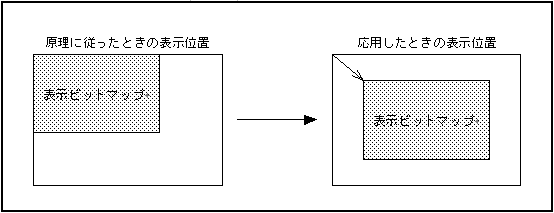
Applying the above principle, we will explain the technique of arranging a bitmap smaller than the TV screen at any position on the TV screen as shown in Fig. 15.2.

Figure 15.2 Bitmap display position

The easiest way to place the bitmap anywhere on the TV screen is to use the screen scroll feature. However, simply scrolling the screen has the following problems and does not work.

These two problems can be solved by changing the window function and the formula for calculating the line scroll value.

1) Window function
Problem (a) can be easily solved by using the window function. All you have to do is set a transparent processing window of the same size at the position where the bitmap is displayed, and enable the outside of that window.

2) Line scroll value
The problem (b) can be solved by calculating the line scroll value based on the above principle by the following procedure. However, the display start line of the bitmap is set to n = 0, and the display start coordinates of the bitmap are set to (Mx, My).
Also, the line scroll value of the line that does not display the bitmap is irrelevant, so set it to 0.

Step 1:
Find the horizontal line scroll value for the My + nth line.

(Horizontal line scroll value)
= {00010000H × (horizontal size) × n} & 01ff0000H

Step 2:
Find the integer part I (n) of the vertical display coordinate value of the My + nth line.

I (n) = {00000080H x (horizontal size) x n} & 01ff0000H

Step 3:
In the nth line of the display bitmap, find the cell number m when the vertical coordinate value increases by one.

Step 4:
Find the vertical line scroll value for the My + nth line.

3) Setting example
A bitmap (NBG0, 16.77 million colors) of 192 horizontal dots x 144 vertical dots is displayed so that it is in the center of the TV screen, and a setting example in which the VRAM address is continuous is explained in detail.

(1) Set the VDP2 register as follows.

address +0 +2 +4 +6 +8 + A + C + E
25F80000H 8000 0000 0000 0000 0000 0000 0000 0100 ← Since bitmap data is in one bank,
25F80010H 4444 4444 cfff ffff ffff ffff ffff ffff Divide only one side for double buffer 25F80020H 0001 0000 0000 0000 0042 0000 0000 0000 ← 16.77 million color bitmap, size 25F80030H 0000 0000 0000 0000 0000 0000 0000 0000 25F80040H 0000 0000 0000 0000 0000 0000 0000 0000
25F80050H 0000 0000 0000 0000 0000 0000 0000 0000
25F80060H 0000 0000 0000 0000 0000 0000 0000 0000
25F80070H 07c0 0000 0000 0000 0001 0000 0001 0000 ← Horizontal screen according to the display start coordinates 25F80080H 0000 0000 0000 0000 0000 0000 0000 0000 0000 Set the scroll value 25F80090H 0000 0000 0000 0000 0007 0001 8000 ← Line scroll (horizontal, vertical) Direction screen 25F800A0H 0001 0000 0000 0000 0000 0000 0003 ffff Scroll value) and enable vertical cell scrolling 25F800B0H 0000 0000 0000 0000 0000 0000 0000 0000 
25F800C0H 0080 0028 01fe 00b7 0000 0000 0000 0000 ← Set the window 25F800D0H 0003 0000 0000 0000 0000 0000 0000 0000 0000
25F800E0H 0000 0000 0000 0000 0000 0000 0000 0000
25F800F0H 0000 0000 0000 0000 0007 0000 0000 0000 ← Display only NBG0 25F80100H 0000 0000 0000 0000 0000 0000 0000 0000
25F80110H 0000 0000 0000 0000 0000 0000 0000 0000

(2) Set the value calculated by the formula in the vertical cell scroll table.

address +0 +4 +8 + C   
25E30000H 00000000 00000400 00000800 00000c00
25E30010H 00001000 00001400 00001800 00001c00
25E30020H 00002000 00002400 00002800 00002c00
25E30030H 00003000 00003400 00003800 00003c00
25E30040H 00004000 00004400 00004800 00004c00
25E30050H 00005000 00005400 00005800 00005c00
25E30060H 00006000 00006400 00006800 00006c00
25E30070H 00007000 00007400 00007800 00007c00
25E30080H 00008000 00008400 00008800 00008c00
25E30090H 00009000 00009400 00009800 00009c00
25E300A0H 0000a000 0000a400 0000a800 0000ac00 ← In this example, the data of the 41st cell and above is not used.

(3) Set the value calculated by the formula in the line scroll table.

address +0 +4 +8 + C   
25E20000H 00000000 00000000 00000000 00000000
25E20010H 00000000 00000000 00000000 00000000
25E20020H 00000000 00000000 00000000 00000000
25E20030H 00000000 00000000 00000000 00000000
25E20040H 00000000 00000000 00000000 00000000
25E20050H 00000000 00000000 00000000 00000000
25E20060H 00000000 00000000 00000000 00000000
25E20070H 00000000 00000000 00000000 00000000
25E20080H 00000000 00000000 00000000 00000000
25E20090H 00000000 00000000 00000000 00000000
25E200A0H 00000000 00000000 00000000 00000000
25E200B0H 00000000 00000000 00000000 00000000
25E200C0H 00000000 00000000 00000000 00000000
25E200D0H 00000000 00000000 00000000 00000000
25E200E0H 00000000 00000000 00000000 00000000
25E200F0H 00000000 00000000 00000000 00000000

25E20100H 00000000 00000000 00000000 00000000
25E20110H 00000000 00000000 00000000 00000000
25E20120H 00000000 00000000 00000000 00000000
25E20130H 00000000 00000000 00000000 00000000
25E20140H 00000000 00000000 00c00000 00000000 ← Bitmap display start line 25E20150H 01800000 0000a000 00400000 00010000
25E20160H 01000000 00010000 01c00000 0001c000
25E20170H 00800000 00020000 01400000 00020000
25E20180H 00000000 00030000 00c00000 00030000
25E20190H 01800000 0003a000 00400000 00040000
25E201A0H 01000000 00040000 01c00000 0004c000
25E201B0H 00800000 00050000 01400000 00050000
25E201C0H 00000000 00060000 00c00000 00060000
25E201D0H 01800000 0006a000 00400000 00070000
25E201E0H 01000000 00070000 01c00000 0007c000
25E201F0H 00800000 00080000 01400000 00080000

25E20200H 00000000 00090000 00c00000 00090000
25E20210H 01800000 0009a000 00400000 000a0000
25E20220H 01000000 000a0000 01c00000 000ac000
25E20230H 00800000 000b0000 01400000 000b0000
25E20240H 00000000 000c0000 00c00000 000c0000
25E20250H 01800000 000ca000 00400000 000d0000
25E20260H 01000000 000d0000 01c00000 000dc000
25E20270H 00800000 000e0000 01400000 000e0000
25E20280H 00000000 000f0000 00c00000 000f0000
25E20290H 01800000 000fa000 00400000 00100000
25E202A0H 01000000 00100000 01c00000 0010c000
25E202B0H 00800000 00110000 01400000 00110000
25E202C0H 00000000 00120000 00c00000 00120000
25E202D0H 01800000 0012a000 00400000 00130000
25E202E0H 01000000 00130000 01c00000 0013c000
25E202F0H 00800000 00140000 01400000 00140000

address +0 +4 +8 + C   
25E20300H 00000000 00150000 00c00000 00150000
25E20310H 01800000 0015a000 00400000 00160000
25E20320H 01000000 00160000 01c00000 0016c000
25E20330H 00800000 00170000 01400000 00170000
25E20340H 00000000 00180000 00c00000 00180000
25E20350H 01800000 0018a000 00400000 00190000
25E20360H 01000000 00190000 01c00000 0019c000
25E20370H 00800000 001a0000 01400000 001a0000
25E20380H 00000000 001b0000 00c00000 001b0000
25E20390H 01800000 001ba000 00400000 001c0000
25E203A0H 01000000 001c0000 01c00000 001cc000
25E203B0H 00800000 001d0000 01400000 001d0000
25E203C0H 00000000 001e0000 00c00000 001e0000
25E203D0H 01800000 001ea000 00400000 001f0000
25E203E0H 01000000 001f0000 01c00000 001fc000
25E203F0H 00800000 00200000 01400000 00200000

25E20400H 00000000 00210000 00c00000 00210000
25E20410H 01800000 0021a000 00400000 00220000
25E20420H 01000000 00220000 01c00000 0022c000
25E20430H 00800000 00230000 01400000 00230000
25E20440H 00000000 00240000 00c00000 00240000
25E20450H 01800000 0024a000 00400000 00250000
25E20460H 01000000 00250000 01c00000 0025c000
25E20470H 00800000 00260000 01400000 00260000
25E20480H 00000000 00270000 00c00000 00270000
25E20490H 01800000 0027a000 00400000 00280000
25E204A0H 01000000 00280000 01c00000 0028c000
25E204B0H 00800000 00290000 01400000 00290000
25E204C0H 00000000 002a0000 00c00000 002a0000
25E204D0H 01800000 002aa000 00400000 002b0000
25E204E0H 01000000 002b0000 01c00000 002bc000
25E204F0H 00800000 002c0000 01400000 002c0000

25E20500H 00000000 002d0000 00c00000 002d0000
25E20510H 01800000 002da000 00400000 002e0000
25E20520H 01000000 002e0000 01c00000 002ec000
25E20530H 00800000 002f0000 01400000 002f0000
25E20540H 00000000 00300000 00c00000 00300000
25E20550H 01800000 0030a000 00400000 00310000
25E20560H 01000000 00310000 01c00000 0031c000
25E20570H 00800000 00320000 01400000 00320000
25E20580H 00000000 00330000 00c00000 00330000
25E20590H 01800000 0033a000 00400000 00340000
25E205A0H 01000000 00340000 01c00000 0034c000
25E205B0H 00800000 00350000 01400000 00350000 ← Bitmap display end line 25E205C0H 00000000 00000000 00000000 00000000
25E205D0H 00000000 00000000 00000000 00000000
25E205E0H 00000000 00000000 00000000 00000000
25E205F0H 00000000 00000000 00000000 00000000

address +0 +4 +8 + C   
25E20600H 00000000 00000000 00000000 00000000
25E20610H 00000000 00000000 00000000 00000000
25E20620H 00000000 00000000 00000000 00000000
25E20630H 00000000 00000000 00000000 00000000
25E20640H 00000000 00000000 00000000 00000000
25E20650H 00000000 00000000 00000000 00000000
25E20660H 00000000 00000000 00000000 00000000
25E20670H 00000000 00000000 00000000 00000000
25E20680H 00000000 00000000 00000000 00000000
25E20690H 00000000 00000000 00000000 00000000
25E206A0H 00000000 00000000 00000000 00000000
25E206B0H 00000000 00000000 00000000 00000000
25E206C0H 00000000 00000000 00000000 00000000
25E206D0H 00000000 00000000 00000000 00000000
25E206E0H 00000000 00000000 00000000 00000000
25E206F0H 00000000 00000000 00000000 00000000

(4) Set black (0000H) for the back screen table (25E7FFFEH).

With this, the VRAM address of the bitmap of 192 dots horizontally x 144 dots vertically becomes continuous. In the case of this example, since the bitmap data will be in one bank, it is possible to make a double buffer configuration with VRAM-A and VRAM-B. However, since it is a bitmap of 16.77 million colors, VDP2 cannot read the table unless the vertical cell scroll table is set on the side other than the display side VRAM. Therefore, it is necessary to store the exact same vertical cell scroll table on both the VRAM-A side and the VRAM-B side.

● Summary
The method for displaying a continuous address bitmap of a specified size at any position on the TV screen is as follows. However, the horizontal size of the display bitmap must be an integral multiple of 8.

1) Setting the screen scroll value
Set the horizontal screen scroll value. However, the horizontal display start position on the TV screen of the bitmap is set to Mx.

2) Window settings
Set a transparent processing window of the same size at the TV screen display position of the bitmap, and enable the outside of that window. If you want to display in full screen, you do not need to set the window.

3) Vertical cell scroll table setting
Set the vertical cell scroll table. However, the leftmost cell is w = 0. If the horizontal size of the display bitmap is 8 dots, 16 dots, 32 dots, 64 dots, 128 dots, or 256 dots, it is not necessary to use the vertical cell scroll function.

4) Line scroll table settings
Set the line scroll table. However, the display start line of the bitmap on the TV screen is set to n = 0. Also, set the line scroll value of the line that does not display the bitmap to 0.

5) Advantages
This technique has the following advantages:

(a) The VRAM capacity allocated to bitmap data is the minimum required.
(b) VRAM addresses are continuous regardless of the bitmap color number setting.

■ Technique to make VRAM a double buffer

VDP2 has two VRAMs, VRAM-A and VRAM-B. I will explain the technique to make these two VRAMs into a double buffer configuration for display and writing.

1) Principle
The VRAM cycle pattern register controls VRAM access during the display period. In other words, the set values for the registers corresponding to VRAM-A and VRAM-B can be divided into those for display and those for writing.

2) Usage example
This section describes a setting example for displaying a 32768 color bitmap (NBG0, width 512 dots x height 256 dots) in a double buffer configuration.

(1)

Bitmap data is stored from the VRAM-A start address (25E0000H), and the VDP2 register is set as follows.
address +0 +2 +4 +6 +8 + A + C + E
25F80000H 8000 0000 0000 0000 0000 0000 0000 0000 ← VRAM is not divided into two because it is not necessary 25F80010H 4444 ffff ffff ffff ffff ffff ffff ffff 
25F80020H 0001 0000 0000 0000 0032 0000 0000 0000 ← 32768 million color bitmap, size 25F80030H 0000 0000 0000 0000 0000 0000 0000 0000 Horizontal 512 dots x Vertical 256 dots 25F80040H 0000 0000 0000 0000 0000 0000 0000 0000 
25F80050H 0000 0000 0000 0000 0000 0000 0000 0000 
25F80060H 0000 0000 0000 0000 0000 0000 0000 0000 
25F80070H 0000 0000 0000 0000 0001 0000 0001 0000 
25F80080H 0000 0000 0000 0000 0000 0000 0000 0000 
25F80090H 0000 0000 0000 0000 0000 0000 0000 0000 
25F800A0H 0000 0000 0000 0000 0000 0000 0000 0000 
25F800B0H 0000 0000 0000 0000 0000 0000 0000 0000 
25F800C0H 0000 0000 0000 0000 0000 0000 0000 0000 
25F800D0H 0000 0000 0000 0000 0000 0000 0000 0000 
25F800E0H 0000 0000 0000 0000 0000 0000 0000 0000 
25F800F0H 0000 0000 0000 0000 0007 0000 0000 0000 ← Display only NBG0 25F80100H 0000 0000 0000 0000 0000 0000 0000 0000 
25F80110H 0000 0000 0000 0000 0000 0000 0000 0000 

With this setting, VRAM-A is for display and VRAM-B is for writing. Writing from the CPU to VRAM-B for writing can always be performed even during the display period.

(2)

Write the bitmap data of the next picture from the VRAM-B start address (25E40000H), and change the VDP2 register in the V blank immediately before the frame you want to switch as follows.
address +0 +2 +4 +6 +8 + A + C + E
25F80010H ffff ffff ffff ffff 4444 ffff ffff ffff
25F80030H 0000 0000 0000 0000 0000 0000 0002 0000

With this setting, VRAM-B is for display and VRAM-A is for writing. Moreover, the boundary address value of the bitmap pattern is set at the beginning of VRAM-B.

(3)

Write the bitmap data of the next picture from the VRAM-A start address (25E0000H), and change the VDP2 register in the V blank immediately before the frame you want to switch as follows.

address +0 +2 +4 +6 +8 + A + C + E
25F80010H 4444 ffff ffff ffff ffff ffff ffff ffff
25F80030H 0000 0000 0000 0000 0000 0000 0000 0000

With this setting, VRAM-A is for display and VRAM-B is for writing. Moreover, the boundary address value of the bitmap pattern is set at the beginning of VRAM-A.

(Four)

By repeating (2) and (3) above, it can be displayed in a double buffer configuration.

3) Application
If you apply this technique, you can make a double buffer configuration even if you think that it can not be displayed without using two VRAMs in terms of capacity, such as a bitmap of 16.77 million colors. It utilizes the fact that the image data for display of VDP2 is read out in real time in synchronization with the scanning line of the TV.
For example, suppose that the period during which VRAM-A data is displayed is the upper half of the display screen, and the period during which VRAM-B data is displayed is the lower half of the display screen. VRAM-B does not need to be for display while the upper half is being displayed, and VRAM-A does not need to be for display while the lower half is being displayed. In other words, you can switch between display and writing with the H blank on the center line of the display screen.

■ Proposal for using rotation parameter mode
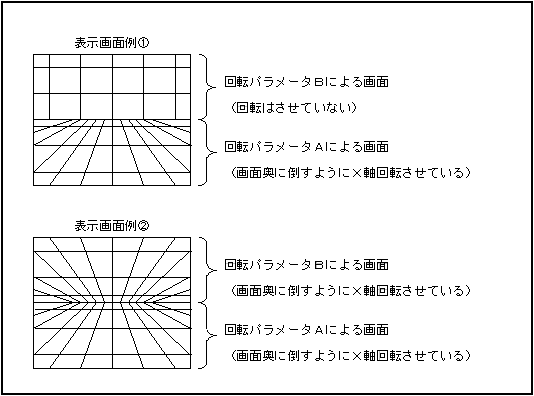
There are two rotation parameter tables on the rotation scroll surface, and RBG0 can switch between the two rotation parameters on one display screen. There are two ways to switch this rotation parameter: mode 2 and mode 3. Figure 15.3 is an example of a screen that can be displayed only with RBG0, and these two examples can be displayed in either mode 2 or mode 3. This display screen example is used to explain the characteristics of each mode.

Figure 15.3 Example display screen of RBG0
● Mode 2
In the rotation parameter mode 2, switching is determined based on the value of the most significant bit of the coefficient data read from the coefficient table for rotation parameter A. Therefore, when reading dot by dot from the coefficient table for rotation parameter A, it is for rotation parameter B. It cannot be read dot by dot from the coefficient table of. That is, when the screen according to the rotation parameter A is rotated by two or more axes, the screen according to the rotation parameter B cannot be rotated by other than the Z axis. In the case of the display screen example shown in Fig. 15.3, the screen example ① can be rotated around the center of the screen, but the screen example ② cannot be rotated around the center of the screen.
Further, since the coefficient data when rotating on the X-axis and the Y-axis is obtained from the Z value of the screen, the boundary line between the screen according to the rotation parameter A and the screen according to the rotation parameter B in the screen example ① of FIG. The advantage is that the judgment can be made at the same time as the coefficient data is obtained.

● Mode 3
In rotation parameter mode 3, switching is judged in the rotation parameter window, so coefficient data can be read dot by dot from both the coefficient table for rotation parameter A and the coefficient table for rotation parameter B. That is, the screen according to parameter A and the screen according to rotation parameter B can be rotated simultaneously on two or more axes. In the case of the display screen example shown in Fig. 15.3, both screen example (1) and screen example (2) can be rotated around the center of the screen.
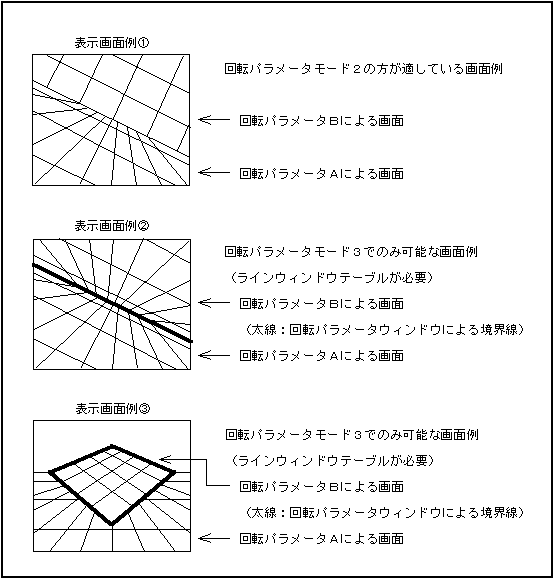
However, in this mode, it is necessary to set the rotation parameter window, and when rotating the display screen example shown in Fig. 15.3 centered on the center of the screen, the rotation parameter switching boundary line must be set in the line window table. not. Therefore, when displaying a screen like screen example ①, I think that rotation parameter mode 2 is more suitable.
In the screen example of Fig. 15.3, the boundary of the rotation parameter is a line, but if this boundary is cut out from the screen by the rotation parameter B and the movements are matched, it seems that there are two independent rotation surfaces. You can also display the screen.

Figure 15.4 Example of display screens for rotation parameter modes 2 and 3
■ Proposal for using sprite window and color calculation window
If you want to display sprites like translucent light on the picture on the left in Fig. 15.5, you have to change the frame buffer data to RGB data in order to perform translucent operation between sprites in VDP1. Don't. However, if the frame buffer data is RGB data, it is possible to make all the sprites of the RGB data and the scroll surface semi-transparent, but it is not possible to make only the sprites such as light semi-transparent. Such pictures can be displayed by using a combination of the sprite window and the color calculation window. However, all sprite data must be in palette format.

Figure 15.5 Example of sprite display to make it translucent
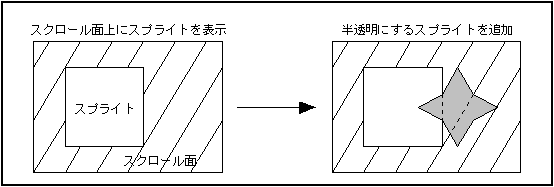
To display a translucent sprite using the sprite window and the color calculation window:

1)

Set the sprite type of VDP2 to types 2-7 and enable the sprite window. Also, set the color operation enable condition so that all sprites are enabled.

2)

Enables the sprite window bit of the color arithmetic window and enables the outside of the sprite window.

3)

Enable the line color screen for sprites and scroll planes and set the color of the translucent sprites for the line color screen data.

4)

Set the color operation enable bit and color operation ratio register of the sprite and scroll plane.

5)

Use the MSB on function of VDP1 to draw the sprite that you want to make semi-transparent.

Since only the outline of the character is drawn for the sprite using the MSB on function, it is necessary to specify the picture (color data) of the sprite that you want to make semi-transparent on the VDP2 side. The above procedure used a monochromatic line color screen to specify it, so translucent sprites can only be monochromatic. However, if you use the scroll surface instead of the line color screen, it is not impossible to do anything other than single color.

■ Proposal for using color calculation ratio for sprites
If you want to make the polygons (sprites) displayed in the back darker or brighter in 3D games, you may use the color calculation function of VDP1 (Gouraud shading mode), but use the color calculation function of VDP1. And the drawing time will be long. Therefore, I will introduce a plan to use the color calculation function of VDP2 to perform pseudo color calculation in sprite units without using the color calculation function of VDP1. This proposal uses the fact that the color calculation ratio of sprites can be selected from 8 types for each sprite in the color calculation function of VDP2, so there are the following restrictions.

In this usage plan, the 3 bits corresponding to the color calculation ratio of the color bank data in the command table of VDP1 are changed to 8 types depending on the position (Z value) in the depth direction of the polygon (sprite), and the line of VDP2. Color calculation is performed at the specified ratio with the color screen (single color). An example of the setting procedure is as follows.

(1)

Set the sprite type to one that has 3 bits for the color calculation ratio (for example, type 0), and set the color calculation enable condition (for example, enable only when the priority number is 4) so that the color calculation is performed only for the sprite that you want to perform the color calculation. To do. It also enables the line color screen for sprites and enables color operations for sprites.

address +0 +2 +4 +6 +8 + A + C + E
25F800E0H 1400 0000 0000 0000 0020 0000 0040 0000

(2)

Set the sprite priority number register to a value that meets or does not meet the color calculation enable condition (for example, 4 for sprite 0 and 5 for sprite 1).

address +0 +2 +4 +6 +8 + A + C + E
25F800F0H 0504 0000 0000 0000 0203 0000 0000 0000

(3)

In the color calculation ratio register for sprites, set the ratio in 8 steps (for example, make the ratio of the second screen smaller from sprite 0 to sprite 7).
address +0 +2 +4 +6 +8 + A + C + E
25F80100H 1c1f 1418 0c10 0408 0000 0000 0000 0000

(Four)

Set the color RAM address (for example, address 0) in which the color (for example, black) to be calculated with the sprite is stored in the VRAM address specified in the line color screen table address register (for example, the address is 7FFFC address for a single color). ..

address +0 +2 +4 +6 +8 + A + C + E
25F800A0H 0000 0000 0000 0000 0003 fffe 0003 ffff ← VDP2 register 25E7FFF0H XXXX XXXX XXXX XXXX XXXX XXXX 0000 0000 ← VRAM 
25F00000H 0000 XXXX XXXX XXXX XXXX XXXX XXXX XXXX ← Color RAM

(Five)

It changes depending on the position in the depth direction of the polygon that draws the value of 3 bits corresponding to the color calculation ratio of the color bank in the command table of VDP1 and 1 bit in the priority bit above it, for a total of 4 bits (for example). Make the value smaller as it is located in the back).
Color bank data Depth position 0100 0XXX XXXX 0000 Foremost side (no color calculation)
0011 1XXX XXXX 0000 ↑
0011 0XXX XXXX 0000
0010 1XXX XXXX 0000
0010 0XXX XXXX 0000
0001 1XXX XXXX 0000
0001 0XXX XXXX 0000
0000 1XXX XXXX 0000 ↓
0000 0XXX XXXX 0000 The innermost side (becomes black)

Whereas VDP1 color calculation (Gouraud shading mode) adds or subtracts the specified offset value, VDP2's color calculation function makes it semi-transparent with the specified color (line color screen) at a specified ratio. So you can't get the exact same image. However, it seems that a similar effect can be obtained by appearance.

■ Proposal for using normal shadow and MSB shadow
There are two types of sprites that become shadows with the shadow function: normal shadows and MSB shadows. Each shadow sprite has its own characteristics and must be used in a suitable way.

<Normal shadow>
  1. A shadow sprite character is required to obtain fixed data
  2. Shadows can only be added to the scroll surface
  3. Drawn as a normal sprite on VDP1
  4. There are no restrictions on sprite types
  5. Unlimited sprite color mode

<MSB Shadow>
  1. Normal sprite character data can be diverted
  2. You can add shadows to both sprites and scroll planes
  3. If you want to add shadows to both the sprite and the scroll surface, you need to use the MSB on function of VDP1 and the drawing time will be long.
  4. Sprite type must be type 2-7
  5. Sprite data must be in palette format only

For example, use normal shadows when the shadow of a person (sprite) seen from the side is on the ground (scroll surface), and the shadow of an airplane (sprite) seen from above is on the ground (scroll surface) or building (sprite). ) Is used for scenes with MSB shadows.
MSB shadows can also be used when you want to halve the brightness of a palette-style sprite character, without the need to use the VDP1's MSB on feature. Since the MSB of the color bank data of the command table is written as it is for the MSB of the sprite data in the palette format drawn by VDP1, the MSB of the color bank data of the sprite whose brightness should be halved should be set to 1.


BackForward
HARDWARE ManualVDP2 User's ManualChapter 15 How to use VDP2
Copyright SEGA ENTERPRISES, LTD., 1997