PROGRAMMER'S GUIDEVirtual CD system
BackForward
Virtual CD System User's Manual

2. Setup


1. Main functions of VCD I / F board

The VCD I / F board (RT-V1A) communicates commands and messages between the PC compatible machine and the CD block (RT-V1B) in the target box, and the CD-ROM data from the PC compatible machine to the CD block. , ISA expansion board for PC compatibles that sends out CD-DA data, etc.

  1. Communication with the CD block Receives a command from the CD block, performs the specified processing according to its contents, and returns the status to the CD block.

  2. Communication with the PC compatible machine From the commands from the CD block, the necessary commands are extracted and sent to the PC compatible machine. On the other hand, the PC compatible machine itself returns data as needed.

  3. Data reception from the PC compatible machine When the PLAY command is sent to the PC compatible machine, the PC compatible machine prepares CD-ROM data, CD-DA data, or R to W subcode data as needed. , The VCDI / F board receives these data by the DMA controller on the board.

  4. Sending data to a CD block The data captured in step 3 is scrambled, converted to a serial data format, and sent.


2. Data transfer speed

Only when transferring CD-ROM data, two transfer speeds, standard speed and double speed, are set according to the command sent from the CD block.


3. Jumper pin settings

[important]
For VCD I / F board

  1. ISA-IRQ settings (J3)

  2. ISA-DMA setting (J4)

  3. I / O address setting (J5)

  4. Diag setting (J6)

There are 4 jumper pins.

If the three function settings (J3) , (J4) , and (J5) overlap with those already set on your PC compatible machine, the virtual CD will not start up or the PC compatible machine will hang. It may cause troubles such as.

After understanding each setting of the PC compatible machine, change the following settings only when the VCD I / F board settings must be changed from the default state, for example, when it overlaps with the DMA channel of the SCSI board. to hold. In this case, you also need to change the value of the environment variable. If you install with the default settings at the time of shipment, you do not need to set environment variables after starting up a PC compatible machine. For the procedure, refer to 5.1 Preparation for startup.

(1) ISA-IRQ settings (J3)
Select the interrupt request number for the PC by shorting with a jumper. The default is set to IRQ10.

 1-2 pin
 IRQ4 (00)
 3-4 pins
 IRQ3 (01)
 5-6 pins
 IRQ10 (02)
Default
 7-8 pin
 IRQ11 (03)
 9-10 pins
 IRQ12 (04)
 Pins 11-12
 IRQ15 (05)

(2) ISA-DMA settings (J4)
Select the DREQ and DACK signal numbers for performing DMA transfer with the PC by shorting with a jumper. The default is set to DREQ5 / DACK5.

 1-2 pin & 3-4 pin
 DREQ5 / DACK5 (00)
Default
 5-6 pin & 7-8 pin
 DREQ6 / DACK6 (01)
 9-10 pin & 11-12 pin
 DREQ7 / DACK7 (02)

(3) I / O address setting (J5)
Select the I / O address of the I / F board as seen from the PC compatible machine by shorting with a jumper. The default is set to 340H.

 1-2 pin & 3-4 pin & 5-6 pin
 340H (00)
Default
 3-4 pin & 5-6 pin
 350H (01)
 1-2 pin & 5-6 pin
 3E0H (02)
 5-6 pins
 300H (03)
 1-2 pin & 3-4 pin
 310H (04)
 3-4 pins
 320H (05)
 1-2 pin
 330H (06)
 open
 370H (07)

(4) Diag setting (J6)
The Diag setting function of (J6) is used when manufacturing the board. You can leave it open.


4. Installation and connection to a PC compatible machine

(1) What to prepare

(2) Setup
Unpack the VCD I / F card (RT-V1A) and securely insert it into the expansion slot of the PC compatible machine you have prepared.

Connect the VCD I / F board connector to the virtual CD I / F connector of the SEGA SATURN programming box with the included virtual CD I / F cable. Set up the programming box and ICE according to the instructions in their respective manuals.


5. Execution with sample data

Check the operation of the set up virtual CD emulator.
In the following description, [ENTER] on the command line you enter means to press the carriage return key. Also, △ means to separate by a space. Others The part surrounded by [] indicates the key on the keyboard.

[Procedure 0-a]
Install the VCD I / F board on your PC. At this time, check the value of the next jumper number and make a note of it.

If the VCD I / F board is already installed, perform [Step 0-b]. Also, at this time, you may not need to set the environment [Step 1]. Read the instructions in [Procedure 1].

[Procedure 0-b]
Next, turn on the PC compatible machine and wait for MS-DOS to start up.
[Result] When MS-DOS starts up, the MS-DOS prompt appears.

Once MS-DOS is up, proceed to the next step.

5.1 Preparation for booting

Since it does not work in Japanese mode, set DOS to English mode. Type the command as follows.

[step 1]


C: \> CHEV △ US [ENTER]
    ~~~~~~~~~~~~~~~

If you are in Japanese mode, the screen will flash and you will be prompted at the top of the screen.

Next, set the environment variable VCDIO.
However, if you are already using a virtual CD emulator on that PC compatible machine, this setting may be set automatically when MS-DOS starts up, check with the person who was using it until then. please do.
If it seems to be set, skip this step and start from "Step 3".

The value of the environment variable VCDIO must reflect the VCD I / F board settings, as described in 3. Jumper Pin Settings.
The example sets the default value for the VCD I / F board.

Type the following MS-DOS command.

[Procedure 2]


C: \> SET △ VCDIO = 020000 [ENTER]
    ~~~~~~~~~~~~~~~~~~~~~~~~

If it is not consistent with the VCD I / F board, the virtual CD emulator will not work properly. Also, please note that PC compatibles may hang in some cases.

If the jumper setting is set to a value other than the default due to the convenience of a PC compatible machine, the value of the environment variable will be different.
For example, if the interrupt number 01, the channel number for DMA transfer is 02, and the I / O address of the VCD I / F board is set to 03, set the environment variables as follows.


C: \> SET △ VCDIO = 010203 [ENTER]
    ~~~~~~~~~~~~~~~~~~~~~~~~

Install the sample program attached to the virtual CD emulator on a PC compatible machine.

Create a directory.

[Procedure 3]


C: \> MD △ MYDIR [ENTER]
    ~~~~~~~~~~~~~~~~
C: \> CD △ MYDIR [ENTER]
    ~~~~~~~~~~~~~~~~

Copy the Disk.1 files to that directory.


C: MYDIR> COPY △ A: *. * [ENTER]
        ~~~~~~~~~~~~~~~~~~~

Create sound data using the sample data generation utility VCDMKDAT.


C: MYDIR> VCDMKDAT [ENTER]
        ~~~~~~~~~~~~~~~

Two sound data files used for the following checks are created in the MYDIR directory.

5.2 Start and stop

Start the virtual CD emulator. Type the command as follows.

[Procedure 4]

C: MYDIR> VCDEMU △ JVC [ENTER]
        ~~~~~~~~~~~~~~~~~~

The virtual CD emulator starts and the screen is displayed.
The name of the specified disk image file, CD configuration information file, script file, and log information file is displayed on the screen.
If the log information file is not specified, "No Log File" is displayed.

The virtual CD emulator is waiting for a keystroke to confirm the message. When pressed, proceed to the next.

[Procedure 5]

Press [ENTER] or [ESC].
The program will start reading the files needed for execution.

If loaded correctly,

[result]

=========== Open New File =****. Dat ===============
=========== All Data has been Read ================
=========== PAUSE2 ================================

It is displayed as.

The operation mode display in the dialog box at the top right of the screen should be Direct. The operation mode is "Direct DOS file access".
After this state, the operation from the target box will be the main operation.

[Procedure 6]
Launch the Sega Saturn program from ICE.

[Procedure 7]
Confirm that "VIRTUAL CD CHECK PRGRAM" is displayed on the Sega Saturn screen and the program has started normally.

[Procedure 8]
Follow the instructions displayed on the screen below to operate the pads and check that the CD-DA playback demo ends.

■ How to end

[Procedure 9]
Press [SPACE] on a PC compatible machine running the virtual CD.

[Result] "Menu" on the top bar is highlighted.

When the cursor is [LEFT] or [RIGHT], "Menu" or "Help" is highlighted alternately, but make sure that Menu is highlighted.

[Procedure 10]
Press [ENTER] or the [DOWN] key of the cursor.

[Procedure 11]
Use the [DOWN] key to highlight the last menu item Exit.

[Procedure 12]
Press the [ENTER] key.

This completes the virtual CD emulator.

5.3 Sample data specifications

■ File structure

 JVC.SCR
Sample script
 JVC.PRM
PRE / BUILD startup parameter file
 PAT_1.DAT
10KBYTE increment data
 PAT_10.DAT
130KBYTE inclusion data
 JVC.RTI
PRE / BUILD output information file
 JVC.PVD
PRE output information file
 JVC1.ABS
Ver. 1.02 Small sample program
 JVC1.INI
Sample execution command file
 SYSTBL.TSK
 SDDRV.TSK
Sound initialization file
 NEWMAP.BIN
 VCDMKDAT.EXE
Create two sound data files in the current directory.
Each has a data volume of about 1.4 MByte.

■ Check items

Check items are

There are 3 items.
The CD-ROM test is normal if a COMPLETE message is displayed for each item.
CD-DA is normal if the sound of sine wave (about 440Hz, -10dB) and square wave (about 440Hz, -10dB) is reproduced according to the message.
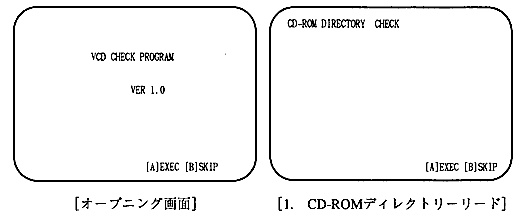
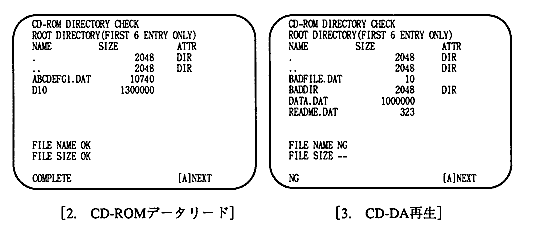
■ Basic operation method

The operation is performed only with the A and B buttons on the pad. The A button executes the test item. Press the A button to move to the next item. If you do not want to execute the item, press the B button. Press the S button to always return to the opening.

[Opening screen]
Press the A button to move to the first test item.

[1.CD-ROM directory read]
Displays directories in ISO9660 format. Only the first 8 entries in the root directory (effectively 6 entries because you and your parents are included) are displayed. It also displays directory attributes.
An OK message is displayed when the file name and size are specified.
When the check is complete, COMPLETE will be displayed in the bottom line. If they are different and if they cannot be read, an error message will be displayed.

[2.CD-ROM data read]
Since we know the contents of ABCDEFG1.DAT and D10, we will check by reading the data and comparing them. When finished, COMPLETE is displayed on the bottom line, waiting for A button input.

[3.CD-DA playback]
Play the sound using the data of tracks 2 and 3. Play some playback automatically.

The TNO, ATIME, and status are always displayed on the screen.
When finished, COMPLETE is displayed on the bottom line, waiting for A button input.


6. Switching between virtual CD and CD drive

In order to switch between the virtual CD and the CD drive, there is a changeover switch between the CD block and the CD drive as shown in Fig. 1. Both the virtual CD and the CD tray of the CD drive must be open when you operate this switch. To open the virtual CD, select the menu on the VCD emulator.

If you operate the changeover switch without doing this, there will be an inconsistency between the track information held on the target machine and the CD drive (VCD).


BackForward
PROGRAMMER'S GUIDEVirtual CD system
Copyright SEGA ENTERPRISES, LTD ,. 1997