PROGRAMMER'S GUIDEVirtual CD system
BackForward
Virtual CD System User's Manual

Chapter 1 Overview


1.1 Overview of Virtual CD Emulator

The virtual CD emulator is an MS-DOS program that runs on a PC compatible machine.
By communicating with the VCD I / F board inserted in the expansion slot of the PC compatible machine, it receives the CD access command sent from the target box, accesses the MS-DOS file according to the command, and accesses the CD drive. Is realized in a pseudo manner.

The following is a brief description of the main features of the virtual CD emulator.

The following three types of MS-DOS file formats can be accessed.

(1) A collection of data files before becoming a CD image
This is an MS-DOS file that contains the data before creating the CD image. (Hereafter, it is simply called "data file".)
The virtual CD emulator determines the data file according to the access position of the CD access instruction received from the VCD I / F board, edits it so that it becomes a CD image, and sends it to the VCD I / F board.
As a result, the target box can receive data in the same way it entered from the CD drive. Emulation in this case is called "direct DOS file access".
In this case, if you have the data to create a CD image, you can start emulation with a simple pre-processing, but since the data is sent while editing, it will be played back at the same timing as the input from the original CD drive. You can not. Therefore, the channel interleaving function that requires complicated disk access cannot be supported in this operation mode. Also, the MPEG function cannot be supported either.

(2) A file containing the CD image as it is
There are various format standards for CDs, and a file in which data is edited and written in a shape and length according to the standard is called a "CD image file". The virtual CD emulator sends this "CD image file" to the I / F board as it is. To do this, you need to create a CD image before you start emulation.
This case is called "real-time emulation".
In this operation mode, complicated sector placement such as channel interleaving is executed before the emulation starts, so there are no functional restrictions like "Direct DOS file access" in the previous section.

(3) CD image and data file for partial correction
This is an emulation that modifies only one data file, plays the modified data file, and performs a playback test using the CD image file for the other parts. The emulation in this case is called "partial update of the CD image".

The virtual CD emulator determines which of these emulations to perform based on the presence or absence of files when the virtual CD emulator is started and the parameters on the command line for starting the virtual CD emulator.
The file extension is used to identify the existence of the file, and its body part is specified by the parameter on the command line for starting the virtual CD emulator.

To perform CD emulation, a virtual CD emulator program or a preprocessing program that creates a CD image is required.

1.2 General work flow

This section describes the general procedure for emulating with a virtual CD emulator.
Before starting the virtual CD emulator, read the VCD I / F board edition and connect the cables. The terms described in the VCD I / F board edition are also used in this document, but they are not explained here as they are already understood.
In addition, the following settings on the VCD I / F board are required to operate the virtual CD emulator.

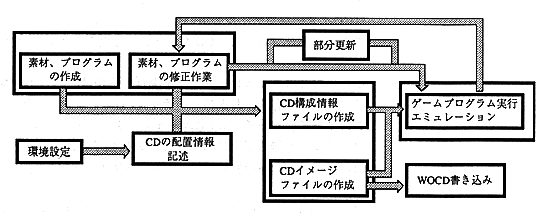
Figure-2. Rough work flow

The general flow of work is shown in Fig. 2, and the explanation of the figure is described below. In the next chapter, we will work with more specific examples.

(1) Environment settings
It is a work to assign the setting items of the VCD I / F board to the environment variable called VCDIO.
It must be consistent with the settings on the Virtual CD emulator program and the VCD I / F board. The required settings are the numbers of the three jumpers on the VCD I / F board. If there is a discrepancy between these values, the virtual CD emulator will not be able to interact with the VCD I / F board. This setting is determined when the board is installed on a PC compatible machine, so if you assign a value to the environment variable in AUTOEXEC.BAT at this time, it will be automatically automatically turned on every time the PC compatible machine is turned on. This preference will be made.

(2) Creation of materials, programs, etc.
Prepare the image data and programs to be placed on the CD in the form of MS-DOS files.

(3) CD placement information description
Specifies how to place MS-DOS files such as materials and programs on the CD.
The format for describing the structure of the CD is fixed, and you can enter according to this format using a text editor. This file is called a "script file" and its contents are called a "script".
Creating this script file will describe the CD placement information. How to create this script file is explained in " CD Builder User's Manual ".

(4) Creating a CD configuration information file
Create a CD configuration information file when performing "Direct DOS file access".
The CD configuration information file shows the correspondence between individual MS-DOS files and the access location (minutes, seconds, frame values) of the CD.
Start CD Builder XBLD.EXE for direct DOS file access and create a CD configuration information file.

(5) Creating a CD image file
Create a CD image file for "real-time emulation".
Launch CD Builder XBLD.EXE for real-time emulation and create a CD image file.

(6) Start the virtual CD emulator
After completing the steps (4) or (5) in the previous section, start the virtual CD emulator.
Whether (4) or (5) is started, the existence of the created file makes it possible to know what mode of emulation is to be performed.
After starting the virtual CD emulator, the operation on the target box side will be the main operation. With the virtual CD emulator, you just need to check the playback status or message.

(7) Correction work
As a result of emulation, if it is necessary to modify the material, program, etc., modify it using each creation tool.
For "Direct DOS file access", repeat step (4) ( if the modified file size is the same, you do not need to perform step (4)).
For "real-time emulation", repeat step (5) .

(8) Partial update of CD image
Partially update the CD image using VCDUTL.EXE.
There are two modes for partial CD image update: a mode in which the CD image file is directly rewritten, and a mode in which real-time emulation is performed using the CD image update information.


BackForward
PROGRAMMER'S GUIDEVirtual CD system
Copyright SEGA ENTERPRISES, LTD ,. 1997