 ★ PROGRAMMER'S GUIDE ★ MPEG library
the term | meaning |
|---|---|
MPEG buffer | Memory area managed by MPEG / Video LSI. |
Frame buffer | Area where the decoded image data is stored. It consists of multiple frame banks. It consists of 4 banks for normal resolution and 1 bank for high-definition resolution. |
Frame bank | The area where the image data for one picture of the MPEG video stream is expanded. |
VBV buffer | Area used to decode an MPEG video stream. It is allocated in the MPEG buffer. |
Display window | A rectangular area on the TV monitor where the MPEG video is output. |
Framebuffer window | A rectangular area set for the framebuffer. |
Bright spot | The smallest display unit on the display. |
Pixel | A display unit consisting of 2x2 bright spots at normal resolution and 1x1 bright spots at high-definition resolution. |
Image data | Decoded color data. 16 to the host area |
MPEG window | An object for controlling the display window and framebuffer window. |
MPEG video handle | An object for controlling MPEG video. |
MPEG still image handle | An object for controlling MPEG still images. |
MPEG handle | A generic term for MPEG video handles and MPEG still image handles. |
MPEG report | Data that represents the state of the MPEG system. |
Picture type | explanation |
|---|---|
I picture (Intra-coded Picture) | An image that can be decrypted only from your own information. Although the compression efficiency is poor, random access is possible if this image is inserted at regular intervals. |
P picture (Predictive-coded Picture) | An image that uses another already decoded picture (I, P) as the predicted image. |
B picture (Bidirectionally) | An image that uses two pictures (I, P) before and after as a prediction image. The compression efficiency is the best. |
Figure 2.1 Predictive relationship between pictures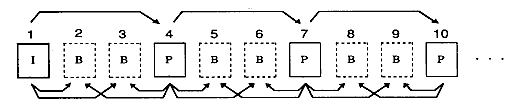
Figure 2.2 Order on CD-ROM and playback image order
★ PROGRAMMER'S GUIDE ★ MPEG library