PROGRAMMER'S GUIDEMPEG library
BackForward
MPEG library

5. MPEG window


5.1 MPEG window control

You can open a window to output to the area in the framebuffer. The control interface in this window makes it easy to create visual effects.

(1) Display window
Set the display window as a rectangular area that is actually displayed on the TV monitor.
For the VDP2 direct output method, specify the position and size with respect to the TV monitor. For the host transfer method, specify only the size because it is not displayed directly on the TV monitor.

(2) Frame buffer window
The display window outputs data for any rectangular area in the framebuffer. The rectangular area in this framebuffer is called the framebuffer window. The framebuffer window can be opened within the area of one framebank.

(3) Window control parameters
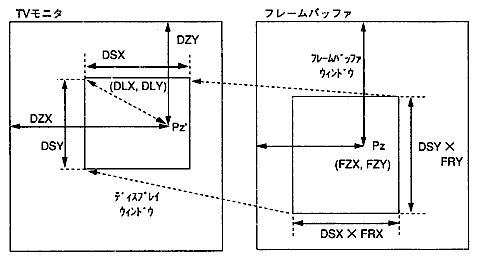
The control parameters for the display window and framebuffer window are as follows:

  1. Display window
    • Display reference position (DZX, DZY): Display reference position on the TV monitor
    • Display relative position (DLX, DLY): Coordinates relative to the display reference position
    • Display size (DSX, DSY): Size on TV monitor

  2. Framebuffer window
    • Zoom point (FZX, FZY): The reference position for display in the frame buffer.
    • Magnification (FRX, FRY): Magnification in X and Y directions

Set the position, size, and magnification of the frame buffer window so that the display reference position (Pz') and zoom point (Pz) overlap. In addition, any value can be specified for the magnification (FRX, FRY), and it is converted to the magnification that can be set by the LSI and set.
A conceptual diagram is shown below.

Figure 5.1 Display window and framebuffer window
The MPEG window control interface can achieve the following visual effects with few parameters. The parameters to be operated when executing the visual effect are shown below.

Table 5.1 Visual effects and control parameters
 Visual effects
 Parameters to control
 effect
 zoom
 FRX, FRY
 Fix the display window and zoom the displayed image.
 scroll
 FZX, FZY
 Moves the image left, right, up and down without changing the magnification.
 Move
 DZX, DZY
 Moves the display reference position without changing the zoom point.
 Peeping
 DLX, DLY
 You can peep at the image in the frame buffer while changing the relative position of the image display.
 wipe
 DLX, DLY, DSX, DSY
 The size of the display window changes without changing the magnification of the image.
 Expand
 DLX, DLY, DSX, DSY
FRX, FRY
 The size of the display window changes as the size of the image changes.

5.2 Precautions when using MPEG windows

(1) MPEG window display switch
There are the following restrictions regarding the display switch of the MPEG window.

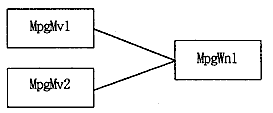
  1. Do not turn on the display switches of more than one VDP2 output window at the same time.
    Please connect and use as shown in the figure below.

(2) Host transfer output
When the image is transferred to the host and output, the number of pixels that is twice the frame buffer window size is output in the X direction due to the specifications of the MPEG system. To avoid this, it is necessary to set the display size to half and the magnification to 2 times in the X direction as shown in the example below.

/ * Outputs a 352 x 240 pixel image to the host at the same magnification * /
/ * Change display size * /
MPG_WnSetSize (mpgwn, (352/2), 240);

/ * Magnification setting * /
MPG_WnSetDispRatio (mpgwn, 2000, 1000);

/ * Host transfer output execution * /


BackForward
PROGRAMMER'S GUIDEMPEG library
Copyright SEGA ENTERPRISES, LTD., 1997