PROGRAMMER'S GUIDEMPEG library
BackForward
MPEG library

4. How to use the library


4.1 Library configuration

MPEG applications are expected to utilize the MPEG library and the stream system library.

Figure 4.1 Module configuration diagram


application


Stream system library


MPEG library

MPEG video is played in the following two steps.

(1) Stream system library
Reads data from the CD into the buffer.

(2) MPEG library
Decodes the data in the CD buffer and outputs it as image data.

Data is supplied from the stream system to the MPEG library through a CD buffer. Therefore, pass the stream handle generated by the stream system to the MPEG library. The MPEG library retrieves and decodes the data from this stream handle.
To use this library, you need to link the following libraries at the same time.

4.2 Capture the state of the MPEG system

The MPEG library needs to capture the latest state of the MPEG system in the CD block and update the internal state.
Therefore, call the MPG_CaptStat function at either of the following timings for each VSYNC to capture the state of the MPEG system.

  1. Clear the MPCM flag with a VBLANK-IN interrupt and wait for it to turn ON before calling.

  2. Call with VBLANK-OUT interrupt

caution
While executing the following functions, it is prohibited to execute the MPG_CaptStat function in interrupt processing.

《MPEG system control》

《Video playback》

《Still image playback》

4.3 VDP2 output mode

When outputting directly to VDP2, each function of the MPEG library is enabled at the falling edge of VSYNC. For information such as time code, you can get the information currently displayed.
Since it is difficult for the application software to obtain the VSYNC timing on this game machine, it is recommended to perform MPEG-related processing from the VBLANK-OUT timing.

Figure 4.2 Timing of processing at VDP2 output
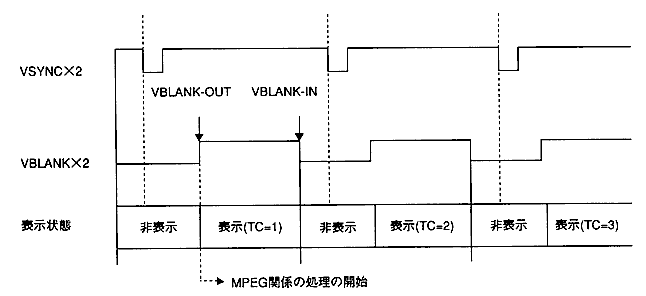
An example of processing
  1. Wait for VBLANK-OUT.
  2. Call the MPG_CaptStat function.
  3. Get the timecode.
  4. Get the collision data corresponding to the time code.
  5. Perform collision detection, etc., and make MPEG-related settings corresponding to the results.
  6. The setting of (5) becomes effective in the next frame.

4.4 Host transfer mode

The image data in the frame buffer is transferred to the host area by calling the MPG_WnTrans function. For example, you can animate a sprite's texture by opening a display window in the sprite's texture area and calling the MPG_WnTrans function periodically.

4.5 State transition

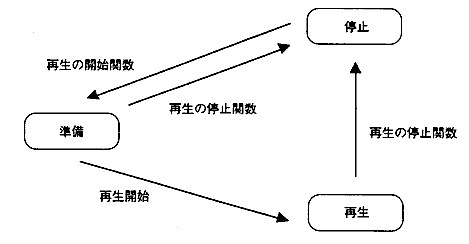
The MPEG system is controlled through the MPEG handle.
The MPEG handle holds the video and audio operating states. The operating status transitions as follows for both video and audio.
Use the following functions to start and stop playback.

  1. Playback start function
    • MPG_MvStart
    • MPG_SpStart

  2. Playback stop function
    • MPG_MvStop, MPG_MvStopVideo, MPG_MvStopAudio
    • MPG_SpStop

    Figure 4.3 State transition diagram of MPEG handle
  3. Playback stop function behavior
    1. If the decoder is initialized in the play stop function, the MPEG screen display will be set to ON in the library.
    2. Clear the VBV buffer in the MPG_MvStop function, MPG_MvStopVideo function, and MPG_SpStop function.
    3. When the video playback is stopped, the next stream is canceled for the MPEG system.

4.6 Hang up detection

The MPEG library provides functions for detecting MPEG / Video LSI hangs.
Hang-up detection is performed by calling the MPG_ResetHng function once and then calling the MPG_CheckHng function for each VSYNC.
If it hangs, stop MPEG playback and then start MPEG playback again. If this action does not recover, initialize it with the MPG_Init function.

4.7 User transfer function registration

In host transfer mode, you can register a transfer function that transfers image data.
The specifications of the transfer function are as follows.

[Form] Sint32 trFunc (void * dst, void * src, Sint32 nbyte)
[Input] dst: Transfer destination address src: Transfer source address nbyte: Number of transfer bytes [Function value] Error code
  1. dst contains the address of the transfer area set by the MPG_WnSetOutputMode function.
  2. The transfer function is called from the MPEG library when you execute the MPG_WnTrans function.
  3. To register the transfer function, use the MPG_WnEntryTrFunc function.
  4. By default, the DMA transfer function on the B-Bus by SCU is registered in the transfer function.
  5. The default transfer function times out in about 2 seconds if the DMA transfer is not complete.

4.8 Precautions for use

The main points to note when using this library are shown below.

(1) Restrictions during audio / video synchronous playback
Audio / Video Sync If you call the following function during playback, the audio and video will be out of sync.

MPG_MvSetVideoId

To avoid this, stop the video playback before executing the above function, and restart the playback with the MPG_MvStart function after executing the above function.

(2) Restrictions on how to stop audio / video playback
To stop playback during audio / video synchronous playback, call the MPG_MvStop function or perform the following procedure. Do not stop the video first.

  1. Call the MPG_MvStopAudio function.
  2. Make sure the audio is stopped by the MPG_MvGetAudioStat function.
  3. Call the MPG_MvStopVideo function.


BackForward
PROGRAMMER'S GUIDEMPEG library
Copyright SEGA ENTERPRISES, LTD., 1997
