Branch playback is the switching of the currently playing stream to another stream. By registering the MPEG handle when the next stream to be played is determined, the stream is switched to the next stream and played by the end of the current stream or the forced switching function. The timing of switching may be as follows.
When system end code is detected
When the EOR bit is detected
When the forced switch function is called
7.1 Clear buffer
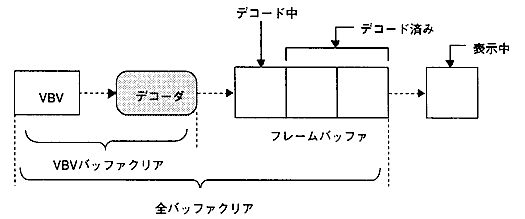
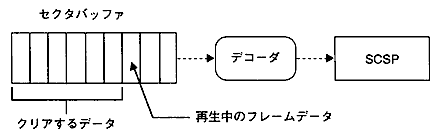
The decode buffer must be cleared in a timely manner for smooth branch playback. The video has a VBV buffer in front of the decoder and a framer behind it. Audio has a buffer for one sector in front of the decoder. Therefore, there are two buffers to be cleared, VBV buffer or VBV + frame buffer for video, and only the sector buffer for audio.
(1) For video
Target to clear
Figure 7.1 MPEG video buffer configuration
Clear timing
Clear immediately.
Wait for the start of decoding the I or P picture to clear it.
Due to the nature of the MPEG video stream, clearing the VBV buffer after waiting for the I or P picture to start decoding will result in a very clean connection. At other times, the response will be slightly better, but the same frame will be output or the frame will be skipped.