#include <machine.h>
#define _SPR3_ / * Using sprite 3D display library * /
#define SPR_3USE_DOUBLE_BUF / * Double buffer specification * /
#include "sega_spr.h"
#include "sega_scl.h"
#include "sega_int.h"

SprCluster model0;
SprCluster model1;

#define COMMAND_MAX 1000 / * Maximum number of commands * /
#define GOUR_TBL_MAX 1000 / * Maximum number of gouro tables * /
#define LOOKUP_TBL_MAX 1000 / * Maximum number of lookup tables * /
#define CHAR_MAX 100 / * Maximum number of characters * /
#define DRAW_PRTY_MAX 256 / * Maximum number of drawing priority blocks * /
SPR_2DefineWork (work2d, COMMAND_MAX, GOUR_TBL_MAX,
                                 LOOKUP_TBL_MAX, CHAR_MAX, DRAW_PRTY_MAX)
                                       / * 2D work area definition * /
#define OBJ_SURF_MAX 16 / * Maximum number of faces in object * /
#define OBJ_VERT_MAX 16 / * Maximum number of vertices in object * /
SPR_3DefineWork (work3d, OBJ_SURF_MAX, OBJ_VERT_MAX)
                                       / * 3D display work area definition * /
extern void vbStart (void); / * V-BLANK IN interrupt routine * /
extern void vbEnd (void); / * V-BLANK OUT interrupt routine * /
main ()
{
     set_imask (0); / * Enable interrupts * /

     SCL_Vdp2Init (); / * Scroll and priority initialization * /
     SCL_SetPriority (SCL_SP0 | SCL_SP1 | SCL_SP2 | SCL_SP3 | SCL_SP4 |
                              SCL_SP5 | SCL_SP6 | SCL_SP7,7);
     SCL_SetSpriteMode (SCL_TYPE1, SCL_MIX, SCL_SP_WINDOW);

     SPR_2Initial (& work2d); / * Initialize 2D sprite display * /

     SPR_3Initial (& work3d); / * Initialize 3D sprite display * /

     INT_ChgMsk (INT_MSK_NULL, INT_MSK_VBL_IN | INT_MSK_VBL_OUT);
                                       / * Disable V-BLANK interrupts * /
     INT_SetFunc (INT_SCU_VBLK_IN, & vbStart);
                                       / * Registration of V-BLANK IN interrupt routine * /
     INT_SetFunc (INT_SCU_VBLK_OUT, & vbEnd);
                                       / * Registration of V-BLANK OUT interrupt routine * /
     INT_ChgMsk (INT_MSK_VBL_IN | INT_MSK_VBL_OUT, INT_MSK_NULL);
                                       / * Enable V-BLANK interrupt * /

     SPR_2FrameChgIntr (0xffff); / * Indefinite frame change interval * /
                                       / * Set to mode * /

     SPR_3SetTexture (texture); / * Set texture data for 3D * /

     for (;;) {
           --------------- / * Scroll dataset * /

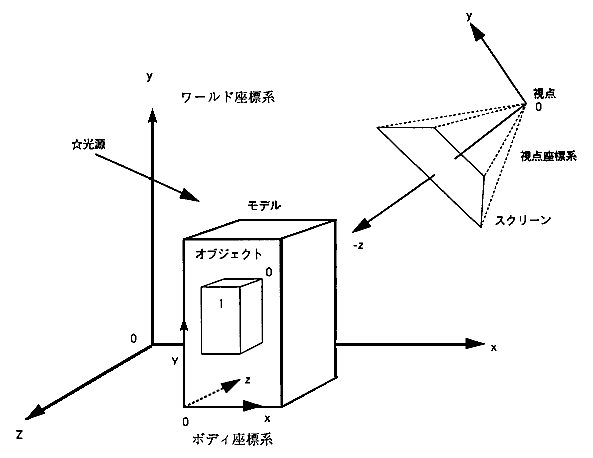
          SPR_3SetLight (...); / * Set 3D light source * /
          SPR_3SetView (...); / * Set 3D viewpoint * /

          SPR_2OpenCommand (SPR_2DRAW_PRTY_ON);
                                       / * Open sprite command write * /
          SPR_2SysClip (SPR_2MOST_FAR, & xy);
                                       / * System clip area command * /
          SPR_2LocalCoord (SPR_2MOST_FAR, & xy);
                                       / * Local coordinate command * /

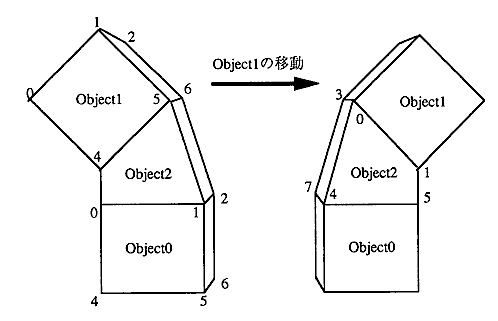
          SPR_3moveCluster (model0, ...); / * Move the root cluster of 3D model 0 * /
          SPR_3DrawModel (model0, ...); / * Register 3D model 0 * /

          SPR_3moveCluster (model1, ...); / * Move the root cluster of 3D model 1 * /
          SPR_3DrawModel (model1, ...); / * Registration of 3D model 1 * /
                            ..
                            ..
                            ..
          SPR_3Flush (); / * 3D sprite command set * /
          SPR_2CloseCommand (); / * Close sprite command write * /
          SCL_DisplayFrame (); / * Wait for V-BLANK interrupt, * /
                                       / * Sprite display and scrolling * /
      }
}

−V Blank processing routine (source file different from the above main) −

#include <machine.h>
#include "sega_spr.h"
#include "sega_scl.h"

#pragma interrupt (VbStart)
#pragma interrupt (VbEnd)

void VbStart (void)
{
     SCL_VblankStart (); / * V blank start VDP interrupt processing * /
     -------- / * Other V blank start processing * /
 }

void VbEnd (void)
{
     SCL_VblankEnd (); / * V blank end VDP interrupt processing * /
      -------- / * Other V blank end processing * /
}
Since the Z sort of polygons in the viewpoint coordinate system of the sprite 3D display library is performed using the sprite command priority drawing function of the VDP1 extension processing library (2D library), the priority drawing is turned on in the SPR_2OpenCommand () routine to perform the Z sort of polygons. Must be (SPR_2DRAW_PRTY_ON).