PROGRAMMER'S GUIDECD communication I / F (CD part)
BackForward
CD Communication Interface User's Manual

CD drive


4.1 CD drive state transition

(1) CD drive status
The status of the CD drive is shown in Table 4.1.

Table 4.1 CD drive status
 Status
 explanation
 <BUSY>
 During state transition
 <PAUSE>
 Pausing (pause)
 <STANDBY>
 Standby (drive stopped state)
 <PLAY>
 Playing a CD
 <SEEK>
 Seeking
 <SCAN>
 Scan playback
 <OPEN>
 The tray is open
 <NODISC>
 No disk
 <RETRY>
 Read retry processing in progress
 <ERROR>
 Read data error occurred
 <FATAL>
 A fatal error has occurred (requires stop command)

(2) Types of drive commands
Table 4.2 shows the commands (drive commands) that change the state of the CD drive.

Table 4.2 Drive commands
 Drive command
 Corresponding function
 CD block initialization
 CDC_CdInit
 Open tray
 CDC_CdOpen
 play
 CDC_CdPlay
 seek
 CDC_CdSeek
 Pause
 CDC_CdSeek
 stop
 CDC_CdSeek
 scan
 CDC_CdScan

  1. At the time of soft reset, the initialization of the CD block does not work as a drive command. Even if a soft reset is executed in the <OPEN> and <NODISC> states, the state does not change.
    However, except in the <OPEN> and <NODISC> states, the CD drive is paused at the current position.

  2. Drive commands other than tray open also serve as tray close commands.

(3) Issuing a drive command
  1. The drive command response always returns <BUSY> unless it is REJECT.

  2. As a general rule, commands issued later will be executed with priority. If issued continuously, the command issued earlier may be overwritten.
    To ensure execution, do not issue until a state other than <BUSY> is entered.

4.1.1 CD drive state transition diagram

(1) State transition diagram of normal system
Figure 4.1 shows the state transition diagram of the CD drive in a normal system.

Figure 4.1 CD drive state transition diagram (normal system)
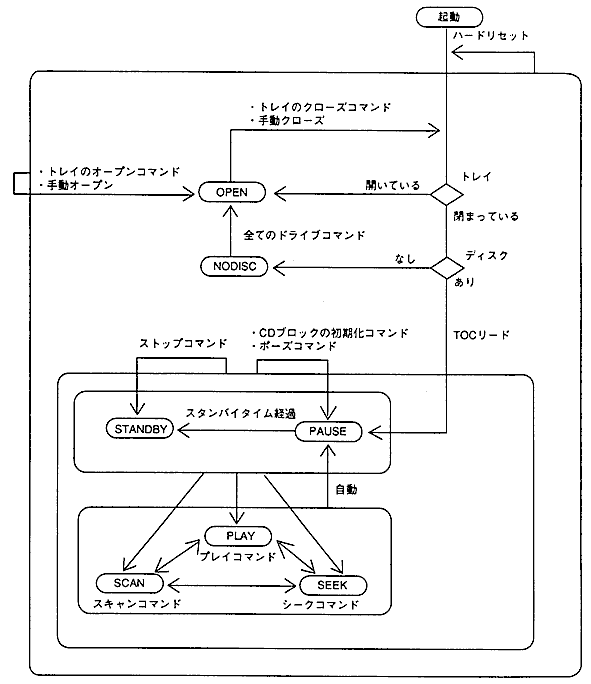
  1. After the TOC read, it will be in the <PAUSE> state at the 0th frame of 2 seconds (FAD = 150 = 96H).

  2. During the state transition (on the arrow line), it will be in the <BUSY> state.

  3. The tray close command refers to a drive command other than tray open.
    After the tray is closed, it will transition to the state corresponding to each command.
    Example: A play command in the <OPEN> state will be in the <PLAY> state after the tray is closed.

(2) Error system state transition diagram
Figure 4.2 shows the state transition diagram of the CD drive in the error system, and Table 4.3 shows the state description.

Figure 4.2 State transition diagram of CD drive (error system)
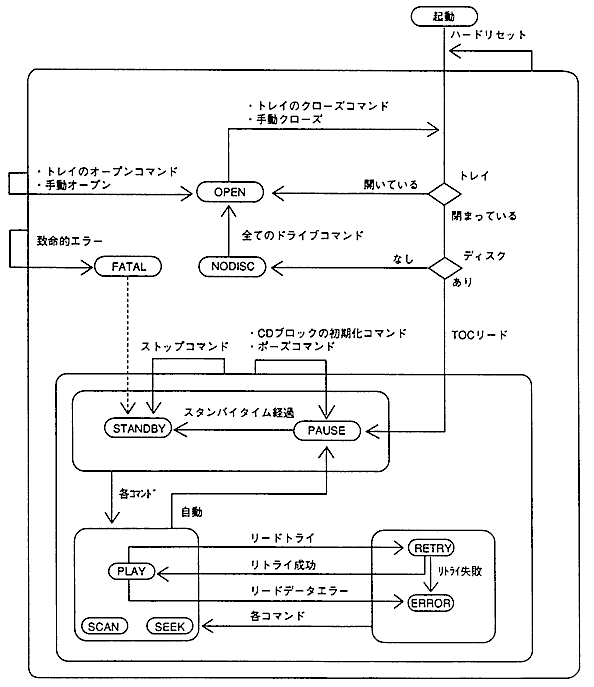
Table 4.3 Error-related status explanations
 Status
 explanation
 Internal state
 <RETRY>
 If the retry succeeds, it becomes <PLAY>, and if it fails, it becomes <ERROR>.
 <SEEK>
 <ERROR>
 The state does not change until the next drive command is issued.
 <PAUSE>
 <FATAL>
 Issue a stop command and try to recover.
If it can be restored, it will transition to <STANDBY>.
 <STANDBY>

The internal state refers to the state equivalent to the internal operation of the CD block.

4.1.2 CD drive state transition table

Table 4.4 shows the state transition table of the CD drive. For example, if you issue a pause command in the <PLAY> state, it will be in the <PAUSE> state.

Table 4.4 CD drive state transition table
 Operation
Status
 Automatic
 command
 Initialize
 Tray open
 play
 Seek
 Pause
 stop
 scan
 <BUSY>
 There is a change
 <PAUSE>
 <OPEN>
 <PLAY>
 <SEEK>
 <PAUSE>
 <STANDBY>
 <SCAN>
 <PAUSE>
 <STANDBY>
 <PAUSE>
 <OPEN>
 <PLAY>
 <SEEK>
 <PAUSE>
 <STANDBY>
 <SCAN>
 <STANDBY>
 <PAUSE>
 <OPEN>
 <PLAY>
 <SEEK>
 <PAUSE>
 <STANDBY>
 <SCAN>
 <PLAY>
 <PAUSE>
 <PAUSE>
 <OPEN>
 <PLAY>
 <SEEK>
 <PAUSE>
 <STANDBY>
 <SCAN>
 <SEEK>
 <PAUSE>
 <PAUSE>
 <OPEN>
 <PLAY>
 <SEEK>
 <PAUSE>
 <STANDBY>
 <SCAN>
 <SCAN>
 <PAUSE>
 <PAUSE>
 <OPEN>
 <PLAY>
 <SEEK>
 <PAUSE>
 <STANDBY>
 <SCAN>
 <OPEN>
 <PAUSE>
 <OPEN>
 <PLAY>
 <SEEK>
 <PAUSE>
 <STANDBY>
 <SCAN>
 <NODISC>
 <OPEN>
 <OPEN>
 <OPEN>
 <OPEN>
 <OPEN>
 <OPEN>
 <OPEN>
 <RETRY>
 There is a change
 <PAUSE>
 <OPEN>
 <PLAY>
 <SEEK>
 <PAUSE>
 <STANDBY>
 <SCAN>
 <ERROR>
 <PAUSE>
 <OPEN>
 <PLAY>
 <SEEK>
 <PAUSE>
 <STANDBY>
 <SCAN>
 <FATAL>
 Indefinite
 Indefinite
 Indefinite
 Indefinite
 Indefinite
 Indefinite *
 Indefinite
"-" Is unchanged.
* If you issue a stop command in the <FATAL> state, you may be able to return to the <STANDBY> state.

(1) Issuing a command in the <BUSY> state
The command is accepted even in the <BUSY> state, but it is not always executed immediately. For example, if the tray is open or closed, it will not be executed until the operation is completed. (However, the tray open command is executed immediately.)

(2) Opening and closing the tray

  1. As a general rule, the tray open command is executed immediately in any state.

  2. If it is not an automatic opening / closing type, the tray opening / closing command will be <BUSY> until it is manually executed.

  3. Commands in the <OPEN> state (excluding tray open) transition to each state after the tray is closed.

  4. When the tray is closed, if TOC cannot be read, it will be <NODISC>. (Even if a disc is included)

(3) Via state
  1. When using a command, all go through the <BUSY> state.

  2. When transitioning to the <PLAY> or <SCAN> state, it may go through the <SEEK> state.

(4) In case of multi-session
  1. Lead the TOC for the final session.

  2. After the TOC read, it will be in the <PAUSE> state at the 0th frame 2 seconds from the start position of the final session.

(5) Restoration processing of <FATAL> state
To perform the recovery process, wait until the SCDQ flag is updated twice after issuing the stop command. Until then, do not issue the following drive command:
You may also be able to return from the <FATAL> state by opening and closing the tray.

4.2 CD drive behavior

(1) Frame address in <PLAY> state
The frame address (current FAD) notified during CD playback refers to the sector being read.
The current FAD sector is not stored in the CD buffer and cannot be retrieved.
The host can access up to the sector immediately before the current FAD. (For CD-ROM)

Figure 4.3 Sectors pointed to by the current FAD
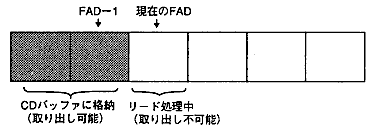
When playback is finished, FAD = playback end position + 1.
(It also holds when the playback end position is the disc end, and FAD refers to the readout area.)

(2) Transition from <PLAY> state and storage of sectors
When transitioning from the <PLAY> state to another state, it is uncertain whether the sector being read is stored. If it transitions to a state other than <BUSY>, the sector to be stored is fixed.
If you issue a pause command in the <PLAY> state and transition to the <PAUSE> state, the FAD of the storage sector + 1 will be notified in the same way as in (1).

(3) Repeat processing for CD playback
As shown below, repeat processing is performed when the current position goes out of the playback range during CD playback.

Both the number of repeat notifications (0H to EH) and the maximum number of specified times (0H to FH) are expressed in 4 bits.
The procedure for repeat processing (judgment with / without repeat) is shown below.

  1. If the number of repeats <the maximum number of repeats, repeat.
    Seek to the start position and enter the <PLAY> state.
    At that time, if the number of repeats <EH (14 times), the number of repeats is increased by one.

  2. If the number of repeats ≥ the maximum number of repeats, no repeat is performed.
    At the current position, the <PAUSE> state is set, and the PEND flag of the interrupt cause register is set to 1.

If the playback range or the maximum number of repeats is changed, the number of repeats will be cleared to 0.
Neither the number of repeats nor the playback range depends on the opening and closing of the tray and the seek operation during playback.

(4) Playback range and frame address
When playing a CD without changing the pickup position, if the current position is within the new playback range, it will be in the <PLAY> state. If executed during <PLAY>, the playback status will not be interrupted.

Figure 4.4 Relationship between playback range and current position
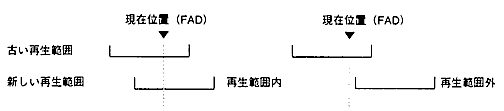
In the following operations, FAD will be out of the playback range (FAD <start position, FAD> end position).

Operation outside the playback range depends on whether or not there is a repeat.
For example, if playback ends without repeat, FAD = end position + 1 will put the <PAUSE> state, and the PEND flag will be 1.

Table 4.5 Operation outside the playback range
 Operation (command)
 No repeat
 With repeat
 Status
 PEND
 Status
 PEND
 CD playback finished
 <PAUSE> with FAD = end position +1
 1
 Seek to the start position <PLAY>
(Repeat operation)
 0
 Play CD → Change playback range → Cancel pause
 At the current position <PAUSE>
 seek
 At the target position <PAUSE>
 1
 At the target position <PAUSE>
 0
 Scan playback
 <PAUSE> in an indefinite position
 1
 <PAUSE> in an indefinite position
 0
A PEND flag of 0 means no change.

A PEND flag of 0 means no change.

(5) Seek (stop) to the home position
By seeking to the home position, the CD block will be in the following state.

  1. The disk motor stops rotating and the pickup moves to the inner peripheral standby position.

  2. The CD drive status changes to <STANDBY>, and the report becomes an invalid value (list of FFH).

  3. When the <PAUSE> state is entered at the home position, the pickup moves to the beginning of the disc.

  4. The held playback range, maximum number of repeats, and number of repeat notifications are not changed.

    (6) Pickup position in <STANDBY> state
    • When transitioning from the <PAUSE> state: Current position (report remains as it is)

    • When seeking to the home position: Inner circumference standby position (report is invalid value)

    (7) CD read operation in CD buffer full
    When the CD buffer is full, it goes into the <PAUSE> state and the BFUL flag in the interrupt cause register becomes 1. When the CD buffer becomes full, the rest of the playback will start automatically.

    4.3 Subcode

    (1) Subcode update and SCDQ flag
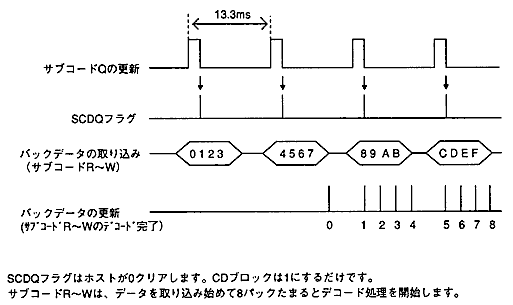
    Subcode Q is updated every frame (1 sector). The SCDQ flag is set to 1 each time the subcode Q is updated. (Same as the update timing of the regular response)
    For subcodes R to W, 4 packs (1 packet) are updated in 1 frame and stored in the pack buffer. The CD block has a pack buffer for 24 packs (6 packets) with a ring buffer structure.

    << When playing a CD-DA (standard speed) >>

    Figure 4.5 Timing of subcode updates and SCDQ flags
    (2) Subcode retrieval timing
    The host issues an acquisition command when the SCDQ flag becomes 1, and extracts the data of subcodes Q and R to W. (To prevent polling due to continuous command issuance)

    (3) Acquisition of subcode Q (CDC_TgetScdQch)
    The get command can always be executed regardless of the CD drive status. However, an invalid value may be returned depending on the CD drive status, such as when <OPEN>.

    (4) Acquisition of subcodes R to W (CDC_TgetScdRwch)
    Pack data is retrieved by repeatedly issuing the capture command until the pack buffer is empty. However, do not remove more than 16 packs during one frame time (13.3ms).
    After issuing the capture command, the host must complete the data transfer within one pack of decoding time (3.2ms).
    If the pack buffer is empty and there is no pack data, WAIT is returned.

    (5) Decoding of subcodes R to W

    1. Decoding start and end Decoding ON / OFF is set by the CD block initialization command.
      To start decoding, set decoding ON and then execute CD-DA playback.

    2. Decoding starts at the decoding start timing <PLAY>.
      Actually, the data will start to be imported 2 frames before the <PLAY> state.

    3. Clear timing of the pack buffer Cleared at the start of decoding.
      The contents of the pack buffer are retained even if you pause or seek.

    4. Decoding conditions
      It is decoded only when playing a CD-DA.
      In other cases (during scan playback or playback of the CD-ROM area), it will not be decoded.

    caution:
    The pack buffer is not cleared only by setting decoding ON. Therefore, if you issue the acquisition command before entering the <PLAY> state, the pack data of the previous song may remain.
    Be sure to confirm that it is in the <PLAY> state before issuing the acquisition command.

    (6) Error of subcodes R to W

    1. Overrun error If the pack is not acquired in time, the pack buffer will be overwritten and an overrun error will occur. After the data transfer is completed (when 23 packs are accumulated without actually acquiring the pack data), the acquisition pointer advances to the pack without overrun error.

    2. Pack data error
      The CD block performs CRC check on the P series and Q series of pack data, and if an error is detected, the data is corrected.
      If correction is not possible, a pack data error will occur.


BackForward
PROGRAMMER'S GUIDECD communication I / F (CD part)
Copyright SEGA ENTERPRISES, LTD., 1997