6.1 MPEG display screen (frame buffer window and display window)
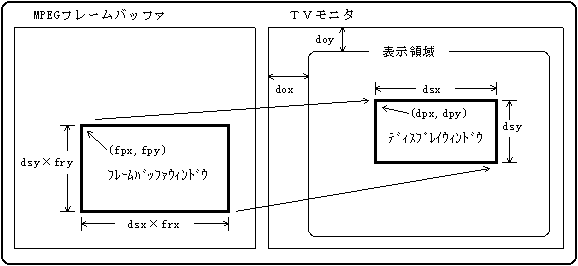
- The screen display in the MPEG system is performed by outputting the data in the frame buffer window to the display window. The relationship between each window is shown in Figure 6.1.
Figure 6.1 Framebuffer and display windows
- (1) Frame buffer window
- The rectangular area of display data in the frame buffer is called the frame buffer window.
The following values can be set for the framebuffer window.- Position (fpx, fpy):
Top left coordinates of framebuffer window (CDC_MpSetWinFpos) - Expansion rate (frx, fry):
Framebuffer window magnification (CDC_MpSetWinFrat)
- However, the actual frame buffer window size calculation formula is not a simple multiplication of the display window size and the enlargement ratio.
- (2) Display window
- The rectangular area actually displayed on the TV monitor is called a display window.
The following values can be set for the display window.- Position (dpx, dpy):
Upper left coordinates of the display window ( CDC_MpSetWinDpos ) - Size (dsx, dsy):
Display window size ( CDC_MpSetWinDsiz ) - Offset (dox, doy):
Position of display area on TV monitor ( CDC_MpSetWinDofs )
- "remarks"
- The window size and coordinate values set here have nothing to do with the settings for VDP2.
6.2 MPEG frame buffer
- 6.2.1 Extracting image data
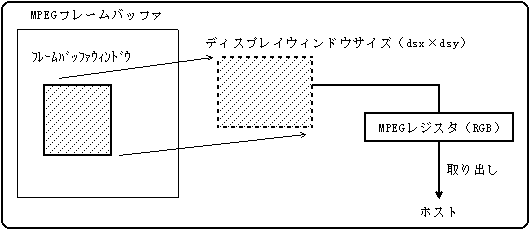
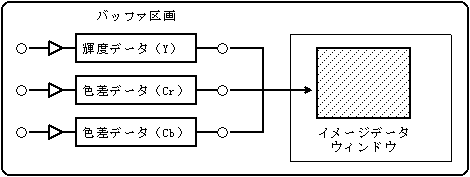
- The image data generated in the MPEG frame buffer can be retrieved to the host through the MPEG register.
The image data retrieved is not the framebuffer window data itself, but the same data as the display window image. Figure 6.2 Extracting image data
- (1) Image data format
- The image data is reduced to 32K color data in 15-bit RGB555 format.
- (2) Extraction of image data (CDC_MpGetImg)
- Issue a command when the image is ready for output. After issuing the command, the host transfers and retrieves data from the MPEG register.
The output destination of the image data must be set to the host output. (Invalid for VDP2 output)
This function is effective in both video playback mode and still image playback mode. - 6.2.2 Reading / writing image data (image data window)
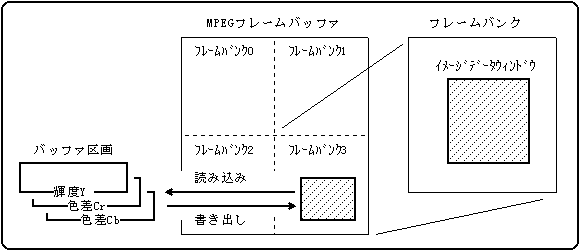
- The MPEG frame buffer is composed of a frame bank having four sides at normal resolution and one side at high definition resolution.
In still image playback mode, image data can be read and written between the image data window defined in the frame bank and the buffer partition. Figure 6.3 Reading and writing image data
- (1) Image data window
- The image data window can be set for any frame bank among frame banks 0 to 3. (Frame bank 0 is fixed at high definition resolution)
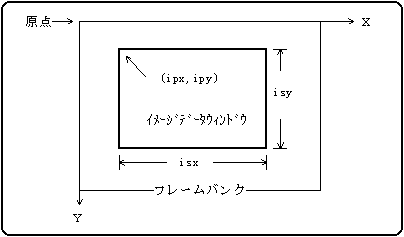
The following values can be set for the image data window.- Position (ipx, ipy):
Upper left coordinates of the image data window (CDC_MpSetImgPos) - Size (isx, isy):
Image data window size (CDC_MpSetImgSiz)
Figure 6.4 Image data window
- (2) Image data format
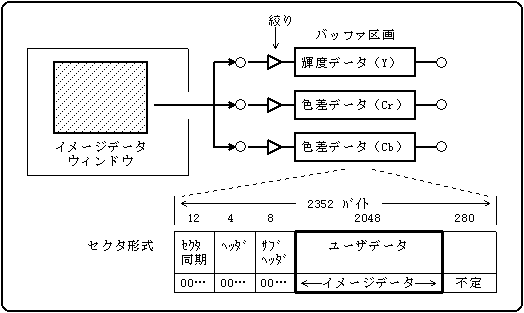
- The image data is decomposed into luminance / color difference data (the following three elements) in YCC 4: 2: 0 format.
- Luminance data (Y): The number of data is (isx × isy) bytes
- Color difference data (Cr): The number of data is (isx × isy) / 4 bytes
- Color difference data (Cb): The number of data is (isx × isy) / 4 bytes
- To read and write, it is necessary to assign selectors (aperture and buffer partition) to each element.
- (3) Reading image data (CDC_MpReadImg)
- Specify the aperture number of the read destination and read the image data from the image data window into the buffer partition.
The image data is treated as a mode 2 form 1 format sector in the buffer partition and stored in the user data area (2048 bytes). The first 24 bytes are filled with 0, and the area after the user data is undefined. Figure 6.5 Importing from the image data window
- (4) Writing image data (CDC_MpWriteImg)
- Export image data from the buffer partition to the image data window by specifying the buffer partition number of the export source.
Figure 6.6 Exporting to Image Data Window
- (5) Selector setting
- Use the CD communication interface on the host side to set the selectors required when reading and writing image data. (Clearing the buffer partition, connecting the aperture and the buffer partition, etc.) The selector is not set on the CD block side.
6.3 MPEG sector buffer
In MPEG sector buffer mode, the MPEG buffer is used as the MPEG sector buffer. With this function, when the MPEG decoder is not used, the memory in the MPEG cartridge can be freely used as a data storage area.
Access to the MPEG sector buffer is performed by reading and writing sector data (2048 bytes) to and from the CD buffer.
The total number of MPEG sectors is 256. (It does not depend on NTSC / PAL.)- (1) Reading sector data (CDC_MpReadSct)
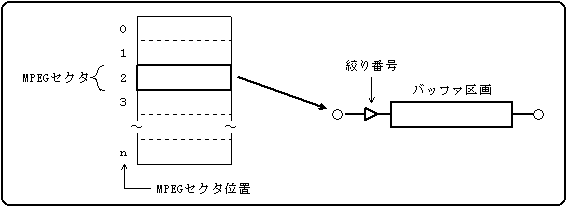
- Specify the aperture number of the read destination and read the sector data into the buffer partition from any MPEG sector position in the MPEG sector buffer.
The MPEG sector data is treated as a mode 2 form 1 format sector in the buffer partition and stored in the user data area (2048 bytes). The first 24 bytes are filled with 0, and the area after the user data is undefined. Figure 6.7 Reading from MPEG sector buffer
- (2) Writing sector data (CDC_MpWriteSct)
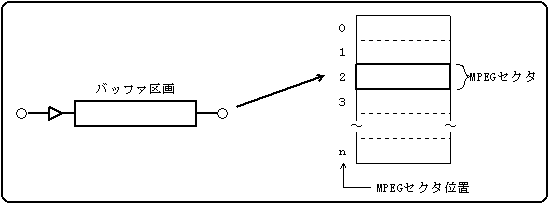
- Specify the buffer partition number of the writing source, and write sector data from the buffer partition to any MPEG sector position in the MPEG sector buffer.
Figure 6.8 Exporting to MPEG sector buffer
6.4 REJECT and WAIT for MPEG commands
- (1) REJECT depending on the operation mode
- Table 6.1 shows the conditions under which the MPEG command becomes REJECT depending on the MPEG operation mode and the output destination of the image data.
- Table 6.1 Conditions for an MPEG command to be REJECT
- (2) LONG WAIT and SHORT WAIT
- WAIT for MPEG commands includes LONG WAIT and SHORT WAIT.
LONG WAIT occurs when you issue a command that cannot be executed in the current MPEG operating mode or MPEG status. The host should retry (re-execute) after these states change.
SHORT WAIT occurs when a specific command is issued while the internal state of the CD block is changing. The host should retry several times with an interval of 50 μsec or more.- Table 6.2 Causes of LONG WAIT
- CDC_MpSetDec
- Pause and freeze were set when the operating state of the video was restored.
- CDC_MpOutDsync
- The decoding timing is VSYNC synchronous.
- CDC_MpSetCon
- I have already set the connection destination buffer partition, but I set it again.
The current connection destination was canceled when the video or audio operating state was playing, switching, or restoring.
When the video or audio operating state was switched, the next connection destination was canceled. - CDC_MpChgCon
- Switching was executed when the next connection destination buffer partition was not registered. The operating state is not playback.
- CDC_MpSetStm
- The operating state of video or audio is in the switching state.
- CDC_MpGetImg
- The output ready flag for MPEG / Video status is 0.
- Table 6.3 Functions that can cause SHORT WAIT
- If WAIT occurs, first remove the cause of LONG WAIT, and if WAIT still does not disappear, retry SHORT WAIT.
